Starting a blog has never been easier, yet succeeding with one has never required more strategy. Every day, thousands of new blogs go live, but only a small percentage attract consistent traffic, build an audience, or generate meaningful income. The difference isn’t luck. It’s understanding how blogging really works before publishing your first post. So, in this very article we are primarily focusing on discussing How to Start a Blog.
The blogging industry has evolved into a massive part of the digital economy. Millions of blog posts are published every month, and businesses, creators, and publishers collectively generate billions of dollars in annual revenue through advertising, affiliate marketing, sponsored content, digital products, online courses, memberships, and consulting. In fact, content marketing, of which blogging remains a core component, is a multi-hundred-billion-dollar global industry, with companies of every size investing heavily in high-quality content to attract customers and build long-term trust.
The global blogging platform market is valued at approximately $5.2 billion and is projected to grow to between $12.8 billion and $17 billion by the early 2030s. This sector supports an estimated 600 million+ active blogs worldwide, with a significant portion of industry revenue driven by advertising, affiliate marketing, and corporate content strategies

This growing demand presents a huge opportunity for beginners. Whether your goal is to share your expertise, build a personal brand, create an online business, or earn passive income, a well-planned blog can become one of your most valuable digital assets. Unlike social media posts that quickly disappear from feeds, a well-optimized blog post can continue attracting readers, leads, and revenue for years after it’s published.
That said, simply buying a domain name and writing a few articles isn’t enough anymore. Search engines have become smarter, readers expect trustworthy information, and competition exists in almost every niche. Building a successful blog requires choosing the right niche, understanding your audience, selecting reliable hosting, creating valuable content, optimizing for search engines, and promoting your work consistently.
The good news is that you don’t need to be a developer, professional writer, or marketing expert to get started. With the right approach, anyone can build a blog from scratch and turn it into a platform that educates, inspires, or even generates a steady income.
In this comprehensive guide, you’ll learn every essential step of starting a blog, from choosing the perfect niche and setting up your website to writing SEO-friendly content, attracting readers, and monetizing your blog effectively. By the end, you’ll have a clear roadmap to launch your blog with confidence and set it up for long-term success.
What Is a Blog and How Does It Work?
A blog is a regularly updated website or a dedicated section of a website where individuals, businesses, or organizations publish informative, educational, or opinion-based content. Unlike traditional websites that often remain static, blogs continue to grow over time as new articles are added, allowing them to attract visitors through search engines, social media, email newsletters, and referrals.
In the early days of the internet, blogs were mostly online journals where people shared personal experiences. Today, they have evolved into powerful digital platforms used for education, marketing, lead generation, brand building, and online income. From multinational companies to independent creators, blogging has become one of the most effective ways to reach a targeted audience and establish authority in a niche.
Understanding the Purpose of a Blog
The primary purpose of a blog is to provide valuable information that answers readers’ questions or solves their problems. Every successful blog focuses on a specific audience and consistently publishes content that aligns with their interests and search intent.
📌 Depending on your goals, a blog can help you:
- 🎯Educate readers about a particular topic.
- 🎯Build trust and authority in your industry.
- 🎯Promote products or services without aggressive selling.
- 🎯Generate organic traffic from search engines.
- 🎯Build an email list and long-term audience.
- 🎯Create multiple streams of online income.
Unlike paid advertising, which stops generating visitors as soon as the budget ends, high-quality blog posts can continue bringing traffic for months or even years.
Types of Blogs You Can Start
One of the biggest advantages of blogging is its flexibility. You can create a blog around almost any topic, provided there is genuine audience interest and long-term content potential.
📌 Some of the most popular blog categories include:
- 📝Personal Blogs: Share experiences, opinions, and life stories.
- 📝Technology Blogs: Cover gadgets, software, AI, cybersecurity, and digital trends.
- 📝Finance Blogs: Focus on saving, investing, insurance, taxes, and personal finance.
- 📝Health and Fitness Blogs: Publish content on nutrition, workouts, mental wellness, and healthy living.
- 📝Travel Blogs: Share destination guides, itineraries, travel tips, and experiences.
- 📝Food Blogs: Feature recipes, cooking techniques, restaurant reviews, and meal planning.
- 📝Education Blogs: Offer tutorials, study materials, career guidance, and exam preparation.
- 📝Business and Marketing Blogs: Help entrepreneurs grow their businesses through practical strategies.
- 📝Lifestyle Blogs: Cover fashion, home improvement, relationships, parenting, and productivity.
The most successful blogs usually focus on a clear niche rather than trying to cover every topic. A specialized blog is easier to rank in search engines, attracts a more loyal audience, and often performs better when it comes to monetization.
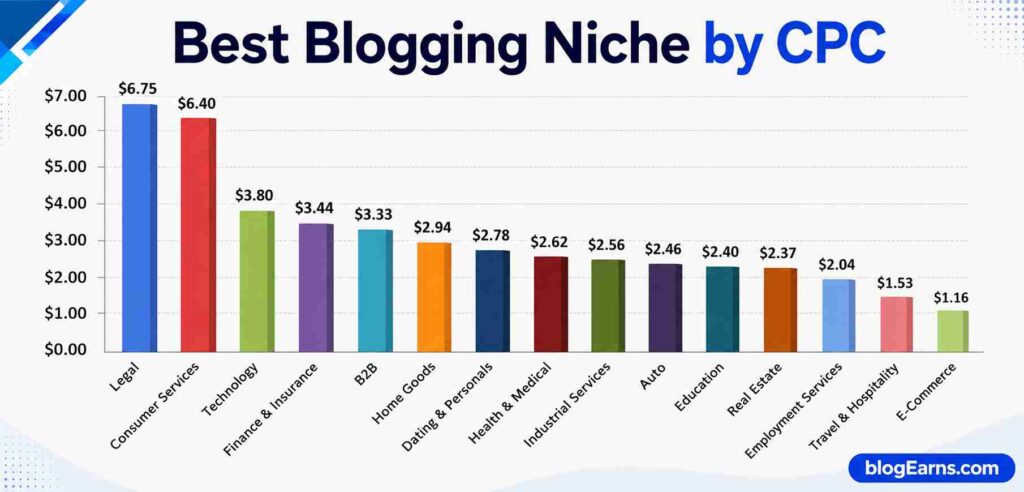
How Blogs Make Money
Many beginners assume that blogging is just a hobby, but it has become a full-fledged business model for thousands of creators worldwide. Once your blog starts attracting consistent traffic, it can generate revenue through several channels.
📌 Some of the most common monetization methods include:
| Monetization Method | How It Works |
|---|---|
| Display Advertising | Earn revenue when visitors view or click ads placed on your website. |
| Affiliate Marketing | Recommend products or services and earn a commission for successful referrals. |
| Sponsored Content | Brands pay you to publish articles featuring their products or services. |
| Digital Products | Sell eBooks, templates, courses, printables, or software directly from your blog. |
| Online Services | Offer consulting, coaching, freelancing, or professional services. |
| Memberships | Provide exclusive content to paying subscribers through a membership model. |
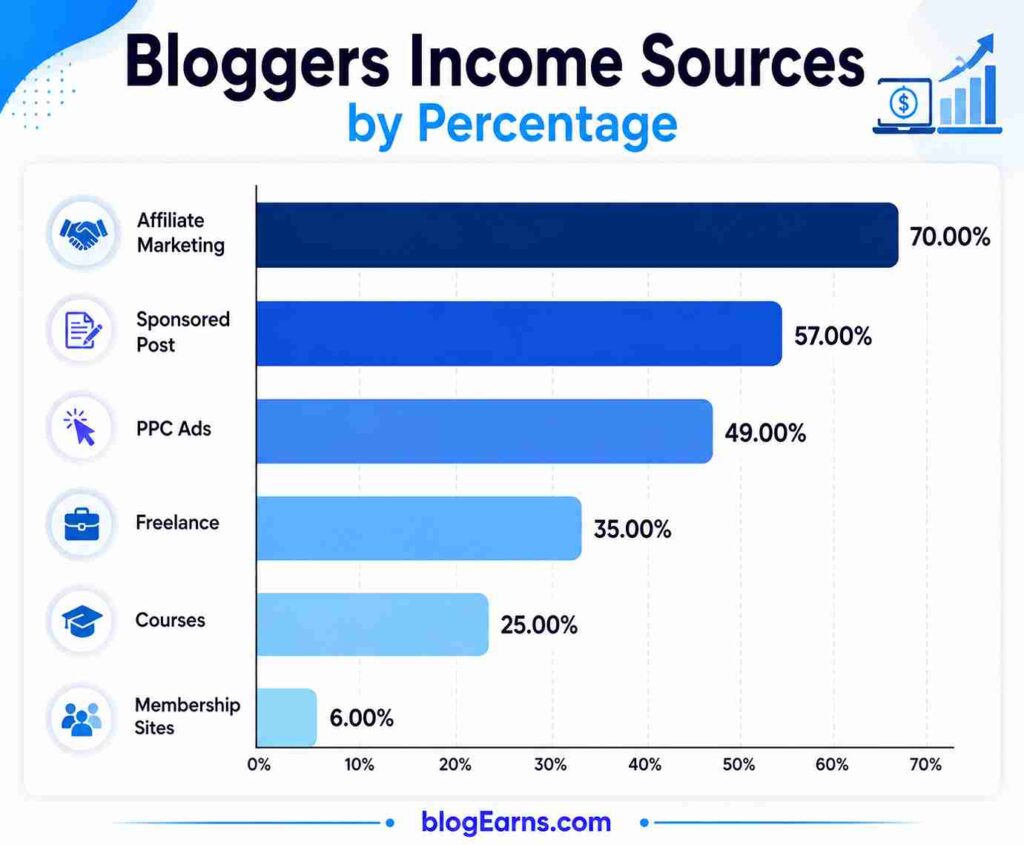
Many successful bloggers combine multiple income streams instead of relying on a single source. As traffic grows, so does the potential to increase revenue and build a sustainable online business.
Ultimately, a blog works by consistently publishing valuable, search-optimized content that attracts visitors. Over time, those visitors become subscribers, customers, or loyal readers, turning your blog into an asset that continues to grow in value.
Why You Should Start a Blog 🤨?
Starting a blog is no longer just about sharing your thoughts online. It has become one of the most effective ways to build authority, reach a global audience, create multiple income streams, and establish a long-term digital presence. Whether you’re a student, professional, entrepreneur, freelancer, or someone passionate about a particular subject, a blog can open doors to opportunities that extend far beyond writing articles.
Unlike social media platforms where your content has a short lifespan, blog posts can continue attracting readers through search engines for months or even years. Every article you publish becomes a valuable digital asset that works around the clock to bring in traffic, leads, and potential revenue.
Share Your Knowledge with the World
Everyone has expertise or experiences that can help others. A blog gives you a platform to organize and share that knowledge in a structured, searchable format.
For example, if you’re skilled in cooking, personal finance, photography, fitness, coding, or travel, you can create articles that answer common questions and solve real problems. As your content library grows, readers begin to recognize your blog as a reliable source of information.
Sharing valuable content also helps build trust. People are more likely to return to a blog that consistently provides practical, accurate, and easy-to-understand guidance.
Build a Personal Brand and Authority
A blog acts as your digital portfolio. Every well-written article showcases your expertise, communication skills, and understanding of your niche.
📌 Over time, publishing high-quality content can help you:
- 👉 Establish yourself as an authority in your industry.
- 👉 Gain credibility with readers and potential clients.
- 👉 Receive invitations for interviews, podcasts, webinars, or speaking engagements.
- 👉 Build trust before someone even contacts you.
For businesses, blogging demonstrates expertise and improves customer confidence. For individuals, it creates a professional online identity that can support career growth and networking opportunities.
Generate Passive Income
One of the biggest reasons people start blogging is the opportunity to earn money online. While blogging isn’t a get-rich-quick scheme, it can become a reliable source of passive income with consistent effort.
📌 A successful blog can generate income through:
- 📺 Display advertising
- 💹 Affiliate marketing
- 📝 Sponsored articles
- 📹 Selling digital products
- 📢 Online courses
- 💲 Freelance services
- 🪪 Membership programs
- 📨Email marketing campaigns
The best part is that a single high-ranking article can continue generating revenue long after it has been published. As your content library expands, your earning potential grows alongside your website traffic.
Create New Career and Business Opportunities
A blog can become much more than a website. It can serve as the foundation for an entire business.
📌 Many bloggers eventually branch out into:
- 🌟 Launching online businesses
- 🌟 Building eCommerce stores
- 🌟 Selling software or SaaS products
- 🌟 Starting YouTube channels or podcasts
- 🌟 Creating online communities
- 🌟 Publishing books
- 🌟 Offering consulting or coaching services
Even employers often view an active blog as evidence of expertise, initiative, and communication skills, making it a valuable addition to your professional profile.
Drive Long-Term Organic Traffic
Unlike paid advertising, which stops delivering visitors when your budget runs out, blog posts optimized for search engines can continue attracting traffic for years.
Every article targeting a relevant keyword increases your chances of appearing in search results. Over time, hundreds of well-optimized articles can collectively bring a steady stream of organic visitors without ongoing advertising costs.
This long-term visibility is one of the biggest advantages of blogging and a key reason why businesses continue investing heavily in content marketing.
Build a Loyal Community
A blog isn’t just about publishing articles. It’s about creating meaningful connections with readers who share similar interests.
As your audience grows, you can engage with them through:
- 🔹Blog comments
- 🔹Email newsletters
- 🔹Social media
- 🔹Online forums
- 🔹Private communities
These interactions help foster trust, encourage repeat visits, and create a community around your content. A loyal audience is also more likely to recommend your blog, purchase your products, or support your future projects.
Enjoy Complete Ownership of Your Content
One of the biggest advantages of blogging over social media is ownership.
On platforms like Facebook, Instagram, or TikTok, changes to algorithms or policies can significantly reduce your content’s visibility. In contrast, a self-hosted blog gives you full control over your website, content, branding, and monetization strategies.
While promoting your blog on social media is beneficial, your website remains an asset that you own and control, making it a more stable foundation for long-term growth.
Starting a blog requires time, consistency, and patience, but the rewards can be substantial. From building authority and helping others to creating sustainable income and expanding your career opportunities, blogging offers benefits that continue to grow with every quality article you publish.
Choose the Right Blogging Niche
Selecting the right blogging niche is one of the most important decisions you’ll make before launching your blog. A niche determines who your audience is, the type of content you’ll publish, the keywords you’ll target, and how you’ll eventually monetize your website. Choosing a niche simply because it’s trending or profitable often leads to burnout, inconsistent publishing, and difficulty standing out in a competitive market.
The most successful blogs focus on a specific topic and gradually become trusted resources in that area. Instead of trying to write about everything, they solve a particular set of problems for a defined audience. This focused approach helps search engines understand your website, improves topical authority, and makes it easier to attract loyal readers.
What Is a Blogging Niche?
A blogging niche is the primary subject your blog revolves around. It represents the area in which you’ll consistently create content and build expertise.
For example, instead of creating a broad Technology blog, you could narrow your focus to:
- 📂WordPress Tutorials
- 📂Artificial Intelligence Tools
- 📂Smartphone Reviews
- 📂Cybersecurity Tips
- 📂Web Hosting Guides
Similarly, instead of a general Health blog, you could specialize in:
- 📁Weight Loss for Beginners
- 📁Home Workouts
- 📁Mental Wellness
- 📁Yoga and Meditation
- 📁Nutrition and Healthy Recipes
A focused niche makes it easier to build authority because your content covers related topics in depth. Search engines are more likely to recognize your blog as a reliable source when multiple articles comprehensively address the same subject.
How to Find a Profitable Blogging Niche
A profitable niche sits at the intersection of three key factors:
- Your Interest and Expertise
You’ll likely spend months or even years creating content for your blog. Choosing a topic you genuinely enjoy makes it easier to stay consistent and produce high-quality articles.
📌 Ask yourself:
- What topics do I enjoy learning about?
- What problems can I solve for others?
- What skills or experiences do I already have?
- Audience Demand
Even the best content won’t attract readers if there’s little interest in the topic. Use keyword research tools to identify whether people are actively searching for information related to your niche.
Look for:
- Consistent monthly search volume
- A wide range of related keywords
- Common questions people ask
- Opportunities to create evergreen content
- Monetization Potential
A niche should also offer realistic earning opportunities. Consider whether you can monetize your blog through affiliate marketing, advertising, digital products, online courses, consulting, or sponsored content.
For example, niches like personal finance, technology, web hosting, digital marketing, health, and software reviews often have higher monetization potential because businesses are willing to pay more to reach these audiences.
Mistakes to Avoid When Choosing a Niche
Many beginners make the mistake of selecting a niche based solely on popularity or expected earnings. While profitability matters, long-term success depends on balancing passion, expertise, and market demand.
⚠️ Avoid these common mistakes:
- 👎Choosing a niche with no genuine interest.
- 👎Targeting an audience that is too broad.
- 👎Ignoring keyword research before starting.
- 👎Entering an extremely competitive niche without a unique angle.
- 👎Frequently changing your niche after publishing several articles.
- 👎Focusing only on short-term trends that lose relevance quickly.
Instead, think about the long-term vision for your blog. Ask yourself whether you’ll still be excited to write about the topic a year from now.
Evergreen vs. Trending Niches
When selecting a niche, it’s helpful to understand the difference between evergreen and trending topics.
| Feature | Evergreen Niche | Trending Niche |
|---|---|---|
| Lifespan | Remains relevant for years | Popular for a limited time |
| Traffic | Consistent long-term traffic | Short bursts of high traffic |
| Content Updates | Occasional updates | Frequent updates required |
| Stability | High | Low to Moderate |
| Examples | Blogging, SEO, Personal Finance, Health, Gardening | Viral Apps, New Gadgets, Breaking News, Seasonal Events |
Evergreen niches provide a stable foundation because readers continue searching for the same information over time. Trending niches can generate significant traffic quickly but often require constant content updates to remain relevant.
A smart strategy is to build your blog around an evergreen niche while occasionally publishing articles on relevant trends. This approach helps maintain steady organic traffic while taking advantage of timely opportunities.
Choosing the right niche isn’t about finding a topic with the highest search volume. It’s about identifying an area where you can consistently create valuable content, solve readers’ problems, and build trust over time. A well-chosen niche lays the groundwork for stronger SEO performance, better audience engagement, and sustainable long-term growth.
Identify Your Target Audience
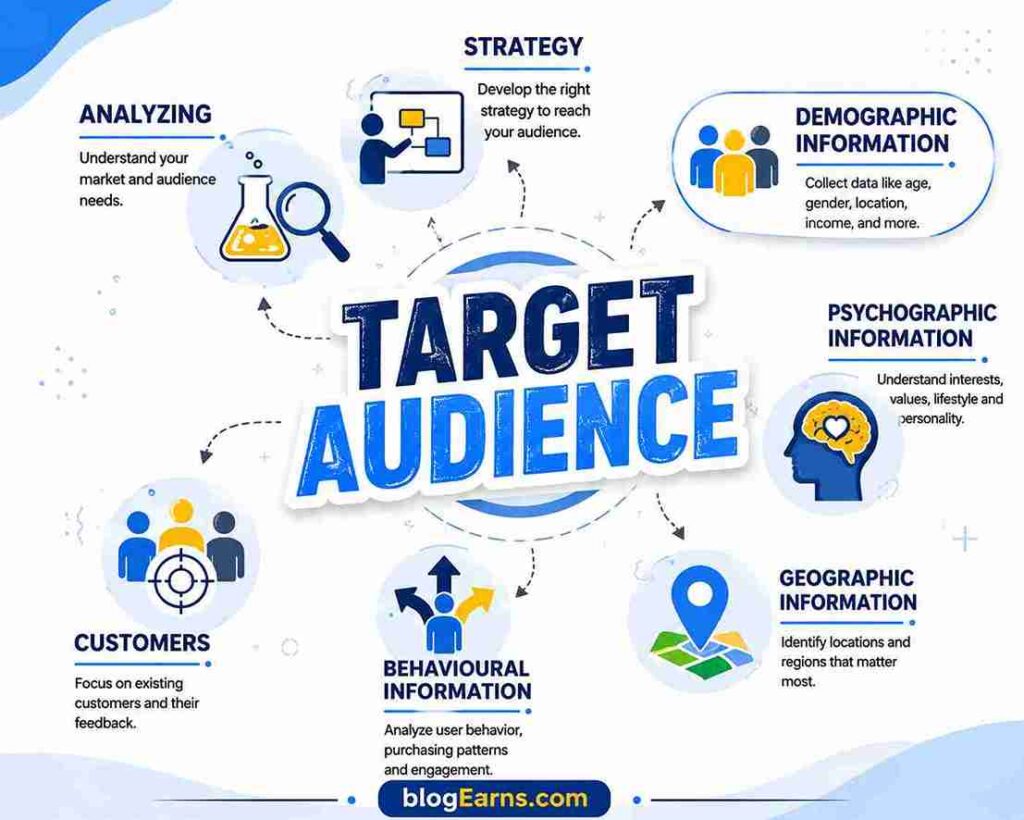
One of the biggest mistakes new bloggers make is writing for “everyone.” While it may seem like the best way to attract more readers, it usually has the opposite effect. Content that tries to appeal to everyone often ends up connecting with no one.
Successful blogs are built around a clearly defined audience. Knowing exactly who you’re writing for helps you choose the right topics, answer the right questions, create more engaging content, and improve your chances of ranking in search engines. It also increases reader trust because your articles feel relevant and personalized.
Before writing your first post, spend time understanding the people you want to help. The better you know your audience, the easier it becomes to create content they’ll find valuable.
Why Audience Research Matters
Audience research is the process of understanding who your readers are, what problems they face, what questions they ask, and what type of information they’re searching for online.
When you understand your audience, you can:
- 🔸Write content that solves real problems instead of making assumptions.
- 🔸Choose keywords that match what people actually search for.
- 🔸Create articles that answer common questions in a clear and practical way.
- 🔸Improve engagement because readers feel your content speaks directly to them.
- 🔸Build trust and encourage visitors to return for more information.
Search engines also reward content that satisfies user intent. If readers spend more time on your blog, explore additional pages, and find answers to their questions, your website is more likely to perform well in search results.
Create a Reader Persona
A reader persona is a fictional profile that represents your ideal audience. It helps you visualize who you’re writing for and ensures your content remains focused and relevant.
For example, if your blog is about blogging and SEO, your ideal reader might look like this:
| Reader Attribute | Example |
|---|---|
| Experience Level | Beginner blogger |
| Age Group | 20 to 40 years |
| Primary Goal | Start a profitable blog |
| Biggest Challenge | Doesn’t know where to begin |
| Budget | Limited |
| Preferred Content | Step-by-step tutorials with screenshots and examples |
| Search Behavior | Searches Google before watching videos |
When creating your own reader persona, consider questions such as:
- 🔸Who is my ideal reader?
- 🔸What are they trying to achieve?
- 🔸What challenges are stopping them?
- 🔸How much knowledge do they already have?
- 🔸What type of content would help them the most?
- 🔸Which devices do they usually use to browse the internet?
Answering these questions allows you to write articles that resonate with your audience rather than producing generic content.
Understand Search Intent
Search intent refers to the reason behind a user’s search query. Understanding this intent is essential for creating content that ranks well and satisfies readers.
There are four primary types of search intent:
| Search Intent | Purpose | Example Search |
|---|---|---|
| Informational | Learn something | “How to start a blog” |
| Navigational | Find a specific website | “WordPress login” |
| Commercial Investigation | Compare options before buying | “Best web hosting for bloggers” |
| Transactional | Take an action or make a purchase | “Buy WordPress hosting” |
Since this article targets the keyword “How to Start a Blog,” the primary intent is informational. Readers are looking for a complete, beginner-friendly guide that explains the entire process from choosing a niche to publishing their first post.
Meeting search intent means going beyond answering the main question. You should also anticipate related questions readers are likely to have, such as:
- Which blogging platform should I choose?
- How much does it cost to start a blog?
- Can I start a blog for free?
- How do bloggers make money?
- How long does it take to get traffic?
Answering these related questions within your content makes your article more comprehensive and increases its chances of ranking for multiple keywords.
Where to Find Audience Insights
You don’t need expensive tools to understand your audience. Many valuable insights are freely available if you know where to look.
Some of the best sources include:
- Google Search suggestions and the “People Also Ask” section.
- Comments on popular blogs in your niche.
- YouTube video comments.
- Social media groups and communities.
- Online discussion forums.
- Customer reviews of related products or services.
- Keyword research tools that reveal common search queries.
Pay attention to the language people use when asking questions. Using similar wording naturally in your articles helps improve readability and aligns your content with real user searches.
Write for One Reader, Not Thousands
A common trait of successful bloggers is that they write as if they’re having a conversation with a single person. This approach makes content more engaging, relatable, and easier to understand.
Instead of trying to impress readers with technical jargon or overly formal language, focus on being clear, helpful, and practical. Explain concepts in a way that a beginner can easily follow, and whenever possible, include real-world examples or actionable tips.
When your audience feels that your content addresses their specific needs, they’re more likely to trust your recommendations, share your articles, and return for future content.
Identifying your target audience is not a one-time task. As your blog grows, continue analyzing reader behavior, feedback, and search trends to refine your content strategy. A deep understanding of your audience will help you create articles that consistently deliver value, improve search visibility, and build a loyal readership over time.
Choose a Blog Name and Domain
Your blog name and domain name are more than just your website’s identity. They influence how readers remember your brand, how easily they can find your site, and how professional your blog appears. While a great domain name alone won’t improve your search engine rankings, it can increase brand recognition, boost credibility, and encourage visitors to return.
Many beginners spend weeks searching for the “perfect” domain name. In reality, it’s better to choose a simple, memorable name and start creating valuable content than to delay your blog launch waiting for inspiration. Your content, consistency, and user experience will have a far greater impact on your blog’s success than an overly clever name.
How to Choose the Perfect Blog Name
A blog name should reflect your niche while being easy to remember and pronounce. It should also leave room for your blog to grow. For example, if you choose a name that’s too specific, expanding into related topics later may become difficult.
When brainstorming ideas, keep these best practices in mind:
- Keep it short and memorable. Aim for two or three simple words that people can easily recall.
- Make it easy to spell and pronounce. If someone hears your blog name in a conversation or podcast, they should be able to type it correctly without guessing.
- Choose a brandable name. A unique name is often easier to build into a recognizable brand than a generic keyword-heavy domain.
- Think long term. Pick a name that will still make sense as your blog grows and evolves.
- Avoid numbers and hyphens. These often confuse users and make your domain harder to remember.
- Stay away from trademarked terms. Using brand names without permission can create legal issues and limit your blog’s growth.
For example, if you’re starting a blogging website, names like BlogEarns, BlogPilot, or BlogLaunch are more brandable than something overly generic like BestBlogTips2026.
Should Your Domain Contain Keywords?
In the past, exact-match domains such as bestbloggingtips.com were considered an SEO advantage. Today, search engines place much greater emphasis on content quality, user experience, and website authority than on keywords in the domain name.
Including your primary keyword can still provide some context for users, but it shouldn’t come at the expense of branding or readability.
Consider these examples:
| Domain Type | Example | Recommendation |
|---|---|---|
| Brandable | BlogEarns.com | Excellent for long-term branding |
| Partial Keyword | SmartBloggingHub.com | Good balance of branding and relevance |
| Exact Match | StartABlogGuide.com | Acceptable if natural and memorable |
| Keyword Stuffed | BestHowToStartABlogOnline.com | Avoid |
If you have to choose between a memorable brand name and an exact keyword match, the brandable option is usually the better investment.
Choosing the Right Domain Extension
A domain extension is the suffix at the end of your website address, such as .com or .org.
Although there are hundreds of extensions available today, some inspire more trust than others.
Here’s a quick comparison:
| Extension | Best For |
|---|---|
| .com | Businesses, blogs, personal brands, and most websites |
| .org | Non-profit organizations and educational projects |
| .net | Technology and networking websites |
| .co | Startups and modern businesses |
| Country-specific extensions | Blogs targeting a specific country (for example, .in, .uk, or .ca) |
For most bloggers, .com remains the best choice because it’s the most widely recognized, easiest to remember, and trusted by users around the world.
Check Domain Availability
Before finalizing your blog name, make sure the domain is available. You should also check whether the same name is available on major social media platforms if you plan to build a consistent online brand.
When evaluating a potential domain, ask yourself:
- Is it easy to type without mistakes?
- Is it easy to pronounce?
- Does it look clean when written?
- Can someone remember it after hearing it once?
- Will it still make sense if I expand my content in the future?
Choosing a name that works across your website and social media helps create a stronger, more recognizable brand.
Common Mistakes to Avoid
A poorly chosen domain can create unnecessary challenges down the road. While changing a domain later is possible, it often involves redirects, branding updates, and potential SEO risks.
Avoid these common mistakes:
- Choosing an overly long or complicated domain name.
- Using multiple hyphens or numbers.
- Following temporary trends that may become outdated.
- Selecting a name that’s too narrow for future growth.
- Ignoring trademark conflicts.
- Prioritizing keywords over user experience and brand identity.
Register Your Domain Early
Once you’ve found a suitable domain name, register it as soon as possible. Good domain names are claimed every day, and waiting too long could mean losing your preferred choice.
Many web hosting providers offer a free domain for the first year when you purchase a hosting plan, making it an affordable way to get started.
Your domain name is the foundation of your online identity. It appears on every blog post, email, business card, and social media profile you create. Choosing a simple, memorable, and future-proof name will make it easier for readers to recognize your brand and return to your website as it grows.
Select the Best Blogging Platform
Choosing the right blogging platform is one of the first technical decisions you’ll make, and it can have a lasting impact on your blog’s growth. A blogging platform is the software that allows you to create, publish, manage, and organize your content without needing advanced programming skills.
Today, there are dozens of blogging platforms available, each with its own strengths and limitations. Some are designed for beginners who want a simple publishing experience, while others provide complete control over customization, SEO, and monetization.
If your goal is to build a professional blog that can grow into a business, attract search engine traffic, and generate income, choosing the right platform from the beginning will save you time, money, and unnecessary migration headaches later.
What Is a Blogging Platform?
A blogging platform, also known as a Content Management System (CMS), is software that helps you create and manage your website without writing code.
Instead of manually creating web pages using HTML and CSS, a CMS allows you to:
- Write and publish blog posts.
- Upload images and videos.
- Organize articles into categories and tags.
- Customize your website’s design.
- Install plugins to add new features.
- Manage comments and user accounts.
- Optimize content for search engines.
This makes blogging accessible to beginners while still offering powerful tools for experienced users.
Why WordPress.org Is the Best Choice
If you’re serious about blogging, WordPress.org is widely considered the best platform available. In fact, it powers more than 40% of all websites on the internet, making it the world’s most popular content management system.
Its popularity isn’t just due to its large user base. WordPress offers unmatched flexibility, allowing beginners to start with a simple website while giving advanced users complete control over design, functionality, and performance.
Some of the biggest advantages of WordPress.org include:
- Complete ownership of your website and content.
- Excellent SEO capabilities.
- Thousands of professionally designed themes.
- More than 60,000 plugins to extend functionality.
- Easy integration with eCommerce, email marketing, and analytics tools.
- Strong security and regular updates.
- A massive global community offering tutorials, forums, and documentation.
Whether you’re creating a personal blog, an affiliate marketing website, a business site, or an online store, WordPress can scale alongside your goals.
WordPress.org vs. WordPress.com
Many beginners confuse WordPress.org and WordPress.com, but they’re very different.
| Feature | WordPress.org | WordPress.com |
|---|---|---|
| Ownership | Full control over your website | Limited control on free and lower-tier plans |
| Hosting | Requires separate web hosting | Hosting included |
| Customization | Unlimited themes and plugins | Restricted unless on higher-tier plans |
| SEO | Complete SEO control | Limited SEO features on lower plans |
| Monetization | Full freedom | Restrictions on some plans |
| Best For | Bloggers, businesses, professionals | Hobby blogs and personal websites |
If you’re building a long-term blog with plans to earn money, WordPress.org is the better choice because it gives you complete control over your website and doesn’t restrict how you monetize your content.
Other Popular Blogging Platforms
Although WordPress.org is the preferred option for most bloggers, it’s helpful to know how other platforms compare.
| Platform | Best For | Limitations |
|---|---|---|
| Blogger | Beginners who want a free blogging platform | Limited customization and fewer advanced features |
| Wix | Drag-and-drop website building | Less flexibility and limited scalability |
| Squarespace | Portfolio and creative websites | Fewer plugins and SEO options than WordPress |
| Medium | Writers who want an existing audience | Limited branding and no full ownership |
| Ghost | Professional publishing and memberships | Smaller ecosystem and steeper learning curve |
These platforms may work well for specific use cases, but if long-term growth, SEO, and monetization are your priorities, WordPress.org remains the most versatile and future-proof option.
Factors to Consider Before Choosing a Platform
Before making your decision, evaluate each platform based on your current needs and future plans.
Consider the following factors:
- Ease of Use: Can you manage your website without technical expertise?
- Customization: Does the platform allow you to change themes, layouts, and features as your blog grows?
- SEO Features: Can you optimize your content, URLs, metadata, and site performance effectively?
- Scalability: Will the platform support your blog as traffic and content increase?
- Monetization: Are there any restrictions on displaying ads, affiliate links, or selling products?
- Community Support: Is there an active community with tutorials, documentation, and troubleshooting resources?
Choosing a platform that excels in these areas ensures your blog can adapt to future opportunities without requiring a complete rebuild.
Can You Switch Platforms Later?
Yes, migrating from one platform to another is possible, but it often involves transferring content, preserving SEO rankings, updating redirects, and redesigning your website. The process can be time-consuming and may temporarily affect your search visibility if not handled correctly.
Starting with the right platform from day one minimizes these challenges and lets you focus on what truly matters: creating valuable content and growing your audience.
Selecting the best blogging platform is an investment in your blog’s future. While there are many capable options available, WordPress.org consistently stands out for its flexibility, scalability, SEO capabilities, and freedom. It provides everything a beginner needs to start a blog today while offering the tools required to grow into a successful online business tomorrow.
Buy Reliable Web Hosting
Once you’ve selected your blogging platform, the next step is purchasing reliable web hosting. If your domain name is your blog’s address, then web hosting is the land where your website is built. Every blog post, image, database, and file that makes up your website is stored on a web hosting server.
Choosing the right hosting provider is more important than many beginners realize. A fast, secure, and reliable host improves your website’s loading speed, keeps your blog online around the clock, protects your data, and contributes to a better user experience. Since page speed and website reliability are ranking factors, good hosting also supports your SEO efforts.
Our RecommendationMany new bloggers choose the cheapest hosting plan available to save money. While this may seem like a smart decision initially, poor hosting can lead to slow loading times, frequent downtime, security issues, and limited scalability. Migrating to a better host later is possible, but it often requires extra time and effort. Starting with a dependable provider gives your blog a stronger foundation from day one.
What Is Web Hosting?
Web hosting is a service that stores your website’s files on internet-connected servers, allowing people to access your blog from anywhere in the world. When someone types your domain name into a browser, the hosting server delivers your website’s content to their device.
Without web hosting, your website simply cannot be viewed online.
A good hosting provider also offers additional services such as:
- High-speed servers
- Website security
- Daily or automatic backups
- SSL certificates
- Email hosting
- Technical support
- One-click software installations
- Performance optimization
These features make it easier to manage your blog while ensuring visitors enjoy a smooth browsing experience.
Types of Web Hosting Explained
Not every blog requires the same type of hosting. The right option depends on your budget, expected traffic, technical knowledge, and future growth plans.
Shared Hosting
Shared hosting is the most affordable option and the best starting point for most beginners.
With shared hosting, multiple websites share the resources of a single server. Because the costs are distributed among many users, hosting companies can offer low monthly prices.
Best for:
- New bloggers
- Personal websites
- Small business blogs
- Websites with low to moderate traffic
Advantages:
- Affordable pricing
- Beginner-friendly
- Easy setup
- Minimal technical knowledge required
Limitations:
- Shared server resources
- Performance may decline if neighboring websites experience traffic spikes
- Limited customization compared to advanced hosting options
For most first-time bloggers, shared hosting provides more than enough resources to launch and grow a website.
VPS Hosting
A Virtual Private Server (VPS) divides a physical server into multiple virtual servers, giving each website dedicated resources.
Compared to shared hosting, VPS hosting offers better performance, greater flexibility, and improved reliability.
Best for:
- Growing blogs
- Medium-sized businesses
- Websites receiving increasing traffic
Advantages:
- Better speed
- Dedicated resources
- Greater control
- Improved scalability
Limitations:
- Higher cost
- May require some technical knowledge
Cloud Hosting
Cloud hosting stores your website across multiple interconnected servers instead of relying on a single physical machine.
If one server experiences issues, another server automatically handles the traffic, making cloud hosting highly reliable.
Best for:
- High-traffic blogs
- Business websites
- Rapidly growing online projects
Advantages:
- Excellent uptime
- Easy scalability
- Strong performance during traffic spikes
- High reliability
Limitations:
- Pricing may vary depending on resource usage
- Slightly more complex than shared hosting
Managed WordPress Hosting
Managed WordPress hosting is specifically optimized for WordPress websites. The hosting provider handles many technical tasks, including updates, backups, caching, and security.
This allows bloggers to focus on creating content rather than maintaining their website.
Best for:
- Professional bloggers
- Businesses
- Agencies
- Website owners who want minimal technical management
Advantages:
- Excellent speed
- Enhanced security
- Automatic WordPress updates
- Daily backups
- Expert WordPress support
Limitations:
- Higher monthly cost
- Some restrictions on plugin usage depending on the provider
Features to Look for in a Hosting Provider
Not all hosting companies offer the same level of service. Before purchasing a plan, compare providers based on features rather than price alone.
A reliable hosting provider should include:
| Feature | Why It Matters |
|---|---|
| 99.9% Uptime Guarantee | Keeps your website available to visitors with minimal downtime. |
| Fast SSD or NVMe Storage | Improves loading speed and overall website performance. |
| Free SSL Certificate | Encrypts data and displays the secure HTTPS connection. |
| Automatic Backups | Protects your content in case of accidental loss or technical issues. |
| 24/7 Customer Support | Ensures help is available whenever problems arise. |
| One-Click WordPress Installation | Makes setting up your website quick and beginner-friendly. |
| Scalability | Allows you to upgrade resources as your traffic grows. |
| Strong Security Features | Protects against malware, hacking attempts, and cyber threats. |
These features help create a stable, secure, and user-friendly website while reducing future maintenance headaches.
How Much Does Web Hosting Cost?
The cost of web hosting varies depending on the type of hosting and the features included.
Here’s a general pricing overview:
| Hosting Type | Typical Starting Price |
|---|---|
| Shared Hosting | $2 to $10 per month |
| VPS Hosting | $10 to $60 per month |
| Cloud Hosting | $10 to $100+ per month |
| Managed WordPress Hosting | $15 to $100+ per month |
Many hosting providers also include valuable extras such as a free domain name for the first year, a free SSL certificate, professional email accounts, and one-click WordPress installation, making it easier and more affordable to launch your blog.
Which Hosting Type Should Beginners Choose?
If you’re starting your very first blog, shared hosting is usually the most practical choice. It offers an excellent balance of affordability, ease of use, and sufficient performance for new websites.
As your blog grows and attracts more visitors, you can easily upgrade to VPS, cloud, or managed WordPress hosting without changing your domain name or rebuilding your website.
Choosing a reliable hosting provider is one of the best long-term investments you can make. It directly affects your website’s speed, security, uptime, and overall user experience. Combined with a memorable domain name and the right blogging platform, quality hosting forms the technical foundation that supports your blog’s growth for years to come.
Install WordPress and Configure Your Blog
With your domain name registered and web hosting account ready, it’s time to install WordPress and configure your blog. This is where your website starts taking shape. Fortunately, most modern hosting providers have simplified the installation process so much that you can launch a WordPress website in just a few minutes without writing a single line of code.
While installing WordPress is relatively straightforward, the initial configuration is equally important. Proper settings improve your website’s security, SEO, performance, and overall user experience. Spending a few extra minutes configuring your blog correctly now can save you hours of troubleshooting in the future.
Install WordPress
Most hosting providers include a one-click WordPress installer in their hosting dashboard.
The exact steps may vary slightly depending on your hosting provider, but the overall process is generally the same:
- Log in to your hosting account.
- Open the website or application management section.
- Select WordPress from the available applications.
- Choose the domain where you want to install WordPress.
- Enter your website title.
- Create a secure administrator username and password.
- Click Install.
Within a few minutes, your hosting provider will complete the installation and provide your WordPress login URL, which usually looks like:
https://yourdomain.com/wp-adminYou’ll use this dashboard to manage every aspect of your blog, including publishing articles, installing themes, managing plugins, and customizing your website.
Familiarize Yourself with the WordPress Dashboard
The WordPress dashboard is your website’s control panel. Although it may appear overwhelming at first, its layout is intuitive and easy to learn.
Some of the most important sections include:
| Dashboard Section | Purpose |
|---|---|
| Posts | Create and manage blog articles. |
| Pages | Build static pages like About and Contact. |
| Media | Upload and organize images, videos, and documents. |
| Appearance | Install themes and customize your website design. |
| Plugins | Add new features and functionality. |
| Users | Manage user accounts and permissions. |
| Settings | Configure your website’s general options. |
Take some time to explore these sections before making major changes. Understanding where everything is located will make managing your blog much easier.
Configure General Settings
Before publishing your first article, review the basic WordPress settings.
Navigate to Settings → General and configure the following:
- Site Title: Your blog’s name.
- Tagline: A short description of your website.
- Site Language: Choose your preferred language.
- Time Zone: Set the correct time zone for accurate publishing schedules.
- Date and Time Format: Select the format that best suits your audience.
These settings affect how your website appears to visitors and search engines.
Set Up SEO-Friendly Permalinks
One of the first SEO improvements you should make is changing your permalink structure.
Permalinks determine how your blog post URLs are displayed.
Go to Settings → Permalinks and select:
Post NameYour URLs will then appear like this:
https://yourdomain.com/how-to-start-a-blog/Instead of:
https://yourdomain.com/?p=123Short, descriptive URLs are easier for users to understand and help search engines identify the topic of each page.
Enable HTTPS with an SSL Certificate
An SSL certificate encrypts data exchanged between your website and visitors, making your blog more secure.
When SSL is enabled, your website address changes from:
http://yourdomain.comto:
https://yourdomain.comMost hosting providers include a free SSL certificate, and many activate it automatically. If not, you can usually enable it from your hosting control panel with just a few clicks.
HTTPS is important because it:
- Protects user data.
- Builds visitor trust.
- Removes browser security warnings.
- Supports better search engine rankings.
Delete Default Content
A fresh WordPress installation usually includes sample content that serves no purpose on a live website.
Before you begin publishing, remove:
- The default “Hello World!” blog post.
- The sample page.
- Unused themes that you don’t plan to use.
- Unnecessary plugins that came pre-installed.
Cleaning up your website keeps the dashboard organized and reduces potential security risks.
Configure Discussion Settings
Managing comments properly helps reduce spam and maintain meaningful discussions.
Go to Settings → Discussion and consider these recommendations:
- Enable comment moderation.
- Require approval before comments are published.
- Turn on spam filtering.
- Disable comments on pages where discussions aren’t necessary.
As your blog grows, comment moderation becomes increasingly important for maintaining content quality.
Set Your Reading Preferences
WordPress allows you to control how visitors see your homepage.
Navigate to Settings → Reading and choose between:
- Displaying your latest blog posts.
- Creating a custom homepage with featured sections.
Many professional blogs use a custom homepage while maintaining a dedicated blog page for articles.
Improve Website Security
Protecting your website should be a priority from the beginning.
Some essential security practices include:
- Use a strong administrator password.
- Enable two-factor authentication if available.
- Keep WordPress updated.
- Update themes and plugins regularly.
- Install a trusted security plugin.
- Schedule automatic backups.
These simple measures significantly reduce the risk of hacking attempts and data loss.
Test Your Website Before Publishing
Before writing your first article, visit your website from different devices and browsers to ensure everything is working correctly.
Check that:
- Pages load quickly.
- Navigation menus work properly.
- Images display correctly.
- HTTPS is active.
- Mobile responsiveness looks good.
- Links function as expected.
Fixing small issues early provides a better experience for your future readers.
Installing WordPress is only the beginning. Proper configuration ensures your blog is secure, organized, and optimized for both users and search engines. With your website now fully set up, the next step is making it visually appealing by choosing a fast, responsive, and SEO-friendly WordPress theme that reflects your brand and enhances the overall user experience.
Choose a Fast and SEO-Friendly Theme
Your blog’s theme determines much more than its appearance. It influences your website’s loading speed, mobile responsiveness, user experience, accessibility, and even search engine optimization. A well-designed theme helps visitors navigate your content effortlessly, while a poorly coded theme can slow down your website, increase bounce rates, and negatively affect your rankings.
Many beginners choose a theme based solely on attractive demos or animations. Although visual appeal matters, performance should always come first. Readers visit your blog for valuable information, and they expect pages to load quickly regardless of the device they’re using.
Think of your WordPress theme as the foundation of a house. You can decorate it with plugins and customizations later, but if the foundation isn’t strong, you’ll continue facing performance and maintenance issues as your blog grows.
What Makes a Good WordPress Theme?
A high-quality WordPress theme should be lightweight, well-coded, regularly updated, and optimized for both users and search engines.
When evaluating a theme, look for these characteristics:
- Fast page loading speed.
- Mobile-responsive design.
- SEO-friendly code structure.
- Clean and modern layout.
- Regular updates from the developer.
- Compatibility with the latest WordPress version.
- Support for popular plugins.
- Accessibility features.
- Easy customization without coding.
Avoid themes overloaded with unnecessary animations, sliders, or visual effects. While they may look impressive in demos, they often reduce website performance and create a poor user experience.
Free vs Premium Themes
One of the first decisions you’ll face is whether to use a free or premium WordPress theme.
Both options have their advantages, depending on your goals and budget.
| Feature | Free Theme | Premium Theme |
|---|---|---|
| Cost | Free | Paid (one-time or annual) |
| Design Options | Basic | Advanced customization |
| Customer Support | Limited | Dedicated support |
| Updates | Usually available | Frequent and long-term |
| Features | Essential functionality | More layouts, templates, and premium features |
| Best For | Beginners and hobby blogs | Professional blogs and businesses |
If you’re just starting and have a limited budget, a well-maintained free theme from the official WordPress Theme Directory is an excellent choice.
As your blog grows, upgrading to a premium theme can provide additional flexibility, customization options, and professional support.
Best WordPress Themes for Beginners
The WordPress ecosystem offers thousands of themes, but only a handful consistently stand out for performance, reliability, and SEO.
Some of the most popular options include:
| Theme | Best For | Key Highlights |
|---|---|---|
| Astra | Beginners and professionals | Lightweight, highly customizable, WooCommerce support |
| GeneratePress | Speed-focused websites | Exceptional performance and clean code |
| Kadence | Modern business and blogging websites | Flexible header builder and design options |
| Blocksy | Gutenberg users | Fast, feature-rich, and highly customizable |
| Neve | Small businesses and blogs | Mobile-first design and lightweight architecture |
| OceanWP | Multipurpose websites | Extensive customization and plugin compatibility |
These themes are trusted by millions of website owners because they balance speed, flexibility, and ease of use.
Essential Factors to Consider Before Installing a Theme
Before activating any theme, evaluate it carefully.
Consider the following questions:
- Is the theme actively maintained?
- Has it been updated recently?
- Does it work well on mobile devices?
- Is it optimized for speed?
- Does it support popular SEO plugins?
- Can you customize it without coding?
- Does it have positive user reviews?
- Is it compatible with your preferred page builder, if you plan to use one?
Reading reviews and checking update history can help you avoid abandoned or poorly maintained themes.
Install and Activate Your Theme
Installing a WordPress theme is straightforward.
Follow these steps:
- Log in to your WordPress dashboard.
- Navigate to Appearance → Themes.
- Click Add New.
- Search for your preferred theme or upload a premium theme file.
- Click Install.
- Click Activate.
Your website will immediately begin using the new design, although you’ll still need to customize it.
Customize Your Theme
After activating your theme, spend some time personalizing your website to match your brand.
Important customization tasks include:
- Upload your website logo.
- Create a navigation menu.
- Choose brand colors.
- Select readable typography.
- Configure the homepage layout.
- Add a favicon.
- Customize the footer.
- Set sidebar preferences if applicable.
Remember that simplicity often creates a better reading experience than excessive design elements.
Prioritize Speed Over Fancy Features
Many themes advertise dozens of built-in animations, sliders, and visual effects. While these features may look attractive, they often increase page size and slow down loading times.
A faster website provides several benefits:
- Better user experience.
- Lower bounce rate.
- Higher search engine rankings.
- Improved Core Web Vitals.
- Increased conversion rates.
Choose a lightweight theme that focuses on performance rather than unnecessary visual effects.
Test Your Theme Before Publishing
Before launching your blog, thoroughly test your website.
Verify that:
- The homepage loads correctly.
- Navigation menus work properly.
- Fonts are readable.
- Images scale correctly on mobile devices.
- Buttons function as expected.
- The design remains consistent across different screen sizes.
- No layout issues appear after installing plugins.
Making these adjustments before publishing your first article ensures that visitors have a professional experience from their very first visit.
A well-chosen WordPress theme enhances both the appearance and performance of your blog. Combined with quality hosting and proper configuration, it creates a strong technical foundation that supports faster loading times, improved SEO, and a better overall experience for your readers.
Install Essential WordPress Plugins
One of the biggest reasons WordPress is the world’s most popular content management system is its extensive plugin ecosystem. Plugins allow you to add powerful features to your blog without writing code. Whether you want to improve SEO, enhance security, optimize speed, create contact forms, or automate backups, there’s likely a plugin designed for the task.
However, installing too many plugins can have the opposite effect. Every additional plugin adds code to your website, and poorly developed or outdated plugins may slow down your site, create security vulnerabilities, or cause compatibility issues. Instead of installing every plugin you come across, focus on a small collection of high-quality plugins that solve specific problems.
As a general rule, choose plugins that are actively maintained, have positive user reviews, and receive regular updates from reputable developers.
What Is a WordPress Plugin?
A WordPress plugin is an extension that adds new features or functionality to your website. Think of plugins as mobile apps for your blog. Just as you install apps on your smartphone to perform different tasks, plugins allow you to customize WordPress according to your needs.
For example, plugins can help you:
- Improve search engine optimization (SEO)
- Speed up your website
- Protect your blog from hackers
- Create contact forms
- Optimize images
- Schedule automatic backups
- Add social sharing buttons
- Build online stores
- Display analytics and reports
One of the biggest advantages of WordPress is that you only install the features you actually need, keeping your website lightweight and efficient.
SEO Plugin
An SEO plugin helps search engines understand your content and makes it easier to optimize every page and post.
A good SEO plugin allows you to:
- Edit SEO titles and meta descriptions.
- Generate XML sitemaps.
- Manage robots.txt and canonical URLs.
- Add schema markup.
- Optimize social media previews.
- Analyze on-page SEO elements.
Popular SEO plugins include:
For most beginners, Rank Math SEO is an excellent choice because it offers many advanced features in its free version while remaining easy to use.
Security Plugin
Website security should never be overlooked. Even new blogs can become targets for spam, malware, brute-force login attempts, and other cyber threats.
A security plugin helps protect your website by providing features such as:
- Firewall protection
- Malware scanning
- Login security
- Two-factor authentication
- Brute-force attack prevention
- File integrity monitoring
Popular security plugins include:
- Wordfence Security
- Solid Security (formerly iThemes Security)
- Sucuri Security
Whichever plugin you choose, keep it updated and review security alerts regularly.
Caching Plugin
Website speed plays an important role in user experience and search engine rankings. Caching plugins improve loading times by storing pre-generated versions of your pages, reducing the amount of processing required for each visitor.
Benefits of caching include:
- Faster page loading
- Lower server resource usage
- Better Core Web Vitals
- Improved user experience
- Higher SEO performance
Popular caching plugins include:
- LiteSpeed Cache (ideal for LiteSpeed servers)
- WP Rocket (premium)
- W3 Total Cache
- WP Super Cache
Many hosting providers also include built-in caching, so avoid installing multiple caching plugins at the same time.
Backup Plugin
No matter how careful you are, unexpected issues can occur. A plugin conflict, server problem, hacking attempt, or accidental deletion could potentially damage your website.
A backup plugin allows you to restore your blog quickly if something goes wrong.
Look for features such as:
- Automatic scheduled backups
- Cloud storage integration
- One-click restoration
- Incremental backups
- Database backups
Popular backup plugins include:
- UpdraftPlus
- Duplicator
- Backup Migration
It’s also a good practice to store backups in cloud services like Google Drive or Dropbox instead of keeping them only on your hosting account.
Image Optimization Plugin
Images make blog posts more engaging, but large image files can significantly slow down your website.
Image optimization plugins compress images without noticeably reducing their quality.
Benefits include:
- Faster loading pages
- Reduced bandwidth usage
- Better Core Web Vitals
- Improved SEO performance
Popular image optimization plugins include:
- ShortPixel
- Imagify
- Smush
- EWWW Image Optimizer
Always optimize images before or immediately after uploading them to WordPress.
Contact Form Plugin
A contact form allows readers, businesses, and potential clients to communicate with you without displaying your email address publicly.
Most bloggers create a dedicated Contact page using a simple contact form.
Popular options include:
- WPForms
- Contact Form 7
- Fluent Forms
A contact form also helps reduce spam emails while making your website appear more professional.
Performance and Database Optimization
As your blog grows, your WordPress database accumulates revisions, drafts, spam comments, and temporary files.
Performance optimization plugins help clean unnecessary data and keep your website running efficiently.
Popular options include:
- WP-Optimize
- Advanced Database Cleaner
Running regular database optimization improves website performance without affecting your content.
Plugins You Probably Don’t Need Initially
Beginners often install dozens of plugins before publishing their first article. In most cases, this creates unnecessary complexity.
You can safely postpone installing plugins for features such as:
- Page builders (unless you specifically need one)
- Popup builders
- Live chat software
- Membership systems
- Learning management systems
- eCommerce platforms
- Advanced analytics tools
Only install these when your blog genuinely requires them.
Best Practices for Managing Plugins
To keep your website secure and efficient, follow these best practices:
| Best Practice | Why It Matters |
|---|---|
| Install only trusted plugins | Reduces security and compatibility risks. |
| Keep plugins updated | Protects your website from known vulnerabilities. |
| Delete unused plugins | Improves security and reduces clutter. |
| Avoid duplicate functionality | Prevents conflicts and unnecessary resource usage. |
| Test new plugins before using them extensively | Ensures they don’t break your website. |
| Review plugin permissions | Understand what data each plugin can access. |
WordPress plugins are powerful tools that extend your blog’s functionality and improve both the user experience and website management. By selecting only the essential plugins and maintaining them properly, you’ll build a faster, safer, and more reliable website that’s ready to grow with your content and audience.
Create Important Pages
While blog posts are the heart of your website, a professional blog also needs several essential pages that help visitors understand who you are, what your website offers, and how they can interact with you. These pages build trust, improve user experience, and ensure your blog complies with legal requirements.
Whether you’re running a personal blog, a niche website, or an online business, these pages create a strong first impression. They also demonstrate transparency, which is an important aspect of Google’s Experience, Expertise, Authoritativeness, and Trustworthiness (E-E-A-T) guidelines.
Before publishing your first article, take time to create these foundational pages.
About Page
The About page is one of the most frequently visited pages on any blog. Readers often visit it to learn more about the person or team behind the content before deciding whether to trust the information.
Instead of writing a lengthy autobiography, focus on explaining:
- Who you are.
- Why you started the blog.
- What topics you cover.
- How your content helps readers.
- What visitors can expect from your website.
For example, if your blog is about blogging and SEO, your About page should explain your experience, your mission to help beginners succeed online, and your commitment to publishing accurate, practical, and up-to-date content.
Adding a professional photo and a short personal story can make your blog feel more authentic and approachable.
Contact Page
A Contact page makes it easy for readers, businesses, advertisers, and potential partners to reach you.
A good Contact page should include:
- A contact form.
- Your professional email address.
- Links to your social media profiles.
- Business inquiry information (if applicable).
Avoid displaying your email address as plain text if possible, as it may attract spam. Using a contact form offers better privacy while making communication more convenient.
Privacy Policy
If your blog collects any visitor information, such as email subscriptions, analytics data, cookies, or contact form submissions, you should have a Privacy Policy.
This page explains:
- What information you collect.
- Why you collect it.
- How the data is used.
- Whether information is shared with third parties.
- How users can manage their data.
A Privacy Policy is particularly important if your blog uses services such as:
- Google Analytics
- Google AdSense
- Affiliate programs
- Email marketing platforms
- Contact forms
- Comment systems
In many countries and regions, privacy regulations require websites to inform users about data collection practices.
Disclaimer
A Disclaimer helps protect both you and your readers by clearly stating the limitations of the information provided on your website.
Depending on your niche, your disclaimer may explain that:
- Content is for informational purposes only.
- Articles do not constitute professional, legal, financial, or medical advice.
- Affiliate links may generate commissions.
- Opinions expressed are personal.
For blogs that participate in affiliate marketing, an affiliate disclosure is also essential to maintain transparency and comply with advertising guidelines.
Terms and Conditions
The Terms and Conditions page outlines the rules governing the use of your website.
It may include information about:
- Acceptable use of your content.
- Intellectual property rights.
- Copyright notices.
- User responsibilities.
- Limitations of liability.
- Website usage policies.
Although many beginner bloggers overlook this page, it becomes increasingly important as your blog grows and begins generating revenue.
Editorial Policy
If your goal is to build a trusted authority website, consider creating an Editorial Policy page.
This page explains:
- How articles are researched.
- Your fact-checking process.
- Content update procedures.
- How corrections are handled.
- Editorial independence.
An Editorial Policy demonstrates your commitment to publishing accurate, high-quality content and reinforces trust with both readers and search engines.
Affiliate Disclosure
If you recommend products or services and earn commissions through affiliate links, create a dedicated Affiliate Disclosure page in addition to placing brief disclosures within relevant articles.
Your disclosure should clearly explain:
- That some links are affiliate links.
- That you may earn a commission if readers make a purchase.
- That recommendations are based on honest opinions and research.
Transparency builds credibility and helps readers make informed decisions.
Advertise or Work With Us Page
As your blog gains traffic, companies may become interested in advertising or collaborating with you.
A dedicated Advertise or Work With Us page can include:
- Audience demographics.
- Monthly traffic statistics.
- Advertising opportunities.
- Sponsored content options.
- Partnership information.
- Contact details for business inquiries.
Even if your blog is new, you can create this page later when your website begins attracting a steady audience.
Sitemap Page
Although XML sitemaps are primarily designed for search engines, some websites also include an HTML sitemap for visitors.
An HTML sitemap helps readers:
- Navigate your website.
- Discover important categories.
- Find older articles more easily.
For large blogs with hundreds of articles, an HTML sitemap can improve usability.
Cookie Policy
If your website uses cookies for analytics, advertising, personalization, or login functionality, consider creating a Cookie Policy.
This page explains:
- What cookies are.
- Which cookies your website uses.
- Why they are used.
- How visitors can manage cookie preferences.
Many privacy regulations require websites to inform users about cookie usage.
Pages Every Beginner Blog Should Have
The following pages should be created before or shortly after launching your blog:
| Page | Purpose |
|---|---|
| About | Introduces you and your blog to readers. |
| Contact | Allows visitors and businesses to reach you. |
| Privacy Policy | Explains how visitor data is collected and used. |
| Disclaimer | Clarifies the limitations of your content and disclosures. |
| Terms and Conditions | Defines the rules for using your website. |
As your blog grows, consider adding:
- Editorial Policy
- Affiliate Disclosure
- Advertise With Us
- Cookie Policy
- HTML Sitemap
Creating these pages may not seem as exciting as publishing your first article, but they are essential for building a trustworthy, professional, and legally compliant blog. They reassure readers, support your brand’s credibility, and strengthen the overall user experience, laying the groundwork for long-term success.
Plan Your Content Strategy
Publishing random articles whenever inspiration strikes is one of the biggest reasons many blogs fail to grow. While consistency is important, strategy is what turns a collection of blog posts into a valuable resource that readers trust and search engines reward.
A content strategy is your long-term roadmap. It helps you decide what to write, who you’re writing for, when to publish, and how every article contributes to your overall blogging goals. Without a plan, you may end up creating content that overlaps, targets the wrong audience, or competes with your own articles.
Whether your objective is to generate organic traffic, build an email list, or earn affiliate income, every piece of content should have a clear purpose.
Define Your Content Goals
Before researching keywords or writing articles, identify what you want your blog to achieve. Your content strategy should align with these goals.
Some common blogging objectives include:
- Building authority in a specific niche.
- Increasing organic search traffic.
- Generating affiliate sales.
- Growing an email subscriber list.
- Promoting products or services.
- Establishing a personal brand.
- Educating readers and solving their problems.
For example, if your goal is to build a blogging website that earns through affiliate marketing, your content should naturally guide readers from beginner tutorials to hosting reviews, SEO tools, email marketing platforms, and other related topics.
Having clear objectives ensures every article contributes to your blog’s long-term growth instead of existing in isolation.
Conduct Keyword Research
Keyword research forms the backbone of an SEO-driven content strategy. It helps you understand what your target audience is actively searching for and allows you to create content that matches their needs.
A good keyword research process involves identifying:
- Primary Keywords: The main topic of an article (e.g., How to Start a Blog).
- Secondary Keywords: Closely related variations that support the main topic.
- Long-Tail Keywords: More specific search queries with lower competition and higher user intent.
- Question-Based Keywords: Queries beginning with how, what, why, when, where, and which.
- Semantic Keywords: Related terms that help search engines understand your content in context.
Rather than chasing only high-volume keywords, aim for a balance of competitive and low-competition topics. Long-tail keywords often attract more qualified visitors because they reflect specific user needs.
Build Topical Authority with Topic Clusters
Modern SEO isn’t just about ranking individual articles. Search engines increasingly reward websites that demonstrate expertise across an entire subject.
This is where topic clusters become valuable.
A topic cluster consists of one comprehensive pillar article supported by multiple related articles that link to one another.
For example:
| Pillar Topic | Supporting Articles |
|---|---|
| How to Start a Blog | Best Blogging Platforms |
| Best Web Hosting for Bloggers | |
| How to Choose a Domain Name | |
| WordPress Installation Guide | |
| Essential WordPress Plugins | |
| On-Page SEO for Beginners | |
| How Bloggers Make Money | |
| Affiliate Marketing for Blogs | |
| Common Blogging Mistakes | |
| Blog Promotion Strategies |
This structure provides several advantages:
- Helps search engines understand your website’s expertise.
- Strengthens internal linking.
- Improves crawlability.
- Encourages visitors to read multiple articles.
- Increases average session duration.
Over time, publishing interconnected content around one niche builds topical authority, making it easier for future articles to rank.
Understand Search Intent Before Writing
One of the most common SEO mistakes is targeting a keyword without understanding why people are searching for it.
Every search query has an underlying intent.
Before writing an article, ask yourself:
- Is the reader looking for information?
- Are they comparing products?
- Do they want to make a purchase?
- Are they trying to solve a problem?
- Are they searching for a specific website?
For example:
| Keyword | Search Intent |
|---|---|
| How to Start a Blog | Informational |
| Best Blogging Platform | Commercial Investigation |
| Buy WordPress Hosting | Transactional |
| WordPress Login | Navigational |
Matching your content to search intent increases reader satisfaction and improves your chances of ranking higher in search results.
Create a Content Calendar
A content calendar keeps your publishing schedule organized and helps maintain consistency.
Instead of deciding what to write each week, plan your content several weeks or even months in advance.
Your calendar might include:
- Article title.
- Primary keyword.
- Search intent.
- Target audience.
- Publishing date.
- Internal linking opportunities.
- Content status (Research, Draft, Editing, Published).
Consistency matters more than frequency. Publishing one high-quality article every week is generally more effective than posting several low-quality articles irregularly.
Balance Evergreen and Trending Content
A successful blog combines evergreen content, which remains useful for years, with timely content that capitalizes on current trends.
Evergreen content examples:
- How to Start a Blog
- What Is SEO?
- WordPress Beginner Guide
- Email Marketing Basics
Trending content examples:
- Latest Google Algorithm Updates
- New WordPress Features
- AI Blogging Tools Released This Month
- Current SEO Industry News
A balanced content strategy ensures your blog receives both steady long-term traffic and occasional traffic spikes from trending topics.
Build an Internal Linking Strategy
Internal links connect related articles on your website, helping readers discover more content while improving SEO.
As your blog grows, every new article should naturally link to relevant existing posts.
For example, this article could later link to:
- How to Choose a Blogging Niche
- Best WordPress Themes
- Best Web Hosting Providers
- Beginner’s Guide to SEO
- Affiliate Marketing Explained
Likewise, those articles should link back to this guide where appropriate.
A well-planned internal linking structure helps distribute authority throughout your website and keeps visitors engaged longer.
Focus on Content Quality, Not Just Quantity
Publishing more articles doesn’t automatically lead to better rankings. One comprehensive, well-researched article often outperforms several short, superficial posts.
Before publishing, ask yourself:
- Does this article answer the reader’s question completely?
- Is the information accurate and up to date?
- Have I included practical examples?
- Is the content easy to read?
- Does it provide unique value compared to competing articles?
Prioritize depth, clarity, and usefulness over word count.
Monitor and Improve Existing Content
Content strategy doesn’t end after clicking the Publish button.
Regularly review your articles to:
- Update outdated information.
- Improve readability.
- Add new statistics and examples.
- Expand sections where necessary.
- Refresh screenshots.
- Strengthen internal links.
- Optimize for newly discovered keywords.
Search engines favor websites that keep their content accurate and current.
Think Long-Term
Successful blogs aren’t built overnight. They grow through consistent effort, strategic planning, and a commitment to helping readers.
Rather than focusing on publishing as many articles as possible, aim to build a library of high-quality content that answers every important question within your niche. Over time, these articles work together to establish authority, improve search visibility, and create a sustainable source of organic traffic.
A well-planned content strategy ensures every article serves a purpose, supports your business goals, and contributes to the long-term success of your blog.
Write Your First Blog Post
Publishing your first blog post is an exciting milestone, but it’s also where many beginners make critical mistakes. Some spend weeks trying to write the “perfect” article and never publish it, while others rush to post thin, poorly researched content that fails to attract readers or rank in search engines.
The truth is that your first blog post doesn’t need to be perfect. It needs to be valuable, well-structured, accurate, and genuinely helpful. Every successful blogger started with a first article. What sets them apart is their commitment to consistently creating high-quality content and improving with every post.
Instead of writing solely for search engines, focus on helping real people solve real problems. Search engines increasingly reward content that demonstrates experience, expertise, authority, and trustworthiness. If readers find your article useful, engaging, and easy to understand, your chances of ranking improve significantly.
Start with Thorough Research
Every great blog post begins with research.
Before writing, invest time in understanding the topic from multiple perspectives. Research helps you create accurate, comprehensive content that stands out from competing articles.
A solid research process includes:
- Studying the top-ranking pages for your target keyword.
- Identifying common questions readers ask.
- Reviewing industry reports and official sources.
- Reading discussions in online communities.
- Analyzing competitor content to find information gaps.
Your goal isn’t to copy existing articles but to create something more useful, more complete, and easier to understand.
Create a Clear Structure Before Writing
Jumping directly into writing often leads to disorganized content.
Instead, prepare an outline before typing your first paragraph.
A well-structured article typically includes:
- An engaging introduction.
- Logically organized headings.
- Supporting subheadings.
- Practical examples.
- Visual elements where appropriate.
- A helpful conclusion.
- Frequently asked questions.
An outline keeps your writing focused and ensures every section contributes to answering the reader’s primary question.
Write an Introduction That Hooks Readers
The introduction determines whether readers continue or leave your website.
A strong introduction should:
- Capture attention immediately.
- Identify the reader’s problem.
- Explain why the topic matters.
- Build curiosity.
- Tell readers what they’ll learn.
Avoid filling the opening paragraph with unnecessary background information. Instead, quickly demonstrate that your article provides the solution they’re looking for.
Write for Humans First
One of the biggest misconceptions about SEO is that articles should be written primarily for search engines.
Modern SEO works differently.
Search engines aim to rank content that provides the best experience for readers. Therefore, write naturally and prioritize clarity over keyword repetition.
Some best practices include:
- Use simple, conversational language.
- Explain technical concepts clearly.
- Avoid unnecessary jargon.
- Break complex ideas into manageable sections.
- Write as though you’re helping a single reader.
When readers enjoy your content, they stay longer, visit more pages, and are more likely to return. These positive engagement signals indirectly support your SEO efforts.
Use Headings to Improve Readability
Large blocks of text can overwhelm readers, especially on mobile devices.
Organizing your content with headings makes it easier to scan and understand.
A typical hierarchy looks like this:
- H1: Article title.
- H2: Main sections.
- H3: Supporting topics.
- H4: Detailed explanations where necessary.
Well-structured headings also help search engines understand the relationship between different sections of your content.
Add Practical Examples
Readers learn more effectively when concepts are supported with real-world examples.
For instance, if you’re explaining how to choose a domain name, show examples of strong and weak domain names. If you’re discussing SEO, include sample title tags or internal linking strategies.
Practical examples:
- Simplify complex concepts.
- Increase reader confidence.
- Improve content quality.
- Make articles more memorable.
Whenever possible, use screenshots, tables, comparisons, or illustrations to reinforce your explanations.
Naturally Optimize for SEO
SEO should enhance your content, not dominate it.
While writing, naturally include:
- Your primary keyword.
- Related semantic keywords.
- Long-tail keyword variations.
- Relevant entities.
- Internal links to related articles.
- Descriptive image alt text.
Avoid forcing keywords into every paragraph. If a sentence sounds unnatural after adding a keyword, rewrite it.
Search engines have become highly effective at understanding context, so focus on writing naturally rather than chasing an exact keyword density.
Format for Better User Experience
Presentation matters just as much as the quality of your writing.
Improve readability by:
- Keeping paragraphs short.
- Using descriptive headings.
- Highlighting important terms in bold.
- Adding tables when comparisons are helpful.
- Including numbered steps for tutorials.
- Using bullet points sparingly to summarize key ideas.
- Leaving enough white space between sections.
A clean layout encourages readers to continue scrolling instead of leaving the page.
Include Original Images and Visuals
Visual content enhances understanding and keeps readers engaged.
Whenever appropriate, include:
- Screenshots.
- Infographics.
- Charts.
- Comparison tables.
- Custom illustrations.
- Step-by-step images.
Optimize every image by:
- Compressing file sizes.
- Using descriptive filenames.
- Writing meaningful alt text.
- Choosing modern image formats such as WebP where possible.
Well-optimized visuals improve both user experience and image search visibility.
Edit Before Publishing
Never publish your first draft immediately.
Take time to review your article carefully.
Check for:
- Grammar and spelling mistakes.
- Factual accuracy.
- Broken links.
- Formatting inconsistencies.
- Keyword placement.
- Mobile readability.
- Image optimization.
- Internal linking opportunities.
Reading your article aloud is an effective way to identify awkward sentences and improve the overall flow.
Publish and Keep Improving
Publishing an article isn’t the end of the writing process. The highest-performing blogs regularly update their content to keep it accurate, relevant, and competitive.
After publishing, monitor:
- Organic traffic
- Search rankings
- Click-through rate (CTR)
- User engagement
- Bounce rate
- Comments and reader feedback
Use this information to refine and improve your articles over time.
Your first blog post sets the tone for your entire website. By focusing on quality, clarity, and reader value rather than chasing quick rankings, you’ll create content that not only performs well in search engines but also earns the trust and loyalty of your audience. Every article you publish is another step toward building a blog that grows in authority, traffic, and long-term success.
Optimize Your Blog for SEO
Writing exceptional content is only half the job. If search engines can’t properly discover, understand, and evaluate your articles, even the best blog posts may struggle to reach their intended audience. That’s where Search Engine Optimization (SEO) becomes essential.
SEO is the process of improving your website and content so that search engines can better understand what your pages are about and confidently recommend them to users searching for relevant information. Effective SEO isn’t about manipulating algorithms or stuffing keywords into every paragraph. It’s about creating content that genuinely deserves to rank while making it easy for search engines to crawl, index, and interpret.
Modern SEO focuses on delivering the best possible experience for users. Search engines increasingly reward websites that publish trustworthy, comprehensive, fast-loading, and user-friendly content.
Understand the Three Pillars of SEO
A successful SEO strategy consists of three interconnected areas:
| SEO Type | Purpose |
|---|---|
| On-Page SEO | Optimizes individual pages and content for search engines and readers. |
| Technical SEO | Improves website performance, crawlability, indexing, and overall site health. |
| Off-Page SEO | Builds authority and trust through backlinks, brand mentions, and online reputation. |
Ignoring any one of these areas can limit your blog’s growth. Together, they create a strong SEO foundation.
Master On-Page SEO
On-page SEO refers to everything you optimize within an individual article to help both readers and search engines understand its content.
Write Compelling SEO Titles
Your title is often the first thing people see in search results. A strong title improves click-through rates while accurately describing the article.
A good SEO title should:
- Include the primary keyword naturally.
- Stay within approximately 55 to 60 characters.
- Clearly communicate the article’s value.
- Spark curiosity without being misleading.
For example:
How to Start a Blog: Everything Beginners Need to Know
This title is descriptive, keyword-focused, and appealing to beginners.
Optimize the Meta Description
Although the meta description isn’t a direct ranking factor, it plays a significant role in encouraging users to click your result.
An effective meta description should:
- Be around 150 to 160 characters.
- Include the target keyword naturally.
- Explain the benefit of reading the article.
- Encourage action.
Think of it as a short advertisement for your content.
Use SEO-Friendly URLs
A clean URL helps both users and search engines understand the page topic.
Good example:
https://yourblog.com/how-to-start-a-blog/Avoid URLs containing unnecessary numbers, symbols, dates, or random parameters.
Short, descriptive URLs are easier to remember, share, and optimize.
Use Proper Heading Structure
Headings improve readability and organize your content logically.
Follow a clear hierarchy:
- One H1 for the article title.
- Multiple H2 headings for major sections.
- H3 headings for supporting information.
- H4 headings only when additional detail is necessary.
Avoid skipping heading levels or using headings solely for styling purposes.
Optimize Images
Images make articles more engaging, but they should also be optimized for performance and accessibility.
Best practices include:
- Compress images before uploading.
- Use descriptive filenames.
- Add meaningful alt text.
- Choose modern formats like WebP when supported.
- Resize images appropriately.
Optimized images contribute to faster loading times and improve visibility in image search results.
Use Internal Links Strategically
Internal links connect related articles within your website.
They help:
- Guide readers to additional resources.
- Improve website navigation.
- Distribute page authority.
- Help search engines discover new content.
For example, this article could naturally link to guides about:
- Choosing a domain name
- Best WordPress hosting
- Keyword research
- Blogging mistakes
- Affiliate marketing
Each internal link should genuinely add value rather than being inserted solely for SEO purposes.
Add External References
Linking to reputable external resources can strengthen your content by providing additional context and supporting factual claims.
Examples include:
- Official documentation
- Government websites
- Academic research
- Industry reports
- Trusted organizations
Always ensure external links are relevant, authoritative, and beneficial to readers.
Improve Technical SEO
Technical SEO ensures search engines can efficiently crawl, index, and understand your website.
Improve Website Speed
Website speed influences both user experience and search rankings.
Improve loading times by:
- Choosing quality hosting.
- Using a lightweight theme.
- Compressing images.
- Enabling caching.
- Using a Content Delivery Network (CDN).
- Minimizing unnecessary plugins.
Fast websites reduce bounce rates and increase visitor satisfaction.
Make Your Blog Mobile-Friendly
Since most users browse on smartphones, your website must perform well on smaller screens.
A mobile-friendly website should:
- Display correctly on all devices.
- Use readable font sizes.
- Provide touch-friendly navigation.
- Load quickly on mobile networks.
Responsive WordPress themes typically handle most of these requirements automatically.
Submit Your Sitemap
An XML sitemap helps search engines discover your content more efficiently.
Most SEO plugins automatically generate a sitemap.
Submit it to:
- Google Search Console
- Bing Webmaster Tools
This helps search engines crawl newly published articles faster.
Secure Your Website
Security contributes to user trust and protects your website from attacks.
Essential practices include:
- Use HTTPS.
- Keep WordPress updated.
- Update plugins and themes regularly.
- Install a security plugin.
- Schedule automatic backups.
A secure website provides a better experience for both users and search engines.
Build Authority Through Off-Page SEO
Publishing great content alone isn’t always enough.
Search engines also evaluate your website’s reputation across the web.
Earn High-Quality Backlinks
Backlinks are links from other websites pointing to your content.
Quality backlinks remain one of the strongest ranking signals.
You can earn backlinks by:
- Publishing original research.
- Creating comprehensive guides.
- Writing guest posts.
- Producing unique infographics.
- Building relationships with other bloggers.
Avoid buying backlinks or participating in spammy link schemes, as these can harm your website.
Build Brand Mentions
Even when another website doesn’t link directly to your blog, mentioning your brand contributes to overall online authority.
Increase brand visibility by:
- Participating in industry communities.
- Speaking on podcasts.
- Sharing expert opinions.
- Publishing helpful content consistently.
Over time, these mentions strengthen your online presence.
Demonstrate E-E-A-T
Google places significant emphasis on Experience, Expertise, Authoritativeness, and Trustworthiness (E-E-A-T).
Strengthen these signals by:
- Writing from real experience whenever possible.
- Providing accurate, well-researched information.
- Citing trustworthy sources.
- Keeping content updated.
- Displaying author information.
- Creating editorial and privacy pages.
- Being transparent about affiliate relationships.
Readers are far more likely to trust content that demonstrates genuine expertise rather than simply repeating information available elsewhere.
Monitor Your SEO Performance
SEO is an ongoing process rather than a one-time task.
Regularly monitor your website using tools such as:
| Tool | Purpose |
|---|---|
| Google Search Console | Track indexing, keywords, and search performance. |
| Google Analytics | Analyze visitor behavior and traffic sources. |
| Bing Webmaster Tools | Monitor performance on Bing search. |
| PageSpeed Insights | Evaluate website speed and Core Web Vitals. |
Review your performance regularly and update older articles to keep them accurate and competitive.
Focus on Helping Readers First
The most successful blogs don’t chase algorithms. They focus on solving readers’ problems better than anyone else.
If every article is:
- Thoroughly researched,
- Easy to understand,
- Well-organized,
- Technically optimized,
- Regularly updated,
then strong SEO performance naturally follows.
Instead of asking, “How can I rank this article?”, ask “How can I make this the most helpful resource available on this topic?” That mindset leads to content that benefits readers, builds trust, and stands the test of time.
Promote Your Blog
Publishing a blog post is only the beginning of your journey. One of the biggest misconceptions among new bloggers is believing that search engines will automatically discover and rank every article immediately after it’s published. In reality, even the highest-quality content often needs promotion to gain visibility, attract readers, earn backlinks, and build authority.
Think of your blog as a newly opened store. Even if it offers outstanding products, very few people will visit unless they know it exists. Promoting your content helps you reach your target audience, generate initial traffic, encourage engagement, and send positive signals that support long-term SEO growth.
Promotion doesn’t mean spamming links across the internet. Instead, it involves strategically sharing your content where your audience is already active and building genuine relationships that encourage people to read, share, and reference your articles.
Optimize for Search Engines First
Before promoting any blog post, ensure it’s fully optimized.
Verify that:
- The article targets a clear primary keyword.
- The SEO title and meta description are compelling.
- Images are compressed and include descriptive alt text.
- Internal links point to related articles.
- External links reference authoritative sources.
- The article is mobile-friendly.
- The page loads quickly.
Promoting an unfinished or poorly optimized article often leads to wasted effort.
Share on Social Media
Social media platforms provide an excellent opportunity to introduce your content to new audiences.
Instead of posting only the article link, create engaging content around it.
Examples include:
- A surprising statistic from the article.
- A useful tip or quick tutorial.
- An infographic.
- A short video summarizing key points.
- A carousel explaining the main concepts.
Different platforms serve different audiences:
| Platform | Best For |
|---|---|
| Communities, groups, and long-form discussions | |
| Visual content, reels, and infographics | |
| Professional and business-related content | |
| Evergreen tutorials and how-to guides | |
| X (Twitter) | Industry updates and quick insights |
| Threads | Conversations and audience engagement |
Focus on platforms where your target audience spends the most time rather than trying to be active everywhere.
Build an Email List
An email list is one of the most valuable assets a blogger can own.
Unlike social media platforms, where algorithms control your reach, email allows you to communicate directly with your subscribers.
Encourage visitors to join your mailing list by offering:
- Free eBooks.
- Checklists.
- Templates.
- Resource guides.
- Exclusive tutorials.
- Weekly newsletters.
Whenever you publish a new article, notify your subscribers. These early visitors often become your most loyal readers and are more likely to share your content.
Participate in Online Communities
Online communities are excellent places to understand your audience and establish credibility.
Consider participating in:
- Facebook Groups.
- Reddit communities.
- Quora.
- Industry-specific forums.
- Discord communities.
- Slack groups.
Instead of dropping links everywhere, answer questions thoughtfully and only share your article when it genuinely provides additional value.
Helping people first builds trust and often leads to more qualified traffic than direct promotion.
Repurpose Your Content
A single blog post can become multiple pieces of content across different platforms.
For example, one article can be transformed into:
- A YouTube video.
- A podcast episode.
- An infographic.
- An Instagram carousel.
- A LinkedIn article.
- A Pinterest infographic.
- A Twitter thread.
- A downloadable checklist.
- An email newsletter.
Repurposing allows you to reach different audiences without creating entirely new content from scratch.
Guest Blogging
Guest blogging involves writing articles for other websites within your niche.
Benefits include:
- Building high-quality backlinks.
- Reaching new audiences.
- Increasing brand awareness.
- Demonstrating expertise.
- Growing referral traffic.
When guest posting, prioritize reputable websites with engaged audiences rather than simply chasing backlinks.
High-quality guest articles often continue sending visitors for years.
Collaborate with Other Bloggers
Networking with other bloggers creates opportunities that are difficult to achieve alone.
You can collaborate through:
- Expert roundup articles.
- Joint webinars.
- Podcast interviews.
- Newsletter exchanges.
- Collaborative research.
- Social media partnerships.
These collaborations introduce your content to audiences that already trust the creators they’re following.
Use Internal Promotion
Many bloggers overlook one of their most effective promotional tools: their existing content.
Whenever you publish a new article:
- Link to it from older related posts.
- Add it to resource pages.
- Feature it on your homepage.
- Include it in navigation menus where appropriate.
- Mention it in future articles.
Internal promotion helps both readers and search engines discover your newest content more quickly.
Encourage Sharing
Make it easy for readers to share your content.
You can:
- Add social sharing buttons.
- Include click-to-share quotes.
- Create visually appealing graphics.
- Write memorable takeaways worth sharing.
The easier it is for readers to recommend your content, the more likely they are to do so.
Build Backlinks Naturally
Backlinks remain one of the strongest ranking factors, but they should be earned rather than manipulated.
Some effective ways to attract backlinks include:
- Publishing original research.
- Creating detailed tutorials.
- Producing free tools or calculators.
- Designing unique infographics.
- Sharing case studies.
- Writing comprehensive guides.
When your content becomes the best resource on a topic, other websites naturally reference it.
Update and Republish Older Articles
Promotion isn’t limited to new content.
Review your existing articles regularly and:
- Update outdated information.
- Add new sections.
- Improve visuals.
- Refresh statistics.
- Expand answers to common questions.
- Optimize internal links.
Once updated, share the article again through your promotional channels.
Many bloggers see significant traffic increases simply by improving and re-promoting older content.
Track Promotional Performance
Not every promotional strategy produces the same results.
Monitor metrics such as:
| Metric | Why It Matters |
|---|---|
| Organic Traffic | Measures SEO performance over time. |
| Referral Traffic | Identifies websites sending visitors. |
| Social Shares | Indicates audience engagement. |
| Email Open Rate | Shows newsletter effectiveness. |
| Click-Through Rate (CTR) | Measures how compelling your headlines and links are. |
| Average Engagement Time | Reveals whether readers find your content valuable. |
Use this data to focus on channels that deliver the highest-quality visitors instead of spreading your efforts too thin.
Be Patient and Consistent
Blog promotion is a long-term process. Very few articles become successful overnight.
Continue to:
- Publish valuable content.
- Build relationships.
- Improve your SEO.
- Engage with your audience.
- Update existing articles.
- Experiment with new promotional methods.
Over time, these consistent efforts compound, helping your blog attract more traffic, earn stronger rankings, and establish authority within your niche.
The most successful bloggers don’t rely on a single traffic source. They combine search engine optimization, email marketing, social media, partnerships, and community engagement to build a diversified audience. By promoting every article strategically and consistently, you’ll maximize the reach of your content and accelerate your blog’s long-term growth.
How to Make Money from Your Blog
One of the most exciting aspects of blogging is its potential to generate income. While many people start a blog to share knowledge, document experiences, or build a personal brand, it can also become a profitable online business. However, it’s important to understand that blogging is not a quick-rich scheme. Successful bloggers invest time in creating valuable content, building trust, and growing a loyal audience before seeing significant financial results.
The good news is that once your blog begins attracting consistent traffic, you can diversify your income through multiple monetization methods. Relying on several revenue streams not only increases your earning potential but also makes your blogging business more resilient if one source of income declines.
Display Advertising
Display advertising is one of the most common ways bloggers earn money. You allow advertising networks to display ads on your website, and you receive payment based on ad impressions, clicks, or other engagement metrics.
Popular advertising networks include:
- Google AdSense
- Mediavine
- Raptive (formerly AdThrive)
- Monumetric
- Ezoic
Generally, higher-quality traffic from countries like the United States, Canada, the United Kingdom, and Australia generates better advertising revenue than traffic from many other regions.
Although display ads provide passive income, avoid overcrowding your website with advertisements. Too many ads can slow down your site and create a poor user experience.
Affiliate Marketing
Affiliate marketing is one of the most profitable blogging monetization methods because it allows you to earn commissions by recommending products or services that genuinely help your readers.
Here’s how it works:
- Join an affiliate program.
- Receive a unique referral link.
- Recommend relevant products in your content.
- Earn a commission when someone purchases through your link.
For example, if your blog teaches people how to start a blog, you could recommend:
- Web hosting services
- WordPress themes
- SEO tools
- Email marketing platforms
- Keyword research software
- Website security solutions
The key to successful affiliate marketing is recommending products you’ve personally used, thoroughly researched, or confidently believe will benefit your audience.
Sponsored Content
As your blog gains authority and traffic, companies may approach you to publish sponsored articles featuring their products or services.
Sponsored collaborations can include:
- Product reviews
- Brand mentions
- Tutorials featuring a product
- Case studies
- Sponsored resource pages
Always disclose sponsored relationships clearly. Transparency builds reader trust and ensures compliance with advertising regulations.
Sell Digital Products
Digital products offer one of the highest profit margins because they can be created once and sold repeatedly without inventory or shipping costs.
Popular digital products include:
- eBooks
- Online courses
- Printable planners
- Templates
- Checklists
- Design assets
- WordPress themes
- Software
- Stock photography
For instance, after publishing a series of blogging tutorials, you could package your knowledge into a premium course or a downloadable blogging toolkit.
Offer Professional Services
Many bloggers leverage their expertise to provide services directly to clients.
Depending on your niche, you could offer:
- Freelance writing
- SEO consulting
- Website design
- Graphic design
- Coaching
- Business consulting
- Digital marketing
- Technical support
Unlike advertising or affiliate marketing, service-based income doesn’t require massive traffic. Even a modest audience can generate high-value clients if your content demonstrates expertise.
Create Memberships or Subscription Content
Membership websites generate recurring revenue by offering exclusive content to paying subscribers.
Examples include:
- Premium tutorials
- Private communities
- Monthly webinars
- Exclusive downloads
- Members-only newsletters
- Live Q&A sessions
Recurring subscription income provides more predictable earnings than one-time purchases and encourages long-term engagement with your audience.
Launch an Online Course
If your niche involves teaching practical skills, online courses can become one of your most valuable products.
Popular course topics include:
- Blogging
- SEO
- Graphic design
- Photography
- Programming
- Personal finance
- Fitness
- Language learning
Your blog acts as a marketing platform by demonstrating your expertise before readers decide to purchase your course.
Build an Email Funnel
An email list isn’t just a communication tool. It can also become a powerful sales channel.
A typical email funnel might look like this:
- A visitor reads your blog.
- They subscribe to your newsletter.
- They receive valuable educational emails.
- You recommend useful products or services.
- Interested subscribers become customers.
Since subscribers have already shown interest in your content, email marketing often produces higher conversion rates than social media.
Diversify Your Income Streams
One of the biggest mistakes bloggers make is relying entirely on a single income source.
A more sustainable approach is combining several monetization methods.
For example:
| Income Source | Example |
|---|---|
| Display Ads | Advertising revenue from blog traffic |
| Affiliate Marketing | Hosting, SEO tools, software recommendations |
| Digital Products | eBooks, templates, online courses |
| Services | Consulting, coaching, freelancing |
| Sponsored Content | Paid brand collaborations |
| Memberships | Exclusive educational content |
Diversification helps protect your income if advertising rates fluctuate or affiliate programs change their commission structures.
Focus on Trust Before Revenue
Readers are more likely to purchase your recommendations when they trust your expertise.
To build that trust:
- Publish accurate and helpful content.
- Recommend only products you genuinely believe in.
- Clearly disclose affiliate relationships.
- Avoid excessive promotions.
- Prioritize reader needs over commissions.
Long-term credibility is far more valuable than short-term earnings.
How Long Does It Take to Earn Money?
Many beginners ask, “How soon can I make money from blogging?”
The honest answer depends on several factors, including:
- Your niche.
- Content quality.
- Publishing consistency.
- SEO strategy.
- Promotion efforts.
- Traffic growth.
- Monetization methods.
Some bloggers earn their first income within a few months, while others may take a year or more. Rather than focusing on immediate revenue, concentrate on building a library of valuable content. As your traffic and authority grow, monetization opportunities naturally expand.
Build a Business, Not Just a Blog
The most successful bloggers view their websites as businesses rather than hobby projects.
This means:
- Understanding your audience.
- Solving real problems.
- Investing in quality content.
- Tracking performance.
- Continuously improving your website.
- Diversifying income streams.
When you consistently help readers achieve their goals, monetization becomes a natural outcome rather than the sole purpose of your blog.
A profitable blog isn’t built by chasing every possible revenue opportunity. It’s built by earning trust, delivering value, and creating content that people genuinely want to read, share, and recommend. By focusing on your audience first and monetization second, you’ll establish a sustainable blogging business capable of generating income for years to come.
Common Blogging Mistakes Beginners Should Avoid
Every successful blogger has made mistakes. The difference is that experienced bloggers learn from them, adapt their strategies, and continue improving. Many new bloggers, however, become discouraged after making a few avoidable errors and eventually abandon their websites before giving them enough time to grow.
The good news is that most blogging mistakes are preventable. By understanding the common pitfalls in advance, you can save months of frustration, protect your SEO performance, and build a blog that grows steadily over time.
Choosing the Wrong Niche
Your niche is the foundation of your entire blog. Selecting one based only on high earning potential or temporary trends often leads to inconsistent publishing and loss of motivation.
A strong niche should satisfy three important criteria:
- You have genuine interest in the topic.
- There is consistent audience demand.
- It offers realistic monetization opportunities.
If any one of these is missing, maintaining your blog over the long term becomes much more difficult.
Ignoring Keyword Research
Writing articles without understanding what people are searching for is like opening a shop in the middle of a desert.
Keyword research helps you create content that aligns with actual search demand.
Instead of guessing topics, identify:
- Frequently searched questions.
- Long-tail keywords.
- Low-competition opportunities.
- Related search terms.
- User search intent.
Publishing content that matches real search queries significantly improves your chances of attracting organic traffic.
Publishing Thin or Low-Quality Content
Search engines have become increasingly effective at identifying content that provides little value.
Articles that are:
- Too short.
- Poorly researched.
- Repetitive.
- AI-generated without human refinement.
- Filled with unnecessary fluff.
rarely perform well over the long term.
Instead, aim to create comprehensive articles that answer readers’ questions thoroughly and provide practical solutions.
Chasing Quantity Instead of Quality
Some beginners believe publishing one article every day guarantees faster growth.
In reality, quality consistently outperforms quantity.
For example:
- Twenty outstanding articles often generate more traffic than two hundred mediocre ones.
- Comprehensive guides usually attract more backlinks than superficial posts.
- Readers are more likely to trust websites that consistently publish helpful content.
Focus on building a valuable content library rather than chasing arbitrary publishing targets.
Neglecting On-Page SEO
Even excellent content can struggle to rank if basic SEO elements are ignored.
Common on-page SEO mistakes include:
- Missing or poorly written title tags.
- Weak meta descriptions.
- Poor heading structure.
- Keyword stuffing.
- Missing image alt text.
- Broken internal links.
- Long, unreadable URLs.
Optimizing these elements improves both user experience and search engine visibility.
Forgetting Internal Linking
Many new bloggers publish articles without connecting them to existing content.
Internal links help:
- Guide readers through your website.
- Improve page discovery.
- Distribute authority across articles.
- Increase session duration.
- Build topical authority.
Every new article should naturally link to related posts whenever appropriate.
Expecting Instant Results
One of the biggest reasons bloggers quit is unrealistic expectations.
SEO is a long-term strategy.
Most new blogs require several months before they begin receiving consistent organic traffic.
Factors influencing growth include:
- Competition.
- Content quality.
- Website authority.
- Backlink profile.
- Publishing consistency.
Instead of checking rankings every day, focus on improving your content and serving your audience.
Ignoring Website Speed
Visitors expect websites to load quickly.
A slow blog can lead to:
- Higher bounce rates.
- Lower user satisfaction.
- Reduced conversions.
- Poorer search rankings.
Improve performance by:
- Using quality hosting.
- Compressing images.
- Installing caching.
- Choosing a lightweight theme.
- Removing unnecessary plugins.
Fast websites create better experiences for both readers and search engines.
Not Optimizing for Mobile Devices
Today, the majority of internet users browse websites using smartphones.
If your blog doesn’t perform well on mobile devices, visitors may leave before reading your content.
Always ensure:
- Responsive layouts.
- Readable fonts.
- Easy navigation.
- Fast mobile loading.
- Proper spacing between interactive elements.
Mobile optimization is no longer optional. It’s essential.
Ignoring E-E-A-T Principles
Google increasingly values Experience, Expertise, Authoritativeness, and Trustworthiness (E-E-A-T) when evaluating content quality.
Many beginner blogs fail to demonstrate these qualities.
Strengthen E-E-A-T by:
- Sharing genuine experience where appropriate.
- Providing accurate information.
- Citing reliable sources.
- Displaying author details.
- Maintaining transparency.
- Updating outdated content regularly.
Trust is one of the most valuable assets a blog can build.
Overusing AI Without Human Editing
Artificial intelligence can accelerate content creation, but publishing AI-generated text without careful review often results in generic, repetitive, or inaccurate articles.
Readers appreciate content that reflects real understanding, practical insights, and a natural writing style.
Always:
- Fact-check information.
- Rewrite awkward sections.
- Add personal insights or examples.
- Improve readability.
- Ensure originality.
Think of AI as a writing assistant rather than a replacement for thoughtful editing.
Ignoring Analytics
Without measuring performance, it’s difficult to know what’s working.
Monitor key metrics such as:
| Metric | Why It Matters |
|---|---|
| Organic Traffic | Shows how much traffic comes from search engines. |
| Click-Through Rate (CTR) | Measures how often users click your search listings. |
| Average Engagement Time | Indicates whether readers find your content valuable. |
| Bounce Rate | Helps identify pages that need improvement. |
| Top Performing Pages | Reveals which topics resonate most with your audience. |
| Conversion Rate | Tracks goals such as email sign-ups or product sales. |
Regular analysis helps you make informed decisions and continuously improve your content strategy.
Giving Up Too Soon
Perhaps the most common blogging mistake is quitting before your efforts have time to produce results.
Many successful blogs receive very little traffic during their first few months.
However, consistent bloggers continue to:
- Publish helpful content.
- Update older articles.
- Learn SEO.
- Build backlinks.
- Engage with readers.
- Improve user experience.
Over time, these small improvements compound into significant long-term growth.
Learn, Improve, and Stay Consistent
No blog launches perfectly. Every article, every update, and every lesson contributes to your growth as a blogger.
Instead of worrying about making mistakes, focus on learning from them.
The bloggers who succeed are rarely those who never fail. They’re the ones who continue publishing, experimenting, and improving while others stop.
If you consistently create valuable content, prioritize your readers, and adapt to changing search trends, your blog will become stronger with every article you publish.
By avoiding these common mistakes, you’ll save valuable time, improve your website’s credibility, strengthen your SEO performance, and build a blog that has the potential to generate traffic, authority, and income for many years.
Frequently Asked Questions (FAQs)
| 1. What is a blog? | ||||||||||
|---|---|---|---|---|---|---|---|---|---|---|
| A blog is a website or a section of a website where individuals or businesses regularly publish articles, guides, tutorials, news, or opinions on a specific topic. Unlike static websites, blogs are updated frequently with fresh content, helping attract readers through search engines and other online channels. | ||||||||||
| 2. Can I start a blog for free? | ||||||||||
| Yes, you can start a blog for free using platforms like Blogger or WordPress.com. However, free blogs have limitations such as restricted customization, limited monetization options, and less control over your website. If you plan to build a professional blog or earn money online, investing in a custom domain and reliable web hosting is generally the better choice. | ||||||||||
| 3. How much does it cost to start a blog? | ||||||||||
| The cost depends on the platform and hosting provider you choose. A basic self-hosted blog typically requires:
Many beginners can launch a professional blog for less than $100 in their first year. | ||||||||||
| 4. Which blogging platform is best for beginners? | ||||||||||
| For most people, WordPress.org is the best blogging platform because it offers complete ownership, excellent SEO capabilities, thousands of themes and plugins, and the flexibility to grow your blog into a business. It is beginner-friendly while remaining powerful enough for advanced users. | ||||||||||
| 5. How do I choose the right blogging niche? | ||||||||||
| Choose a niche that combines your interests, audience demand, and monetization opportunities. Before making a decision, research search trends, analyze competitors, and ensure you can consistently create valuable content on the topic for years to come. | ||||||||||
| 6. How long does it take for a blog to get traffic? | ||||||||||
| There is no fixed timeline. A well-optimized blog may start receiving organic traffic within a few months, while highly competitive niches may take longer. Consistent publishing, proper SEO, quality content, and promotion all influence how quickly your blog grows. | ||||||||||
| 7. How often should I publish new blog posts? | ||||||||||
| Consistency matters more than frequency. Publishing one high-quality article every week is generally more effective than publishing several low-quality articles irregularly. Create a realistic content schedule that you can maintain over the long term. | ||||||||||
| 8. Can I make money from blogging? | ||||||||||
| Yes. Many bloggers earn income through display advertising, affiliate marketing, sponsored posts, digital products, online courses, memberships, and professional services. Most successful blogs combine multiple revenue streams instead of relying on just one. | ||||||||||
| 9. Do I need technical knowledge to start a blog? | ||||||||||
| No. Modern blogging platforms such as WordPress make it possible to build and manage a professional website without coding skills. Most hosting providers also offer one-click WordPress installation, making the setup process beginner-friendly. | ||||||||||
| 10. What is SEO, and why is it important for blogging? | ||||||||||
| SEO, or Search Engine Optimization, is the process of improving your website so that it ranks higher in search engine results. Effective SEO helps attract organic traffic, increase visibility, improve user experience, and generate long-term visitors without relying solely on paid advertising. | ||||||||||
| 11. How many blog posts should I publish before expecting results? | ||||||||||
| There is no magic number. Instead of focusing on quantity, concentrate on publishing comprehensive, helpful, and well-optimized content. Many successful blogs begin seeing meaningful growth after building a strong library of quality articles covering their niche. | ||||||||||
| 12. Should every blog post target a keyword? | ||||||||||
| Yes. Every article should target a primary keyword while naturally incorporating related keywords and topics. This helps search engines understand the purpose of your content and increases its chances of ranking for relevant search queries. | ||||||||||
| 13. Is blogging still profitable in 2026? | ||||||||||
| Absolutely. Blogging continues to be a profitable business model when combined with quality content, SEO, and diversified monetization strategies. Businesses, creators, and entrepreneurs still rely on blogs to generate traffic, build authority, and earn revenue. | ||||||||||
| 14. What’s the biggest mistake new bloggers make? | ||||||||||
| One of the most common mistakes is giving up too early. Many bloggers expect immediate traffic and income, but successful blogging requires patience, consistency, continuous learning, and regular content updates. | ||||||||||
| 15. How can I grow my blog faster? | ||||||||||
| Focus on creating exceptional content, optimizing it for SEO, promoting it through multiple channels, building backlinks naturally, improving website speed, and updating older articles regularly. Sustainable growth comes from consistent effort rather than shortcuts. |
Conclusion
Starting a blog may seem overwhelming at first, but when you break the process into manageable steps, it becomes much more achievable. From choosing the right niche and registering a memorable domain name to setting up WordPress, creating valuable content, optimizing for SEO, and promoting your articles, every stage plays a crucial role in your blog’s long-term success.
The blogging landscape has become more competitive, but it has also become more rewarding for those who prioritize quality over shortcuts. Search engines increasingly favor websites that provide genuine value, demonstrate expertise, and consistently answer users’ questions better than competing pages. This means beginners still have an excellent opportunity to build successful blogs, provided they focus on helping readers rather than chasing quick rankings.
Remember that blogging is a marathon, not a sprint. Your first article may not receive thousands of visitors, and your first month may not generate significant income. However, every well-researched article you publish becomes a long-term asset that can attract readers, build authority, and create new opportunities for years to come.
As your content library grows, your blog can evolve into much more than a website. It can become a trusted educational resource, a personal brand, a thriving online business, or even a full-time career. The key is to remain consistent, continue learning, update your content regularly, and always put your audience’s needs first.
If you’re ready to begin, don’t wait for the perfect moment or the perfect website. Choose your niche, set up your blog, publish your first article, and improve with every post you write. Every successful blogger started exactly where you are today, with a single idea and the decision to take the first step.
Your blogging journey starts now. Stay patient, stay consistent, and keep creating content that genuinely helps people. Over time, your efforts can turn a simple blog into a valuable digital asset that attracts readers, builds trust, and generates lasting success.