
What a DMARC Check Is and Why It Matters for Email Deliverability
A DMARC check involves verifying that a DMARC record exists, is accurate, and functions properly for a specific domain. This process ensures adherence to the domain-based message authentication, reporting, and conformance standards set in RFC 7489. DMARC, an essential email authentication mechanism, employs SPF (Sender Policy Framework) and DKIM (DomainKeys Identified Mail) to authenticate that emails originate from authorized sources. The primary goal of a DMARC check is to safeguard your domain against risks like phishing and email spoofing by outlining how to manage unauthorized sender activities.
Compliance with DMARC significantly affects email deliverability. Major mail services like Microsoft, Yahoo, and Google increasingly depend on DMARC validation to decide the fate of incoming messages — whether they should be delivered, quarantined, or rejected — thereby influencing inbox placement and the overall health of email communications. For organizations and bulk senders in particular, achieving favorable DMARC check results has become a standard practice to enhance email visibility, meet sender requirements, and ensure reliable email delivery. Furthermore, top mailbox providers like Yahoo and Google connect their public tool policies and blacklist statuses to DMARC compliance, motivating senders to adopt robust measures against phishing and spoofing.
How to Find and Read Your Current DMARC Record
A DMARC record is a specific DNS TXT entry found at the subdomain `_dmarc` associated with your domain. To check for a DMARC record, you must look up this TXT entry in the DNS. Various tools, such as MxToolbox SuperTool, dmarcian’s DMARC Record Checker, Cloudflare DNS Lookup, and Google’s Delivery Center API Reference, can help facilitate this check by showing the current DMARC policy and related tags.
Using Online DMARC Record Checkers
A DMARC record checker functions as a diagnostic tool that performs a DNS search, interprets the DMARC record, and displays the existing configurations. Tools like MxToolbox’s DMARC Record Checker and dmarcian’s services examine the DMARC record published for your domain, identifying any issues related to email authentication, such as absent tags or incorrect policy implementations.
Example: How to perform a DMARC record lookup with MxToolbox
1. Input your domain name into the MxToolbox SuperTool.
2. Choose “DMARC Lookup” from the list of diagnostic options.
3. Examine the results for the DMARC policy (`p=`), reporting addresses (`rua=` for aggregate reports and `ruf=` for forensic reports), as well as any optional tags such as `pct` (percentage) or `aspf`/`adkim` for alignment purposes.
Reading the DMARC Record
To understand your DMARC record, you need to analyze the policy status, which can be set to `none`, `quarantine`, or `reject`. The “p” tag determines how emails that fail authentication checks should be handled. Other tags within the record help direct aggregate reports and regulate policy enforcement.
A `p=none` policy functions solely for reporting purposes, allowing you to gain insights into message validation without affecting email delivery. A `p=quarantine` policy directs suspicious emails to the spam or junk folders. Conversely, a `p=reject` policy completely blocks emails that do not pass authentication checks, providing the strongest defense against email spoofing and ensuring better security.
It’s important to keep reporting endpoints operational and to review them regularly, using tools like a report analyzer or DMARC Report Analyzer. Integrations such as Google Analytics and Crisp can assist in organizing and interpreting the aggregate reports for valuable insights.
Checking SPF and DKIM Alignment Before Troubleshooting DMARC
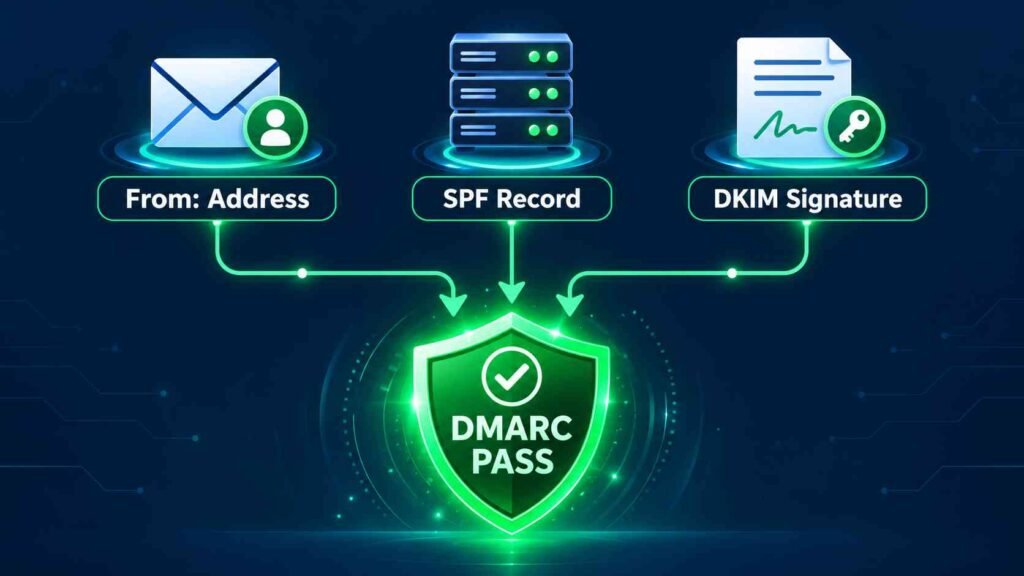
To attain DMARC compliance, it is essential to have a valid DMARC record along with operational SPF and DKIM records. Additionally, these authentication methods must align correctly with the domain from which your emails are sent.
What Is Alignment in DMARC?
Alignment is the necessity for the domain in the `From:` address (which recipients can see) to correspond with or be an approved subdomain of the domains utilized in SPF and DKIM authentication. If alignment is incorrect, even genuine messages might not pass DMARC validation, compromising your email security.
How to Check SPF and DKIM
1. Verify SPF Record
Utilize diagnostic tools such as SPF Lookup from MxToolbox or the SPF Checker from dmarcian. Make sure to list all authorized mail servers and verify for any mistakes, like too many DNS lookups or omitted IP addresses.
2. Inspect DKIM Signature
Dispatch a test email and inspect the headers with an email header analysis tool. Ensure that your outgoing mail server appropriately signs the messages and that the public keys are available in the DNS.
3. Confirm spfdmarc Alignment
spfdmarc is a tool that verifies whether your SPF and DKIM alignment configurations meet DMARC standards. Many DMARC diagnostic tools include an spfdmarc assessment, which evaluates whether your alignment is set to “relaxed” or “strict.” This assessment is essential for successfully passing DMARC validation.
Having accurate and aligned SPF and DKIM records reduces false positive occurrences and supports better inbox delivery.
Common DMARC Authentication Issues and How to Fix Them Fast
Barriers to achieving DMARC compliance frequently arise from improperly set up DNS records, errors in policy dissemination, or failures in message validation. Swiftly identifying and addressing these email authentication issues is crucial for ensuring successful email delivery and maintaining overall email integrity.
Common Problems
1. Missing or Invalid DMARC Record
An absent or faulty DMARC record obstructs mail servers from executing effective DMARC validations and impacts reporting accuracy.
Solution: Utilize a DMARC record checker or DNS lookup tool to identify any missing elements or mistakes in your DMARC configuration. Ensure that you have a valid DMARC TXT record that includes the necessary policy and reporting tags.
2. Misaligned SPF or DKIM Domains
Messages don’t pass DMARC validation when the domains used for SPF or DKIM authentication don’t match the displayed sender’s domain.
Solution: Modify your SPF or DKIM settings to ensure they permit sending from your main domain. Utilize diagnostic tools, such as spfdmarc alignment tests, to confirm configurations.
3. Incorrect Policy (Too Early Enforcement)
Implementing a strict DMARC policy, such as quarantine or reject, without first reviewing legitimate email traffic through DMARCreport aggregate reports may disrupt valid email delivery and cause legitimate messages to be marked as spam or rejected.
Solution: Begin with `p=none` and use tools like DMARC Report Analyzer to track reports. After ensuring correct alignment, gradually transition to a more stringent policy to enhance protection against spoofing.
4. Missing Reporting Addresses
If `rua` (for aggregate reports) and `ruf` (for forensic reports) are not correctly set up, you miss out on critical information about your email traffic and potential threats.
Solution: Ensure that you include valid email addresses in your DMARC record to collect and monitor aggregate reports.
5. Blacklist Status Triggered by Poor Authentication
Email servers keep an eye on DMARC adherence. Continual violations may result in your sending IP being added to blacklists, which can negatively affect inbox placement and lead to delays in email delivery.
Solution: Periodically verify your blacklist status using MxToolbox or Blacklist diagnostics. Address any policy, SPF, and DKIM problems to regain your reputation.
Fast Remediation with Expert Assistance
If problems continue, you might want to seek help from services such as dmarcian or the expert support provided by Cloudflare for thorough DMARC analysis and solutions customized for your domain.
How to Monitor DMARC Reports and Move Safely Toward Enforcement
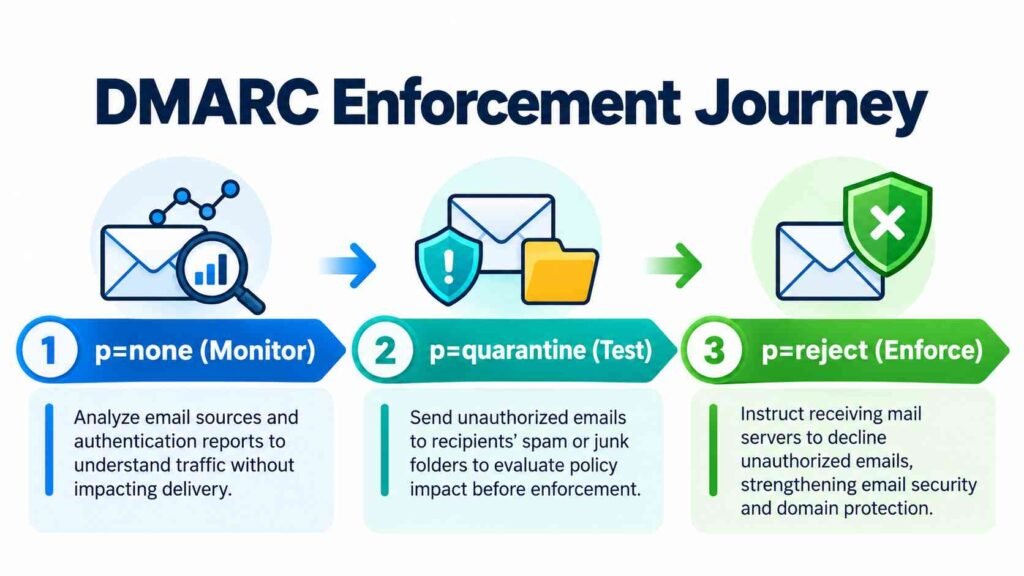
Keeping an eye on DMARC reports is essential for understanding your email strategy and helps facilitate a secure transition from a monitoring-only `none` policy to full enforcement through `quarantine` or `reject`. Typically, mailbox providers such as Google, Yahoo, and Microsoft send daily aggregate reports that provide a snapshot of email authentication results, showcasing any unauthorized sender activities and the corresponding handling of messages.
Setting up Aggregate Report Collection
Set up the `rua` tag in your DMARC record to direct reports to a safe email address. Utilize a report analysis tool, such as dmarcian’s DMARC Report Analyzer, to interpret and visualize the XML aggregate reports. If you’re overseeing large-scale or multiple domain setups, consider using analytics platforms (like Google Analytics, Bing, or HandL UTM Grabber) for enhanced data integration.
Moving Toward Enforcement—Best Practices
Begin with a `none` DMARC policy to improve monitoring without affecting email delivery.
Regularly examine aggregate reports, scrutinize headers, and investigate any unauthorized senders or DMARC validation failures. Gradually adjust your policy — first to `quarantine`, assess the effects, and then to `reject` once all legitimate senders consistently meet authentication standards and alignment.
Keep abreast of sender stipulations from providers like Yahoo Sender Requirements and updates from public tools. Ensure adherence to changing standards by monitoring diagnostics, checking blacklist statuses, and revising your DMARC record when needed.
By maintaining continuous reporting and implementing informed policy changes based on DMARC report analysis, you’ll enhance your domain’s email security, strengthen defenses against spoofing, and create a fully compliant and dependable environment for email sending.