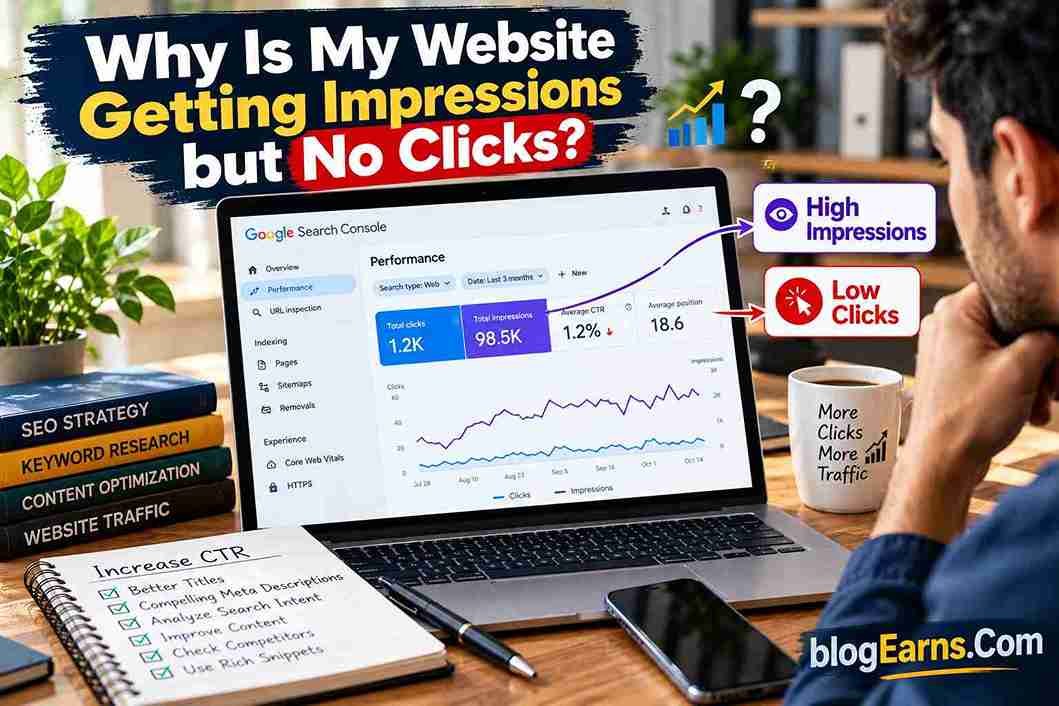
Why Is My Website Getting Impressions but No Clicks?
Your website is appearing in Google search results. Impressions are increasing in Google Search Console, and some of your pages are beginning to rank for relevant keywords. Yet when you check the clicks column, the numbers remain disappointing.
It is a frustrating situation. Google seems to be discovering your content, but searchers are not visiting your website.
If you are wondering, “Why is my website getting impressions but no clicks?”, the first thing to understand is that impressions and clicks measure different parts of the search journey. An impression means your result was shown in a qualifying search context. A click means someone selected your result and visited your website.
A page can receive hundreds or even thousands of impressions without attracting many visitors. That does not automatically mean your content is poor, your website has a penalty, or Google is deliberately suppressing your pages. Your result might appear too low on the page, target queries that do not match the content, or have a title that fails to communicate why someone should click.
The solution is to identify which part of the process is underperforming before making changes.
This guide explains how to diagnose high impressions but low clicks, use Google Search Console to identify the cause, improve your search snippets, and turn existing search visibility into more qualified organic traffic.
What Does It Mean When Your Website Gets Impressions but No Clicks?
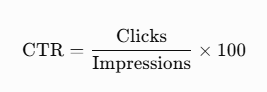
In Google Search Console, an impression generally means that your website’s result was shown to a user in Google Search according to the reporting rules for that search type. A click is recorded when a user clicks a link from Google Search to your property. Click-through rate, or CTR, measures the relationship between those two numbers.
The basic formula is:
Suppose one of your articles receives 1,000 impressions and 10 clicks.
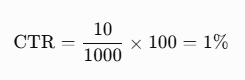
Your page has a 1% CTR for the selected reporting period and filters. Whether that is good or poor depends on the queries, ranking positions, search appearance, device, audience, and competition.
There is no single CTR benchmark that applies to every website and keyword.
A page ranking near the top for a highly relevant query has a different opportunity to attract clicks from a page appearing near the bottom of the first page or farther down the results. Branded searches, informational queries, shopping searches, and searches answered directly on the results page can also behave differently.
The important question is not simply whether your CTR is low. It is why people are seeing your result without selecting it.
Impressions are a sign of visibility, not proof of search success
Impressions can indicate that Google is showing your content for some queries. That is useful information because it gives you a starting point for optimization.
However, impressions alone do not tell you whether the page is reaching the right audience.
For example, an article about WordPress website speed may receive impressions for a broad query about general computer performance. Those searchers might not be looking for WordPress advice at all.
The article could have an acceptable position and still attract few clicks because its result does not satisfy the intent behind those searches.
This is why reviewing individual queries is more useful than reacting to the site’s total impression count.
Why Is My Website Getting Impressions but No Clicks?
Several issues can produce this pattern. More than one may affect the same page, so investigate the evidence before choosing a fix.
1. Your page ranks too low in Google search results
Position is one of the first things to investigate.
A page appearing near the top of the results has a different visibility opportunity from one appearing much farther down. Users may never reach a lower-ranking result, even if the article is relevant and well written.
Suppose Google Search Console shows that your article receives 2,000 impressions but only a handful of clicks. Before rewriting the article, check its average position for the queries generating those impressions.
If many impressions come from lower positions, your main challenge may be ranking visibility rather than the wording of your title.
What to do: Open the Performance report in Google Search Console, select the page, and review the Queries tab. Identify the queries generating the most impressions and inspect their average positions. Compare the results with the pages that appear for the same searches.
Do not treat average position as an exact fixed ranking. Search results can vary by query, location, device, and time. Use it as a diagnostic signal rather than a guarantee of what every searcher sees.
2. Your SEO title does not attract attention
Your title is one of the most important elements people use to decide which search result to open. A vague, generic, outdated, or poorly matched title can make a relevant article look less useful than competing results.
Imagine a user searches for “how to fix broken links in WordPress.” These titles communicate different levels of relevance:
- “WordPress Tips”
- “Broken Links Explained”
- “How to Fix Broken Links in WordPress: Step-by-Step Guide”
The third title communicates the subject and the practical benefit more clearly.
However, a title should not promise something the article fails to deliver. A dramatic headline may attract initial curiosity, but misleading wording can frustrate readers and damage trust.
Google may also generate a different title link from the one you specify if it believes another source better represents the page. Its official guidance recommends clear, descriptive, concise titles and discourages repetitive keyword stuffing.
What to do: Compare the title with the actual search queries. Make the topic and intended benefit clear, remove unnecessary repetition, and avoid exaggerated claims. Change one title at a time where possible, then monitor the results over a meaningful period.
3. Your meta description does not explain the value of the page
The meta description is a short summary that can help searchers understand what a page offers. Google may use it to generate the search snippet, but it can also select text from the page itself.
A description that is vague, repetitive, or unrelated to the query may fail to communicate why the result is worth visiting.
For example, a generic description such as “Welcome to our website. Read our latest blog posts and learn more” tells a searcher very little about a specific tutorial.
A more useful description might explain what the reader will learn, which problem the page addresses, and what practical outcome to expect.
What to do: Write a unique description that accurately summarizes the page. Include the main topic naturally, describe the value of the content, and avoid promises that the article cannot fulfil.
Do not expect a meta description change to guarantee a higher CTR. Google can display a different snippet, and other factors may matter more.
4. Your content targets the wrong search intent
Search intent is the underlying purpose behind a query. A person searching for information, comparing products, looking for a specific website, or trying to complete a task may expect very different results.
For example:
- “What is WordPress?” usually suggests an informational need.
- “Best WordPress hosting” suggests comparison and evaluation.
- “WordPress login” may indicate a navigational need.
- “Buy WordPress hosting” signals a stronger commercial or transactional intention.
If your page does not match the intent behind the queries that trigger it, searchers may choose other results.
An article explaining basic SEO concepts may receive impressions for a query that expects a practical checklist. Even if your article mentions the topic, its title and format may not meet the searcher’s expectations.
What to do: Review the actual search queries in Search Console. Search for several important queries yourself and examine the types of pages that appear. Determine whether searchers expect a tutorial, checklist, review, comparison, definition, or official resource.
Then decide whether to improve the existing page, narrow its focus, or create a separate page for a genuinely different search intent.
5. Your search snippet looks similar to competing results
Even when your page is relevant, searchers may have several alternatives that appear to offer the same answer.
Imagine the search results for “best blogging niches for beginners.” If every result uses a generic title and promises a complete guide, users may have little reason to select one over another.
Your result needs to communicate a specific, honest benefit. That could be a practical comparison, a step-by-step process, examples for beginners, or guidance that helps readers make a decision.
Do not invent unique features simply to stand out. If your article includes examples, templates, or original research, make that value clear. If it does not, improve the content before advertising benefits it cannot deliver.
What to do: Search your target query and compare your title and snippet with the competing results. Look for ways to describe your page more precisely, not just more dramatically.
6. Your title or description may be outdated
An old year, discontinued tool, outdated pricing reference, or obsolete feature can make a result appear less useful than current alternatives.
This is especially relevant to tutorials, software reviews, recruitment information, and articles about changing products.
For example, if a page title promises a guide for an earlier year while competing pages clearly address the current situation, users may prefer the newer-looking result. But changing the year alone will not make the article current.
What to do: Review the article itself. Update obsolete instructions, screenshots, links, examples, and claims before refreshing its title or description. Use a year in the title only when the page genuinely provides current, year-specific information.
7. Search results answer the question before a user visits your website
Some searches can be satisfied directly on the results page. A user may see a featured snippet, calculator, knowledge panel, video, or other result feature that provides enough information to meet their immediate need.
For instance, someone searching for a basic definition may get the answer without opening a full tutorial. Another person searching for a detailed implementation guide may still need to visit a website.
This means the same CTR should not be expected across every kind of query.
What to do: Inspect the search results for your most important queries. Note whether other result features occupy prominent space and whether searchers are likely to need a deeper explanation than the results page provides.
Where appropriate, make your page useful beyond the short answer by offering practical examples, troubleshooting steps, comparisons, or detailed instructions. Do not add unnecessary paragraphs merely to make an article longer.
8. Your page may be appearing for irrelevant queries
Google Search Console can show queries that you did not explicitly target. Some may be useful opportunities, while others may be only loosely related to the content.
Suppose your article explains how to improve WordPress SEO but receives impressions for a broad query about general website development. Searchers may not see your result as a close match, even if the article includes some related terminology.
What to do: Export or review the page’s query data. Separate queries into three groups:
- Relevant and valuable: These match the page’s purpose and deserve attention.
- Relevant but poorly served: These may reveal sections that need improvement.
- Irrelevant or weakly related: These may not be worth optimizing for on that page.
Do not try to make one article rank for every possible variation. Keep the page focused on the main topic and the closely related questions that genuinely belong there.
9. Your page may compete with another page on your own website
Keyword cannibalization is often used to describe a situation in which multiple pages on the same website compete for similar search queries. However, two pages targeting related keywords do not automatically create a problem.
The concern arises when their purposes overlap so much that the site does not have a clear, useful page for the query, or when the pages repeatedly fluctuate in visibility without serving distinct needs.
For example, if you have two articles with almost identical advice about writing meta descriptions, they may overlap unnecessarily.
What to do: In Search Console, filter by a query and inspect the Pages tab. If multiple URLs receive impressions for the same query, compare their intent and content.
If the pages serve different purposes, clarify their focus and link between them where useful. If they are genuinely redundant, consider consolidating the content into one stronger page and redirecting the retired URL when appropriate.
Do not merge pages simply because they share a keyword. Different user needs may justify separate articles.
10. Competitors offer a stronger or more recognizable result
Established brands, trusted publications, official documentation, and websites with highly relevant resources may attract clicks even when your page appears for the same query.
This does not mean a smaller website cannot compete. It means that a title rewrite may not be enough when the underlying page is less useful or less aligned with the search.
What to do: Compare your page with the results that consistently appear above it. Look at the questions they answer, their structure, their examples, their freshness, and whether they provide evidence or practical steps that your article lacks.
Improve the substance of your page first. A more compelling snippet is valuable, but it should reflect a genuinely useful destination.
How to Use Google Search Console to Find High-Impression, Low-Click Pages
Google Search Console is the best starting point for diagnosing this issue because it reports how your website performs in Google Search. Its Performance report lets you examine clicks, impressions, CTR, and average position by query, page, country, device, and other available dimensions.
Follow this process to find pages that deserve attention.
Step 1: Open the Performance report
Sign in to Google Search Console and select your website property.
Open the Search results Performance report. Choose a date range that gives you enough data to identify a pattern.
For a routine review, compare a recent period with a previous period of similar length. If seasonality could affect your topic, also compare with the same period in an earlier year where sufficient data is available.
Avoid drawing strong conclusions from just a few days of data, especially for pages that receive few impressions.
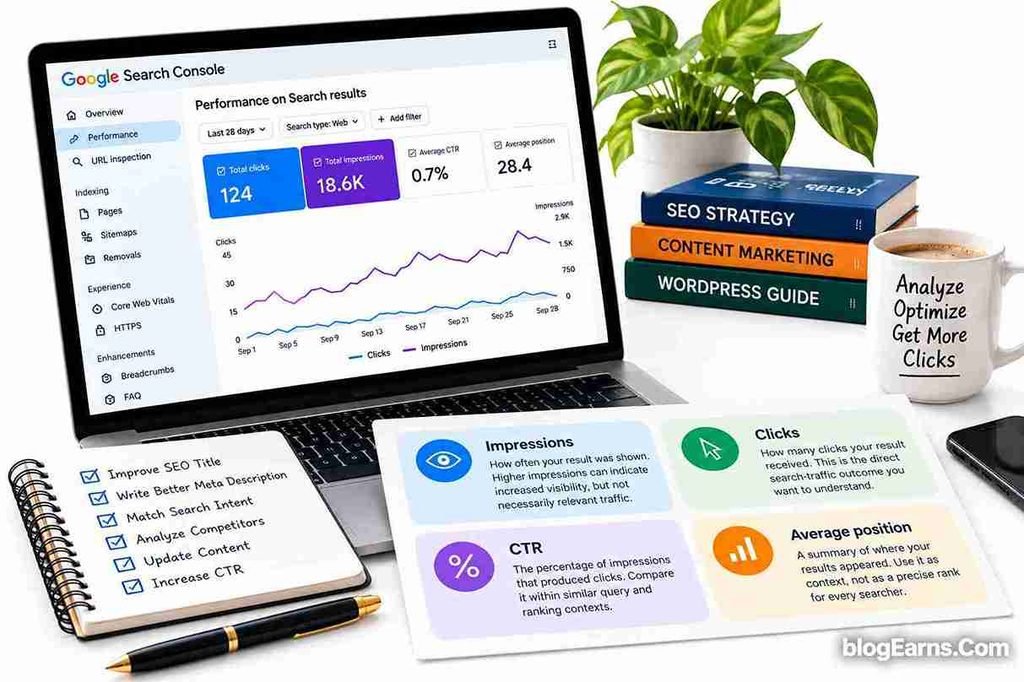
Step 2: Review the four key metrics
Impressions
How often your result was shown. Higher impressions can indicate increased visibility, but not necessarily relevant traffic.
Clicks
How many clicks your result received. This is the direct search-traffic outcome you want to understand.
CTR
The percentage of impressions that produced clicks. Compare it within similar query and ranking contexts.
Average Position
A summary of where your results appeared. Use it as context, not as a precise rank for every searcher.
Step 3: Find pages with many impressions and few clicks
Select the Pages tab and review the URLs with the most impressions.
Look for pages that receive meaningful visibility but generate fewer clicks than you would reasonably expect given their queries and positions.
Do not automatically choose the page with the lowest CTR. A page with three impressions and zero clicks has very little evidence behind it. A page with 20,000 impressions and a consistently low CTR may offer a more valuable optimization opportunity.
A useful prioritization approach is to consider:
- The number of impressions.
- The relevance and commercial or editorial value of the query.
- The page’s average position.
- Whether the page has a clear, fixable snippet problem.
- The potential value of additional qualified visitors.
Step 4: Open the Queries tab for each page
Select a page and inspect the queries associated with it.
This step often reveals the real issue.
A page may receive most of its impressions from a broad, competitive query rather than the specific keyword you expected. Or it may rank for several relevant long-tail queries that could be better addressed in the title and introduction.
Ask yourself:
- Does the page answer the query directly?
- Does the title clearly match the search?
- Is the query informational, commercial, navigational, or transactional?
- Is the average position strong enough for a snippet change to be the main priority?
- Are multiple unrelated queries being grouped together in the overall CTR?
This query-level review helps prevent broad, unnecessary rewrites.
Step 5: Compare mobile and desktop performance
A page’s performance may differ across devices.
Mobile search results have less horizontal space, and the layout may differ from desktop. A long title can be truncated differently, while the ordering and prominence of other search features may also vary.
Use the device filter to compare clicks, impressions, CTR, and average position where enough data exists.
If mobile CTR is noticeably weaker, inspect the mobile search appearance and make sure the title communicates the main benefit early. Do not assume device layout is the cause without checking the actual query and position data.
Step 6: Separate brand and non-brand queries
Branded searches often behave differently from generic informational searches.
Someone searching for your website’s name may already intend to visit it. Someone searching for a general tutorial may be comparing many competing resources.
If possible, review branded and non-branded queries separately. This helps you understand whether the low CTR is concentrated in discovery searches, where people are choosing between alternatives, or whether it affects people already familiar with your brand.
Step 7: Check whether the change is new or persistent
A low CTR that has remained stable for months may require a different response from a sudden decline.
If clicks fall while impressions remain similar, investigate the title, snippet, position, query mix, and competing search features. Google specifically recommends reviewing the Performance report and comparing affected pages and queries when diagnosing search traffic changes.
If impressions and clicks both decline, investigate ranking changes, search demand, indexing issues, technical changes, and possible seasonal patterns as well. The problem may not be CTR alone.
How to Improve CTR When Your Website Gets Impressions but No Clicks
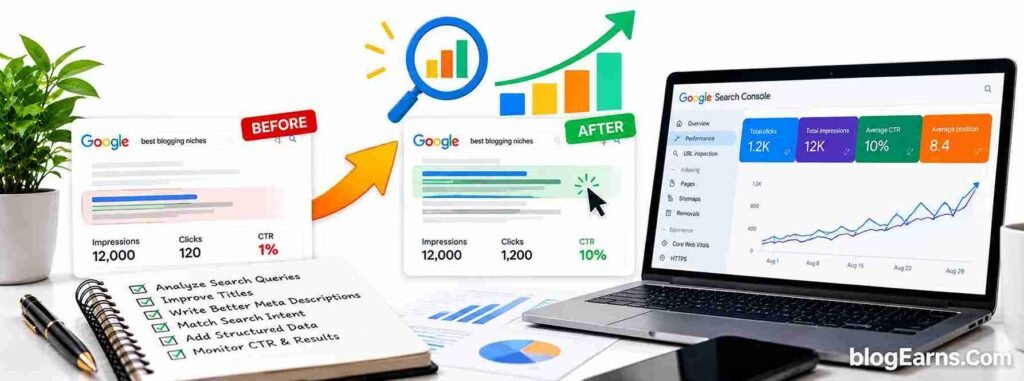
Once you have identified the pages that need attention, make changes that address the actual problem. The following steps are particularly useful for bloggers and content websites.
1. Rewrite titles to communicate a clear benefit
A strong SEO title should tell the reader what the page covers and why it is relevant.
For example:
| Weak or generic title | More descriptive alternative |
|---|---|
| WordPress SEO Tips | WordPress SEO: Practical Ways to Improve Your Site |
| Meta Description Guide | How to Write Meta Descriptions That Attract Clicks |
| Website Ranking Tips | Why Your Website Isn’t Ranking and How to Fix It |
| SEO Tutorial | SEO for Beginners: A Practical Step-by-Step Guide |
These are examples, not guaranteed CTR improvements. The best title depends on the actual content, query, and competing results.
Keep the main topic clear, avoid unnecessary repetition, and make sure the article delivers what the title promises. Google may generate its own title link, so matching your title tag with your visible page heading and the page’s actual content is also important.
2. Write a useful meta description
Think of the meta description as a concise explanation of why someone should visit the page.
A good description usually:
- Summarizes the page accurately.
- Mentions the main topic naturally.
- Explains the practical benefit.
- Uses clear, reader-friendly language.
- Avoids exaggerated claims and keyword stuffing.
For example, for a tutorial about low CTR:
Getting Google impressions but no clicks? Learn how to diagnose low CTR, improve titles and meta descriptions, analyze rankings, and attract more relevant organic traffic.
Google may display this description or generate a different snippet from the page. A description is not a guarantee that your preferred wording will appear.
For a more detailed explanation, link to BlogEarns’ guide on how to write meta descriptions that improve CTR.
3. Improve the introduction to match the search query
When users click through, they should quickly recognize that the page addresses their problem.
If the title promises a step-by-step solution, do not spend several paragraphs discussing unrelated background before providing the first useful instruction.
For informational articles, consider answering the central question near the beginning, followed by the explanation and details. For reviews and comparisons, make the evaluation criteria and important differences easy to find.
This helps the article fulfil the promise made in the search result. It does not guarantee a higher CTR by itself, but it creates a better experience for visitors who do click.
4. Add original examples and practical value
A page that repeats the same generic advice found everywhere has little reason to stand out.
Improve the content with material that genuinely helps readers, such as:
- Original screenshots or walkthroughs.
- A worked example using Search Console metrics.
- A comparison table that simplifies a decision.
- Troubleshooting steps based on the topic.
- Updated information and verified references.
- Useful templates, checklists, or calculations.
For BlogEarns, this is particularly valuable for WordPress tutorials, SEO guides, and blogging resources. A detailed article should help readers accomplish something, not merely repeat definitions.
5. Improve the search result without misleading users
Avoid promises such as “Guaranteed First Rank” or “Double Your Traffic Overnight” unless you can substantiate them, which is rarely possible for SEO outcomes.
A title that overpromises may attract curiosity, but it can also undermine trust. Use specific, compelling wording that reflects the article’s actual value.
The objective is to attract the right visitors, not to maximize clicks regardless of relevance.
6. Improve content freshness when it matters
Review whether your article’s information is still accurate. Update obsolete screenshots, broken links, discontinued tools, outdated procedures, and unsupported claims.
Do not change the publication date merely to make an old article look new. Update the content when there is a meaningful reason, and ensure any displayed dates accurately reflect the page’s history.
Freshness matters more for some topics than others. A current software tutorial may need frequent revisions, while a timeless explanation of a basic SEO concept may not need a complete rewrite.
7. Strengthen internal links and content organization
Internal links help visitors discover related resources and provide additional paths through your website.
For example, an article about CTR can naturally link to your guides on keyword research, SEO titles, meta descriptions, and technical SEO. Supporting articles should link back to broader guides when it helps readers understand the subject.
Explore these related BlogEarns resources:
- What Is SEO? Complete Guide for Beginners
- How to Do Keyword Research for a New Website
- Internal Linking: Best Practices for SEO
- How to Start a Blog: Everything Beginners Need to Know
These articles support a broader content strategy around SEO, blogging, and website growth. BlogEarns+3
Use contextual anchor text and place links where they help the reader. Do not add unrelated internal links simply to increase the number of links on a page.
A Practical Example: Diagnosing a Low-CTR Article
Consider a hypothetical BlogEarns article with the following performance:
| Metric | Before optimization |
|---|---|
| Impressions | 10,000 |
| Clicks | 100 |
| CTR | 1% |
| Average position | 18 |
These figures are illustrative, not actual BlogEarns analytics.
The article has visibility but ranks around the second page on average. Its low CTR may be partly explained by its position. Rewriting the title alone might not solve the main problem.
A sensible plan would be:
- Review the queries responsible for the impressions.
- Check whether those queries match the article’s purpose.
- Examine the current search results and competing pages.
- Improve content gaps and strengthen the article’s usefulness.
- Review internal links from relevant, established pages.
- Rewrite the title and description if they fail to communicate the page’s value.
- Monitor the same queries and pages after the changes.
Now consider a different hypothetical article with 10,000 impressions, 800 clicks, and an average position of 3. Its CTR is 8%. If its performance declines while impressions and average position remain broadly similar, investigating the title, snippet, and changing search-result layout may be more appropriate than immediately rewriting the entire article.
The lesson is simple: the same symptom can have different causes, so the remedy should follow the evidence.
How to Measure Whether Your CTR Improvements Worked
After making changes, record the date and the pages you updated. This allows you to compare performance before and after the work.
Monitor:
- Clicks and impressions.
- CTR for relevant queries.
- Average position.
- The queries generating traffic.
- Organic visits and useful actions, where available.
Use a sufficiently long comparison period for your site’s traffic volume. For low-volume pages, several weeks or longer may be needed before you have enough data to make a reasonable assessment.
Where practical, change one major element at a time. If you simultaneously rewrite the title, replace half the article, change the URL, and restructure internal links, it becomes difficult to determine which change influenced the outcome.
Also remember that search performance changes for reasons outside your control, including seasonality, competitor updates, and changes in search results. A before-and-after comparison can reveal a pattern, but it does not automatically prove that a particular edit caused it.
For further guidance, use Google’s official documentation: Debugging drops in Google Search traffic. It explains how to investigate changes using Search Console and other evidence.
Frequently Asked Questions
| Why is my website getting impressions but no clicks? |
|---|
| Your pages may appear for queries where they rank too low, do not match search intent, or have titles and snippets that fail to communicate their value. Check individual queries, average positions, and competing results in Google Search Console before deciding what to change. |
| Is a 1% CTR bad for SEO? |
| Not necessarily. A 1% CTR can be reasonable for some queries and positions but disappointing for others. Compare pages with similar search intent, ranking positions, devices, and search-result layouts instead of applying one universal benchmark. |
| Do impressions mean my website is ranking on Google? |
| Impressions indicate that your result was shown in a qualifying search context. They do not necessarily mean the page ranks prominently for your target keyword. Review the queries and average positions in Search Console to understand where the visibility comes from. |
| Does improving CTR increase Google rankings? |
| Do not assume that improving organic CTR directly raises rankings. A better title or description can help attract more clicks from existing visibility, but ranking systems consider many factors. Focus on relevant content, satisfying search intent, and providing a useful search result rather than trying to manipulate clicks. |
| Should I change my SEO title if my page has high impressions and low CTR? |
| Possibly, but check the page’s average position and query mix first. If the page ranks well for relevant queries and its title is vague or poorly matched, a title revision may be worthwhile. If it ranks far down the results, content relevance and ranking improvements may deserve attention first. |
| Can a meta description increase clicks? |
| A clear, accurate meta description can help users understand what a page offers and may encourage them to select it. Google can generate a different snippet, however, and the description cannot guarantee more clicks. |
| How long does it take to see CTR improvements? |
| There is no fixed timeline. Google needs to recrawl and process changes before they may appear in search results, and enough new impressions are needed to assess performance. Monitor the results over a suitable period rather than expecting an immediate change. |
| Should I delete pages that receive impressions but no clicks? |
| Not automatically. A page with impressions may have an opportunity to improve. Check its relevance, content quality, indexing status, query data, and purpose. Improve, consolidate, or remove it only after deciding which option best serves users and your site’s overall content structure. |
Conclusion
If you are asking, “Why is my website getting impressions but no clicks?”, treat the data as a diagnostic opportunity rather than proof that your SEO has failed.
Start with Google Search Console. Identify the pages with meaningful impressions, inspect the queries behind those impressions, and evaluate their average positions. Determine whether the main issue is ranking visibility, search intent, title quality, snippet relevance, or competition.
Then make targeted changes. Improve titles and meta descriptions where needed, strengthen the content where it falls short, and connect related articles through useful internal links. Track the results over time and avoid making several major changes at once.
For BlogEarns.com, prioritize pages that already receive relevant impressions and have a realistic opportunity to attract more qualified visitors. This makes better use of the visibility your website has already earned.
The goal is not simply to increase clicks. It is to help the right searchers recognize that your page offers the answer they need.