How to Use Google Search Console for Keyword Research
Most keyword research begins before a website has any meaningful search data.
You enter a topic into a keyword research tool, look at search volume, check keyword difficulty, examine related terms, and then try to predict what people might search for. That process is useful, especially when you are planning content for a new website.
But once your website starts appearing in Google Search, you have access to something far more valuable than an estimate.
You have actual search data.
This is where Google Search Console becomes one of the most useful keyword research tools available to a website owner.
Search Console can show the queries that caused your pages to appear in Google Search, how many impressions those pages received, how many people clicked them, their average click-through rate, and their average position. Google also allows you to break the data down by queries, pages, countries, devices and other dimensions.
That changes the nature of keyword research.
Instead of asking, “What might people search for?”, you can begin asking, “What are people already searching for when Google shows my content?”
The difference is enormous.
Your Search Console data can reveal keywords you never deliberately targeted, pages that are appearing for hundreds of related searches, topics where your website has growing visibility, queries with plenty of impressions but few clicks, and opportunities where a small content improvement could potentially produce more organic traffic.
The trick is knowing how to read that information.
What Is Google Search Console Keyword Research?
Google Search Console keyword research is the process of using the search performance data in Search Console to discover, analyze and improve the keywords associated with your website.
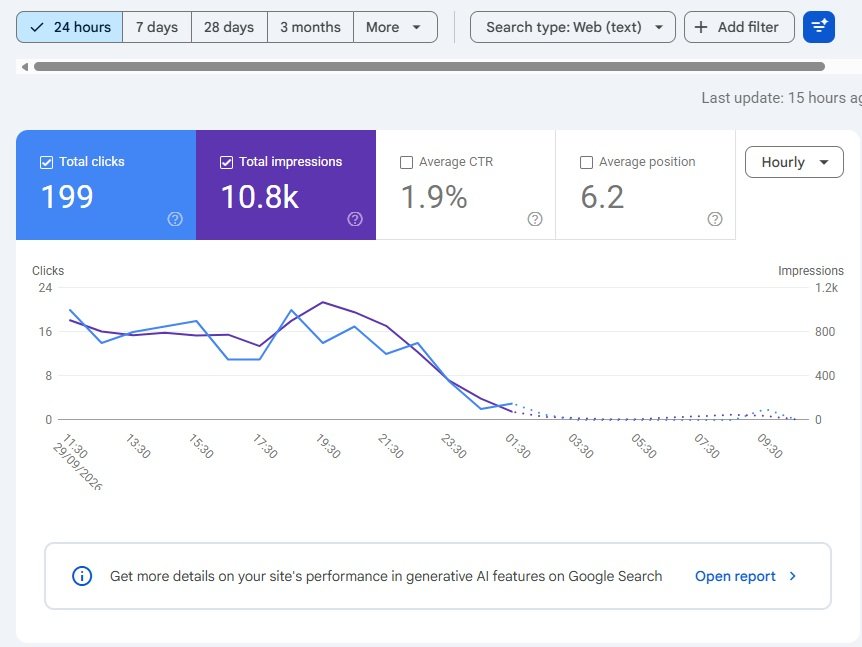
The central source of this information is the Performance report.
Within the Search results performance report, Search Console provides data such as clicks, impressions, click-through rate and average position. You can view the information by dimensions such as queries, pages, countries, devices and search appearance.
The Queries section is particularly valuable for keyword research because it shows the search terms that led to your site appearing in Google Search.
This does not mean that Google is giving you a complete list of every search performed by every visitor. Search Console omits some anonymized queries for privacy reasons, and the visible table does not necessarily contain every query for which your site appeared.
Even with those limitations, the data can be remarkably useful.
Imagine you published an article targeting “keyword research for beginners.”
After several weeks, Search Console may show that the page is also receiving impressions for searches such as:
- keyword research for new websites
- how to find keywords for a blog
- beginner keyword research
- how to choose keywords for SEO
- keyword research examples
- low competition keywords for beginners
You may have discovered six content opportunities from one article without generating a single new keyword list in an external tool.
That is the real strength of Search Console.
Why Search Console Is Different from Traditional Keyword Research Tools
Traditional keyword research tools are designed primarily for discovering opportunities before you create or optimize content.
Search Console works differently.
It tells you how Google is already connecting your website with real search queries.
This distinction becomes increasingly important as a website grows.
Suppose a keyword tool tells you that the phrase “long-tail keyword research” has an estimated monthly search volume and a particular difficulty score.
That information can help you decide whether the topic is worth pursuing.
But Search Console can later tell you that your existing article is already receiving impressions for related searches that the keyword tool did not lead you to consider.
You are no longer working entirely from estimates.
You are working with first-party performance data from your own website.
That does not make Search Console a replacement for every keyword research platform. It makes it a different kind of research tool.
A useful SEO workflow can use both.
External keyword research helps you discover what you could target.
Search Console helps you understand what Google is already associating with your website.
That second source becomes increasingly valuable as your content library grows.
Understanding the Four Metrics You Need
Before using Search Console for keyword research, you need to understand the four primary metrics shown in the Performance report.
They are clicks, impressions, click-through rate and average position. Google defines clicks as visits generated from Google Search, impressions as appearances in Search results, CTR as clicks divided by impressions, and average position as the average position of the topmost result from your site for the relevant data grouping.
These numbers tell different stories.
Impressions
An impression means your site appeared in Google Search in a way that counts as an impression for the relevant result type.
For keyword research, impressions are particularly interesting because they reveal search visibility even when people are not clicking.
A page receiving thousands of impressions for a query has visibility.
A page receiving very few impressions may have limited visibility for that query.
That does not automatically mean the first page needs to be rewritten. It may simply mean that the keyword is highly competitive, the topic is new, the page is not sufficiently relevant, or Google has not yet developed strong confidence in the page.
But impressions provide a useful starting signal.
Clicks
Clicks tell you how many times users selected your result from Google Search.
If a query generates impressions but almost no clicks, there may be an opportunity to investigate.
Perhaps your page ranks too low.
Perhaps the title does not clearly communicate the answer.
Perhaps the search intent does not match your page.
Perhaps other results are more attractive.
Perhaps the query itself is informational while your page is commercial.
Clicks therefore need to be interpreted alongside position, impressions and intent.
Click-Through Rate
CTR is calculated from clicks and impressions.
For example, if a page receives 1,000 impressions and 50 clicks, its CTR is 5%.
CTR can help identify pages and queries where visibility is not translating into visits.
However, there is no universal CTR target that every keyword should achieve.
A result appearing in position 2 for a highly specific informational query may behave very differently from a result appearing in position 8 for a broad query.
Search features can also change how many clicks traditional organic results receive.
Treat CTR as a diagnostic signal rather than a score that your website must achieve.
Average Position
Average position is useful, but it is one of the most frequently misunderstood Search Console metrics.
It is not a simple “your website ranks at position X” number.
Search Console explains that the metric represents the average position of the topmost result from your site in the relevant results. The calculation also changes depending on whether data is being viewed at the property or page level.
This is one reason you should avoid obsessing over small daily movements.
A keyword moving from an average position of 8.4 to 9.1 does not necessarily mean your page suddenly collapsed.
Look at the broader trend.
Are impressions increasing?
Are clicks increasing?
Are more related queries appearing?
Is the page gaining visibility across the topic?
Those questions usually provide more useful information than staring at a single position number.
Start With the Queries Report
If your goal is keyword research, the Queries tab is where you should spend much of your time.
Open your property’s Performance > Search results report and make sure the relevant metrics are enabled.
Then select the Queries dimension.
You will see the search terms associated with your site’s performance during the selected period.
Sort the data by impressions first.
This is often more revealing than sorting immediately by clicks.
Why?
Because high-impression queries show where Google is already giving your website visibility.
Some of these queries may be keywords you deliberately targeted.
Others may be complete surprises.
The surprises are often the most interesting.
Suppose you publish an article called “How to Start a Blog.”
You might expect it to receive impressions for:
“how to start a blog”
“starting a blog”
“how to create a blog”
But Search Console may reveal additional queries such as:
“how to start a blog for free”
“how to start a blog and make money”
“how to start a blog for beginners”
“how to create a blog website”
“how to start a personal blog”
These variations tell you how Google is interpreting the subject and how users are searching around it.
You now have evidence that can guide your next content decisions.
Finding Keywords You Did Not Target
One of the best uses of Search Console for keyword research is finding what can be called unexpected keyword visibility.
These are queries for which your page receives impressions even though you did not intentionally optimize the page around them.
This happens constantly.
You write about one subject, but your page covers related concepts, answers supporting questions, and uses language that Google associates with other searches.
Search Console exposes some of those relationships.
Suppose your article targets:
how to find low competition keywords
But Search Console shows impressions for:
how to find easy keywords to rank for
That is valuable.
The two searches are closely related, but the second wording might not have appeared in your original keyword research.
You could naturally incorporate the concept into the existing article.
You might also decide that it deserves a supporting article if the query represents a sufficiently different intent.
This is where Search Console becomes a content discovery engine.
It is not simply telling you what you already rank for.
It can show you where your content is beginning to enter conversations you did not originally anticipate.
The Most Valuable Queries Are Not Always Your Top Queries
Sorting by clicks will show you which queries currently bring the most traffic.
That is useful.
But the most interesting SEO opportunities are sometimes hidden lower down the table.
Consider a query with:
8,000 impressions
120 clicks
Average position: 9.4
That deserves attention.
Your page is already getting substantial visibility, but it is sitting around the lower part of the first page on average.
A small improvement in relevance, content quality, internal linking, title alignment or overall page usefulness could potentially change the page’s performance.
Now compare that with:
15 clicks
20 impressions
Average position: 4.2
The second keyword may rank higher, but the first provides more evidence of a potentially significant traffic opportunity.
This is why keyword research through Search Console should not be reduced to “find the keywords with the most clicks.”
You want to find opportunities, not simply report existing winners.
How to Find Striking Distance Keywords
One of the most useful concepts when analyzing Search Console is the idea of striking distance keywords.
These are queries for which your pages are already ranking relatively close to the top of Google but have room to improve.
There is no universal position range that defines striking distance.
Some SEOs focus on positions 4 to 20.
Others may look specifically at positions 8 to 20.
The appropriate range depends on the website and the type of opportunity you are analyzing.
The underlying idea is what matters.
If Google is already ranking your page for a query, you have evidence of relevance.
You are not starting from zero.
Suppose your article is averaging position 11 for an important keyword.
Rather than immediately creating a completely new article, investigate the page that already ranks.
Does it answer the searcher’s question completely?
Does it cover important subtopics?
Does the introduction satisfy the intent quickly?
Does it contain useful examples?
Could the title better reflect the query?
Are related pages internally linking to it?
Is the page outdated?
Are there competing pages providing something your article does not?
This analysis can lead to a much more efficient SEO decision.
Sometimes the best keyword research result is not a new article.
It is an existing article that deserves another round of work.
High Impressions and Low CTR: A Hidden Content Opportunity
Search Console can also uncover pages that are visible but not attracting enough clicks.
Google specifically recommends using high-impression, low-CTR queries and pages as opportunities to investigate titles, snippets and alignment with search intent.
Imagine a page receives:
12,500 impressions
180 clicks
1.4% CTR
The number alone does not tell you that the title is bad.
You need to examine the query and the position.
If the page is appearing around position 3 for a highly relevant query, the low CTR deserves investigation.
Search the keyword manually.
Look at the competing titles.
What promise are they making?
What information is Google displaying?
Does your title clearly explain what the reader will get?
Does the page actually deliver on that promise?
Perhaps your article title is too generic.
Perhaps the page is ranking for a query with a different intent than the one you originally had in mind.
Perhaps the search result contains features that change click behavior.
The solution should come from the evidence.
Do not rewrite titles simply because a CTR number looks low.
Search Console Can Reveal New Article Ideas
This is where the tool becomes particularly powerful for publishers.
Suppose you have a broad article about keyword research.
After several months, Search Console shows impressions for dozens of related queries.
Some are closely related and should remain covered by the original article.
Others represent distinct questions.
For example:
Your existing article may rank for:
how to find keyword ideas
But also receive impressions for:
how to find keywords on Google
how to find keywords for a new website
how to find long-tail keywords
how to check keyword difficulty
how to find low competition keywords
These are no longer merely keyword variations.
Some represent separate content opportunities.
This can help you build a topical cluster based on actual search behavior rather than inventing an arbitrary collection of articles.
That approach fits naturally with the broader keyword research process covered in our guide how to do keyword research for a new website.
The original article can remain the broader resource while focused supporting articles address more specific intents.
Don’t Turn Every Search Query Into a New Article
There is a trap here.
Once you discover hundreds of queries in Search Console, it can be tempting to create a new page for every variation.
Don’t.
Search Console is showing you language and search behavior.
It is not handing you a publishing calendar.
Several queries may represent exactly the same intent.
For example:
“what are long tail keywords”
“what is a long tail keyword”
“long tail keywords meaning”
“long tail keyword definition”
These may be different search strings, but a single strong article can satisfy all of them.
Creating four nearly identical articles could create unnecessary duplication and make your site’s architecture more confusing.
Instead, group queries according to search intent.
If multiple queries are asking essentially the same question, they can often belong to one comprehensive page.
If the queries represent different needs, they may deserve separate pages.
This distinction is more important than the number of keywords you can extract from Search Console.
Use the Pages Report Alongside Queries
The Queries report tells you what people searched for.
The Pages report tells you which pages are appearing.
You need both.
Select the Pages tab and identify your important URLs.
Click a page to filter the Performance report around that URL.
You can then return to the Queries tab to see the search terms associated with that page.
This creates a very useful relationship:
Page → Queries → Intent → Opportunity
Suppose one article has 40,000 impressions and 3,000 clicks.
That looks healthy.
But perhaps the page is also receiving impressions for several commercially valuable queries that it barely addresses.
Now you have an opportunity.
You can improve the existing page without creating a separate article.
Alternatively, you may discover a completely different search intent that deserves its own supporting page.
Search Console helps you make that distinction.
Use Query-to-Page Analysis to Find Keyword Cannibalization
Search Console can also help you investigate situations where multiple pages appear for similar queries.
Imagine you have three articles:
“Keyword Research Guide”
“Keyword Research for Beginners”
“Best Keyword Research Tools”
You may discover that several pages are receiving impressions for overlapping queries.
That does not automatically mean you have keyword cannibalization.
Google can legitimately rank multiple pages from the same website for related queries.
The problem occurs when your content structure makes it unclear which page should serve a particular intent, or when multiple pages are competing for essentially the same topic without a good reason.
Search Console can help you identify these patterns.
Click a query and inspect the Pages dimension.
Google’s documentation specifically describes this workflow for seeing which pages from your site were shown for a particular query.
If several URLs appear for the same important query, investigate them.
Perhaps the pages serve different intents.
Perhaps one should link to another.
Perhaps two pages overlap too heavily and need consolidation.
Perhaps the situation is perfectly normal.
The data gives you a reason to investigate rather than a reason to panic.
Compare Different Time Periods
Keyword research should not always be based on a single snapshot.
Search Console allows you to compare date ranges and analyze changes in clicks, impressions, CTR and position. Its current filtering and comparison features can also combine dimensions such as country and device.
This is particularly useful for identifying emerging topics.
Suppose you compare the last three months with the previous three months.
One query has increased from:
500 impressions → 4,500 impressions
while clicks have increased from:
12 → 160
That is not just a keyword.
It may be evidence of growing visibility around a topic.
You should investigate what caused the increase.
Did you publish a new article?
Did you update an old one?
Did another page start ranking?
Did seasonal demand change?
Did Google change the search landscape?
Did you build supporting internal links?
Search Console can reveal the change.
Your job is to explain it.
Country Data Can Change Your Keyword Strategy
Keyword behavior varies between markets.
A query that performs well in India may not have the same search pattern in the United States, United Kingdom, Canada or Australia.
Search Console lets you break down Search performance by country.
This can be valuable if your website serves an international audience.
Suppose one article receives substantial impressions from the United States for a particular query while your overall traffic is heavily concentrated in India.
That may suggest an opportunity to understand the wording and intent of the US audience more closely.
You should not immediately create country-specific pages.
First determine whether the difference represents genuine search behavior, terminology, demand, or simply a difference in your current visibility.
But the country dimension can provide clues that a basic keyword tool may not reveal about your own audience.
Device Data Can Reveal Search Behavior
The same keyword can behave differently on mobile and desktop.
Search Console allows you to analyze performance by device.
This can be useful when a page has strong impressions but unexpectedly weak CTR on mobile.
Perhaps the title is too long to communicate its value quickly.
Perhaps the page takes too long to present the answer.
Perhaps the content is difficult to scan.
Perhaps the query has a strong mobile intent.
The keyword itself has not changed.
The search environment has.
That distinction matters because keyword research is not only about words. It is about understanding the context in which those words are searched.
Use Search Console to Improve Existing Content
One of the biggest mistakes publishers make is treating SEO as a constant race to publish new articles.
Search Console often suggests another path.
Improve what already exists.
Suppose an article has been online for eight months.
It receives 25,000 impressions every month but only 500 clicks.
Its query data shows that Google is displaying the article for dozens of relevant searches.
That is an excellent reason to investigate the page.
Perhaps the introduction needs improvement.
Perhaps the content is missing important questions.
Perhaps the title does not accurately represent the strongest intent.
Perhaps the article was written before the topic changed.
Perhaps related supporting content now exists and should be linked from the page.
Perhaps the article is comprehensive but difficult to navigate.
The answer will vary.
The important point is that Search Console gives you evidence for the investigation.
This is especially useful for older articles that once performed well but have gradually lost visibility.
Search Console and Internal Linking
Keyword research can also influence your internal linking strategy.
Suppose you have an important article about keyword research.
Search Console reveals that the page is receiving impressions for long-tail keywords, but you also have a separate detailed article specifically about long-tail keyword research.
That creates a natural relationship between the pages.
The broader keyword research guide can link to the long-tail guide.
The long-tail guide can link back to the broader keyword research resource.
Other relevant articles can connect the cluster.
Internal linking is not simply about inserting links because an SEO checklist says you need them.
Links should help readers move between related pieces of information.
Search Console can help you discover which topics are already connected in Google’s understanding of your site, which can inform those editorial relationships.
Use Search Console with External Keyword Research
Search Console is incredibly useful, but it has an important limitation.
It primarily tells you about searches associated with your existing visibility.
If your website is brand new and has almost no impressions, there may not be much data to analyze.
This is where external keyword research becomes valuable.
A new website can use keyword research tools, Google suggestions, competitor analysis, forums, industry discussions and SERP research to discover potential topics.
Once the website starts gaining visibility, Search Console becomes increasingly important.
The two methods complement each other.
External research asks:
What should we create?
Search Console asks:
What is already happening?
Your strongest content strategy can emerge from combining both.
Google Search Console for a New Website
If your website is brand new, don’t become frustrated when the Queries report looks almost empty.
That is normal.
There is simply not enough historical search visibility yet.
For a new site, begin with proper keyword research and topic selection.
Once your pages start receiving impressions, return to Search Console regularly.
At first, you may see only a handful of queries.
Then dozens.
Then hundreds.
Eventually, a single page can appear for a surprisingly large collection of related searches.
That progression gives you increasingly valuable information about how Google understands your content.
A new website therefore has two keyword research phases.
The first is predictive.
You research what people might search for and create useful content around those needs.
The second is evidence-based.
You examine what Google is actually showing your pages for and use that information to improve your strategy.
Search Console Can Help You Find Content Gaps
A content gap does not always mean that you need a new article.
Sometimes it means your existing article does not fully answer a question.
Suppose Search Console shows that your article frequently appears for:
“how to use Google Search Console for keyword research”
but your article contains only a brief paragraph about the subject.
That is a signal.
The search query is telling you that Google sees your page as relevant, but the content may not provide the depth required for that particular intent.
You could expand the existing section.
If the query represents a sufficiently different intent, you might create a dedicated guide.
The distinction comes from examining the actual search results and the relationship between the query and your existing content.
Search Console therefore helps identify content gaps within existing visibility, not just completely missing topics.
Search Console Insights Can Help with a Quick Overview
Google also provides Search Console Insights, which offers a simpler view of website performance.
The Insights report highlights areas such as top and trending content, queries leading to your site, countries and traffic sources. Google describes it as a way to quickly understand what content is resonating and where opportunities may exist before moving into more detailed Performance reports.
For serious keyword research, the full Performance report is more useful because it gives you much more control over filtering, comparison and dimensions.
But Insights can be useful when you want a quick overview of what is changing.
Think of it as the dashboard.
The Performance report is where you open the engine.
How to Find Keyword Opportunities with High Impressions
High impressions are worth investigating because they demonstrate that Google is showing your site for a query.
Start by sorting queries by impressions.
Then look for searches that satisfy three conditions:
The query is relevant to your website.
Your page is receiving meaningful visibility.
The page is not generating as many clicks as you would expect.
This combination often reveals opportunities.
But do not automatically rewrite every page with a low CTR.
Check the average position first.
A page at position 20 with a low CTR is a different problem from a page at position 3 with a low CTR.
The first may need stronger content, better topical relevance, stronger internal linking or other SEO improvements.
The second may require investigation into search intent, title alignment and the competitive SERP.
The numbers become useful when read together.
How to Find Keywords Where Your Page Ranks on Page Two
Page-two keywords can be especially interesting.
A query where your page is appearing around positions 11 to 20 indicates that Google already considers the page relevant enough to include in the results, but it has not yet established strong enough visibility to consistently appear near the top.
That does not guarantee that optimization will move the page to page one.
It does, however, provide a logical starting point for investigation.
Open the page.
Search the query.
Compare your article with the current results.
Look at what the competing pages cover.
Identify important questions your page does not answer.
Check whether your introduction matches the intent.
Review internal links.
Look at the title and headings.
Check whether the information is current.
Then make improvements that genuinely help the reader.
Do not simply add the keyword another 15 times.
That is not keyword research.
It is keyword decoration.
Do Not Obsess Over Exact-Match Keywords
Search Console may show you dozens of different ways people search for the same subject.
This is useful because it demonstrates how varied natural search language can be.
You do not need to force every phrase into your article.
If your page comprehensively explains a subject, it can naturally be relevant to many related queries.
Use Search Console to understand the vocabulary and questions surrounding your topic.
Then write for people.
This is particularly important when you discover closely related variations.
Instead of creating awkward sentences to include every keyword, ask what information the searcher is actually trying to find.
That produces stronger content and a much more natural reading experience.
A Practical Search Console Keyword Research Workflow
A useful workflow begins with a reasonably long date range.
For many websites, comparing three months with the previous three months provides more context than looking at a few days.
Open the Search results Performance report and enable clicks, impressions, CTR and average position.
Start with the Queries tab.
Sort by impressions.
Look for relevant queries that you did not intentionally target.
Then look at queries with substantial impressions but relatively low clicks.
After that, investigate queries where your average position suggests the page is already reasonably close to the top.
Click individual queries and switch to the Pages dimension to understand which URLs Google is showing.
Then examine those pages individually.
Ask whether the existing page should be improved, whether it needs better internal links, or whether the query represents a sufficiently different intent to justify a separate article.
Finally, compare the data with actual Google search results.
This final step is important.
Search Console tells you what happened.
The SERP helps you understand why.
How Often Should You Use Search Console for Keyword Research?
There is no need to check Search Console obsessively every morning.
Search performance changes naturally.
Daily fluctuations can be caused by many factors, and the newest data can sometimes be preliminary. Google notes that the most recent Performance data may change as it is collected and processed.
For most content websites, a regular review is more useful than constant monitoring.
A monthly review can help identify emerging queries and content opportunities.
A deeper quarterly comparison can reveal broader trends.
You may want to investigate more frequently when you publish a major article, update an important page, experience a significant traffic change, or launch a new content cluster.
The purpose is not to stare at the dashboard.
The purpose is to make better editorial decisions.
Common Mistakes When Using Search Console for Keyword Research
One common mistake is treating Search Console’s query list as a complete keyword database.
It is not.
Some queries are anonymized, and the report does not necessarily display every query associated with your site.
Another mistake is focusing exclusively on clicks.
Clicks tell you what already brings traffic.
Impressions can reveal opportunities that have not yet converted into visits.
A third mistake is treating average position as an exact ranking position.
Search Console’s position metric is an aggregated measurement, not a permanent ranking number.
Another problem is creating a new article for every keyword variation.
Related queries should be grouped by intent before you decide whether they deserve separate pages.
Finally, do not make SEO changes solely because one metric moved.
A page can lose clicks because impressions fell.
CTR can change because the query mix changed.
Average position can change because the page began appearing for more queries.
SEO data needs interpretation.
Numbers without context can send you in the wrong direction surprisingly quickly.
The Bigger Role of Search Console in an SEO Strategy
Search Console is more than a reporting tool.
Used properly, it becomes a feedback system for your entire content strategy.
Your initial keyword research gives you hypotheses.
Your published content tests those hypotheses.
Search Console provides evidence.
Your next content decisions respond to that evidence.
Then the cycle repeats.
This is a much more intelligent approach than publishing dozens of articles and checking traffic six months later.
It also changes how you think about successful content.
A successful article is not necessarily one that ranks for exactly the keyword you selected six months ago.
It may become successful because it starts ranking for an entire group of related searches.
Search Console allows you to see that broader footprint.
Final Thoughts
Learning how to use Google Search Console for keyword research can fundamentally change the way you approach SEO.
Instead of relying entirely on estimated search volume and keyword difficulty, you can study the actual searches associated with your website.
You can discover unexpected keywords.
You can find pages ranking just outside the top results.
You can identify high-impression queries that deserve better coverage.
You can uncover content gaps.
You can discover new article ideas.
You can identify overlapping pages.
You can compare performance over time.
And perhaps most importantly, you can build your content strategy around evidence from your own website.
The best approach is not to choose between Search Console and traditional keyword research tools.
Use external tools to explore the market.
Use Google to understand search intent and the current SERP.
Use Search Console to understand how your own website is performing within that environment.
Then connect the dots.
A keyword is not valuable simply because a tool says it has 10,000 monthly searches. A keyword is valuable when it represents a meaningful search, fits your audience, matches your content, and creates a realistic opportunity to attract useful organic traffic.
Google Search Console helps you see those opportunities after your website enters the search landscape.
And once you learn how to read the data, your keyword research becomes less about guessing what Google might like and more about understanding what is already happening.
That is a much stronger place from which to build an SEO strategy.
Frequently Asked Questions
| Can Google Search Console be used for keyword research? |
|---|
| Yes. The Performance report shows the queries that caused your site to appear in Google Search, along with clicks, impressions, CTR and average position. These queries can reveal keyword opportunities, content gaps and topics that your existing pages are already associated with. |
| Where can I find keywords in Google Search Console? |
| Open your property in Google Search Console, go to the Search results Performance report, and select the Queries tab. The table displays search queries associated with your site’s performance during the selected period. |
| Does Google Search Console show all keywords? |
| No. Search Console does not necessarily display every query. Google omits some anonymized queries for privacy reasons, and the query table may also be subject to data limitations. |
| How do I find low-ranking keywords in Search Console? |
| Open the Queries report and examine queries where your pages have meaningful impressions but an average position outside the top results. Queries around positions 8 to 20 can be useful starting points for further investigation, although there is no universal position range that guarantees an opportunity. |
| How do I find new content ideas using Search Console? |
| Look for relevant queries that generate impressions for your existing pages but are not adequately covered. If several related queries represent a different search intent from the existing article, they may provide ideas for supporting content. |
| Can Search Console replace keyword research tools? |
| Not completely. Search Console is especially useful for understanding your existing search visibility, while external keyword research tools can help you discover topics and queries your website has not yet ranked for. Using both sources provides a broader research process. |
| What is a good position for keyword research in Search Console? |
| There is no single position that should always be considered good or bad. Queries ranking near the top can bring existing traffic, while queries ranking just outside the top results can represent opportunities for improvement. Always consider impressions, clicks, intent and the actual SERP alongside position. |
| What do high impressions but low clicks mean? |
| High impressions with low clicks means your page is appearing frequently in search results but receiving relatively few visits from those impressions. The reason can vary depending on ranking position, search intent, competing results, SERP features and how well your title and content match the query. |
| How often should I check Google Search Console? |
| For most websites, a regular monthly review combined with deeper quarterly analysis is sufficient. More frequent analysis can be useful after publishing major content, updating important pages or experiencing significant changes in search traffic. |
| Can Search Console help with keyword cannibalization? |
| Yes. You can select a query in the Queries report and then examine the Pages dimension to see which URLs from your site have appeared for that query. This can help identify cases where several pages are competing for similar search intent. |