On-Page SEO Checklist
Search rankings in 2026 are no longer won by simply placing a keyword in the title, adding it to a few headings, and calling the page optimized.
Modern on-page SEO is much broader. Search engines need to understand what your page is about, why it deserves to appear for a particular query, how useful it is to the reader, and whether the page provides a satisfactory experience after the visitor clicks.
That makes on-page SEO less about finding a magic keyword density and more about building a page that is clear, useful, technically accessible, and genuinely better than the alternatives.
Google’s current guidance emphasizes helpful, reliable, people-first content and specifically warns against creating content primarily to manipulate search rankings. It also recommends evaluating whether a page provides original value, demonstrates appropriate expertise, answers the user’s goal, and offers a satisfying experience.
This on-page SEO checklist for 2026 brings those principles together into a practical workflow. You can use it when publishing a new article, updating an old post, auditing a declining page, or preparing a page for a competitive search query.
What Is On-Page SEO?
On-page SEO is the process of optimizing the content and elements of an individual webpage so that search engines can understand the page and users can easily find, consume, and act on the information.
It includes much more than keywords.
A proper on-page SEO process can involve:
- Search intent
- Content quality
- Page titles
- Headings
- URLs
- Meta descriptions
- Keyword targeting
- Semantic relevance
- Internal links
- External references
- Images and alt text
- Structured data
- Content freshness
- Author information
- Mobile usability
- Page experience
- Core Web Vitals
- Canonical URLs
- Indexing controls
The important distinction is that on-page SEO should support a useful webpage rather than turn the webpage into a collection of signals designed exclusively for search engines.
Google itself says SEO can be useful when applied to people-first content rather than search-engine-first content.
On-Page SEO Checklist for 2026
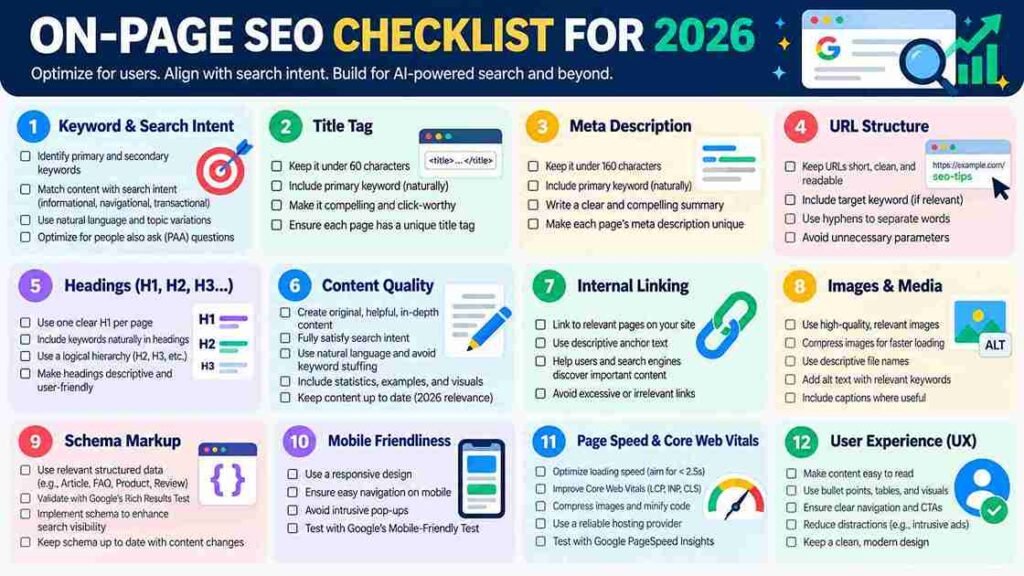
Before publishing or updating a page, work through the following checklist.
Search Intent and Topic
- Identify the primary search intent
- Understand what the searcher actually wants
- Analyze the major questions behind the query
- Identify relevant subtopics
- Study competing search results
- Find information gaps
- Define the page’s unique value
- Avoid covering unrelated topics simply for traffic
Content
- Provide original and useful information
- Answer the primary question early
- Cover important subtopics comprehensively
- Demonstrate relevant experience or expertise
- Use examples
- Explain technical concepts clearly
- Remove unnecessary filler
- Update outdated information
- Fact-check important claims
- Add meaningful first-hand information where available
HTML and SERP Elements
- Write a unique title
- Create a compelling meta description
- Use one clear H1
- Organize H2 and H3 headings logically
- Keep the URL descriptive
- Use descriptive anchor text
- Optimize images
- Add appropriate structured data
Internal and External Links
- Add relevant internal links
- Link to important supporting pages
- Use descriptive anchor text
- Link to trustworthy external resources
- Avoid irrelevant or excessive links
- Check for broken links
Technical and Page Experience
- Ensure the page is indexable
- Check the canonical URL
- Make sure important content is crawlable
- Test mobile usability
- Check Core Web Vitals
- Use HTTPS
- Avoid intrusive interstitials
- Make the main content easy to identify
- Ensure important content is accessible in the rendered page
Now let’s examine each part in detail.
1. Start With Search Intent
The first step in on-page SEO is not writing a title.
It is understanding why someone searched for the query.
Suppose someone searches for:
“how to compress images for WordPress”
They probably want instructions.
A page that spends 1,500 words explaining the history of image compression before giving the first instruction is poorly aligned with the searcher’s goal.
Likewise, someone searching for:
“best SEO plugins for WordPress”
is likely comparing options. A basic definition of SEO plugins will not fully satisfy that search.
Before optimizing a page, determine whether the query is primarily:
- Informational
- Commercial investigation
- Transactional
- Navigational
- Local
- Mixed intent
Then build the page around that intent.
Google’s people-first guidance asks whether users will leave the page feeling that they have learned enough to accomplish their goal. That is a useful standard for evaluating search intent.
A simple search-intent test
Ask:
“If someone searched this exact query, what would they expect to find immediately?”
Your page should deliver that answer without making the visitor hunt for it.
2. Choose One Primary Topic
Every important page should have a clear central subject.
For example, a page targeting:
On-page SEO checklist
should not simultaneously attempt to become a complete guide to:
Some related topics can be discussed, but they should support the primary subject.
A clear topical focus helps readers understand the purpose of the page and helps search engines interpret its content.
This does not mean you should write short articles. A comprehensive page can cover dozens of related concepts while maintaining one central purpose.
3. Research the SERP Before Writing
Search the target query and examine the pages already performing well.
Do not copy them.
Instead, study what the search results reveal about user expectations.
Look for:
- Common subtopics
- Content formats
- Frequently answered questions
- Missing explanations
- Weak examples
- Outdated information
- Unclear instructions
- Poor comparisons
- Topics that deserve greater depth
Then ask:
“What can my page explain better?”
That question is more valuable than asking how many times competitors use a keyword.
Google’s guidance specifically encourages creators to consider whether their content provides substantial value compared with other pages in search results and whether it offers original information, research, analysis, or useful depth.
4. Create a Useful SEO Title
The title is one of the most visible elements of a search result.
Google can generate title links from several sources, including the HTML <title> element and headings on the page. Google recommends titles that are unique, clear, concise, and accurately describe the content.
A good SEO title should:
- Clearly describe the page
- Match search intent
- Include the primary topic naturally
- Give the reader a reason to click
- Avoid misleading claims
- Avoid unnecessary keyword repetition
For example:
Weak:
SEO | SEO Tips | SEO Guide | SEO Checklist | SEO Strategy
Better:
On-Page SEO Checklist for 2026: Complete Guide
Do not become obsessed with an arbitrary character count. Search engines may rewrite title links depending on the query and page context.
The objective is clarity, not mathematical perfection.
5. Write a Strong Meta Description
A meta description is not simply a place to dump keywords.
It should summarize the page and help the searcher understand why the result is relevant.
Google notes that snippets are often generated from the page’s content, although Google may sometimes use the meta description when it provides a useful summary.
A useful meta description should:
- Accurately summarize the page
- Mention the primary topic naturally
- Communicate the benefit
- Encourage a qualified click
- Be unique to the page
Do not write:
SEO checklist SEO checklist 2026 SEO tips SEO guide best SEO checklist.
Instead:
Follow this practical on-page SEO checklist for 2026 covering content, titles, links, images, schema, Core Web Vitals, and indexing.
The second description communicates value.
6. Optimize the H1
The H1 should clearly identify the main subject of the page.
For most articles, the H1 will closely resemble the article title, but it does not need to be identical in every implementation.
A useful H1 should be:
- Descriptive
- Specific
- Easy to understand
- Relevant to the page
- Consistent with the title and search intent
Do not create an H1 such as:
“The Ultimate Secret Weapon!”
when the page is actually about image SEO.
Clarity beats cleverness.
7. Build a Logical Heading Structure
Use headings to organize the content.
A typical article hierarchy is:
H1: Main topic
H2: Major section
H3: Supporting subsection
H3: Another supporting subsection
H2: Another major section
Headings should help readers scan the page.
For example:
H2: How to Optimize a Page Title
H2: How to Optimize Meta Descriptions
H2: Internal Linking Best Practices
This is more useful than headings stuffed with variations of the same keyword.
Do not create a new heading every few sentences simply because you want more keywords indexed.
8. Place the Main Answer Early
Do not make visitors read 1,000 words before receiving the answer to the question they searched.
For informational content, answer the primary question early and then provide deeper context.
For example, if the article explains what canonical URLs are, begin with a clear definition before discussing implementation details.
This approach improves usability and can also make important information easier for search engines to understand.
For definition-based searches, consider giving a concise definition of roughly 40–60 words before expanding into the subject.
9. Use Keywords Naturally
Keywords still matter because they help establish topical relevance, but keyword repetition is not a substitute for useful content.
Use the primary keyword where it makes sense:
- Title
- H1
- Introduction
- Relevant headings
- Body content
- URL when appropriate
- Image alt text when genuinely descriptive
- Internal anchor text where relevant
Then expand the topic naturally with related terminology.
For an article about keyword research, related concepts might include:
- Search intent
- Search volume
- Long-tail keywords
- Keyword difficulty
- SERP analysis
- Search queries
- Topic clusters
- Content gaps
You do not need to repeat “keyword research” in every paragraph.
The goal is topical completeness, not keyword density.
10. Build Topic Depth with Semantic Relevance
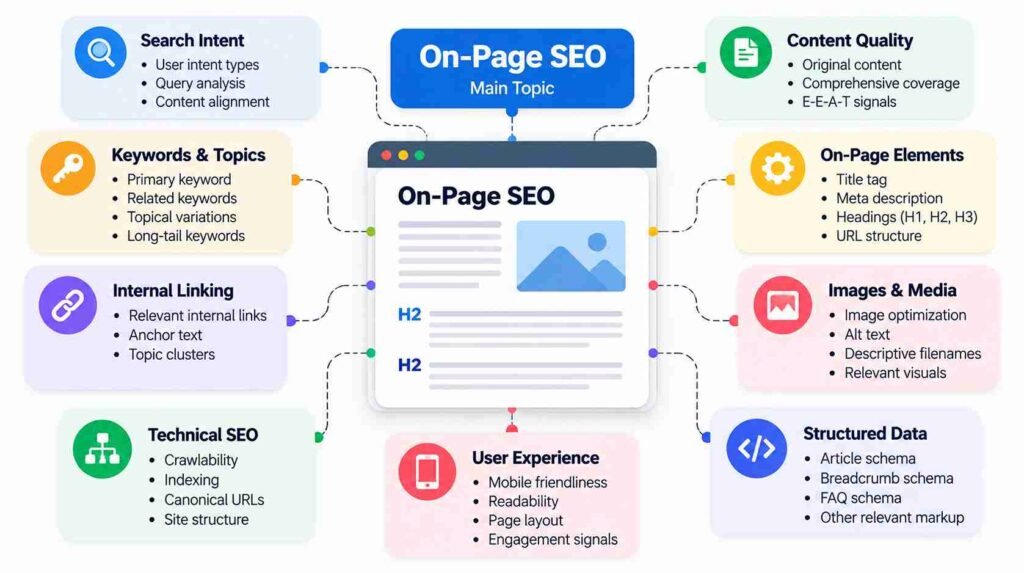
A strong article doesn’t merely mention the target keyword.
It demonstrates that the writer understands the subject.
For example, an article about Core Web Vitals should naturally discuss:
- LCP
- INP
- CLS
- Loading performance
- Interactivity
- Visual stability
- Field data
- Real-user experience
This creates contextual depth.
Think of the page as answering a network of related questions rather than repeating one phrase hundreds of times.
11. Make Content Original and Useful
This is one of the most important elements of on-page SEO in 2026.
Google’s guidance asks whether content provides original information, research, analysis, substantial coverage, and value beyond what is already available elsewhere.
Adding 500 words to an article does not automatically make it better.
Instead, add:
- Original analysis
- Practical examples
- Screenshots where useful
- First-hand observations
- Data
- Expert interpretation
- Case studies
- Clear comparisons
- Decision-making advice
- Troubleshooting information
If the reader could get exactly the same information from ten other websites, the page has little reason to stand out.
12. Demonstrate Experience and Expertise
Google encourages publishers to make it clear who created content and, where appropriate, provide author information and background that helps users understand the creator’s expertise.
For BlogEarns, this can mean using:
- Accurate author names
- Author bios
- Relevant author pages
- Editorial policies
- About information
- Sources
- Review methodology where applicable
- First-hand evidence for product reviews
Never invent credentials.
Never create a fictional expert merely to make an article appear authoritative.
Trust is much harder to build than a fake byline and considerably more valuable.
13. Use Examples to Explain Difficult Concepts
Examples make abstract SEO concepts easier to understand.
Instead of saying:
Use descriptive anchor text.
Show the difference:
Weak anchor text:
Click here
Better anchor text:
Learn how to perform keyword research
Google recommends descriptive, reasonably concise anchor text that helps users and search engines understand the linked page.
The same principle applies throughout your content.
14. Optimize URLs
Keep URLs simple and descriptive.
For example:
Good:
example.com/on-page-seo-checklist
Less useful:
example.com/blog/post?id=847392&cat=12
Google recommends using crawlable URL structures and avoiding unnecessary complexity.
A good URL generally:
- Describes the page
- Uses readable words
- Avoids unnecessary parameters
- Uses hyphens between words
- Avoids keyword stuffing
- Avoids unnecessary dates
Don’t change a successful URL merely because you can make it slightly shorter.
URL changes should have a genuine reason and should be handled carefully with redirects and canonicalization.
15. Add Relevant Internal Links
Internal links are one of the most practical on-page SEO tools available to a publisher.
They help readers discover related content and help search engines discover and understand pages.
Google states that links are important for discovering pages and recommends descriptive anchor text.
For example, an article about on-page SEO could naturally link to related BlogEarns content about:
- Keyword research
- Google Search Console
- Technical SEO
- SEO content writing
- Internal linking
- SEO audits
Do not add links simply because you have a page that needs backlinks.
Ask whether the link genuinely helps the reader.
16. Improve Your Internal Linking Structure
Don’t limit internal linking to adding a few random links inside new articles.
Think about the website as a connected information architecture.
A pillar page can link to detailed supporting articles.
Supporting articles can link back to the pillar.
For example:
SEO Guide
↓
Keyword Research Guide
↓
Long-Tail Keyword Guide
↓
Keyword Mapping Guide
This structure can make the relationship between related topics clearer to both users and search engines.
Always link to the preferred canonical URL when possible. Google specifically recommends consistently linking to canonical URLs rather than duplicate versions.
17. Link to Authoritative External Sources
External links can improve an article when they provide useful evidence or additional information.
Good external sources include:
- Official documentation
- Government websites
- Academic research
- Original studies
- Industry organizations
- Official product documentation
For SEO articles, Google’s own documentation is often the best source for claims about Google Search.
Do not add external links simply to make an article look researched.
One excellent source is better than ten irrelevant ones.
18. Optimize Images
Images are part of on-page SEO too.
Use images that genuinely help the reader.
Google recommends using high-quality images and placing them near relevant text so that users and search engines can understand the image’s context.
For important images:
- Use descriptive filenames
- Compress images
- Choose an appropriate format
- Use descriptive alt text
- Place images near relevant content
- Avoid unnecessary stock imagery
- Avoid huge image files
- Use captions when they provide useful context
Example
Instead of:
IMG_8392.jpg
use something descriptive such as:
on-page-seo-checklist-2026.jpg
Alt text should describe the image when the image conveys meaningful information.
Do not turn alt text into a keyword dumping ground.
19. Optimize Image Performance
Large images can hurt the user experience.
Before uploading an image:
- Resize it to an appropriate display dimension.
- Compress it.
- Choose a suitable image format.
- Avoid uploading a 4,000-pixel image when the page only displays it at 800 pixels.
- Use responsive image techniques where appropriate.
- Lazy-load below-the-fold images when suitable.
The goal is not simply to achieve a perfect speed score.
The goal is to deliver the visual content without unnecessarily slowing the page.
20. Check Core Web Vitals
Page experience remains an important part of modern SEO.
Google recommends looking at the overall page experience rather than obsessing over one isolated metric. Relevant considerations include Core Web Vitals, HTTPS, mobile usability, intrusive interstitials, and whether advertisements interfere with the main content.
The current Core Web Vitals are:
| Metric | Measures | Good target |
|---|---|---|
| LCP | Loading performance | ≤ 2.5 seconds |
| INP | Responsiveness | ≤ 200 ms |
| CLS | Visual stability | ≤ 0.1 |
These thresholds are evaluated at the 75th percentile for user experiences.
Do not misunderstand this.
A perfect PageSpeed score does not guarantee a top ranking.
Google explicitly notes that good Core Web Vitals do not guarantee that a page will rank at the top. Relevance, content quality, and the broader search system still matter.
21. Make the Page Mobile-Friendly
Most modern websites need to work extremely well on smaller screens.
Check:
- Font size
- Line spacing
- Button size
- Navigation
- Tables
- Images
- Embedded videos
- Pop-ups
- Forms
- Horizontal scrolling
A technically responsive page can still provide a poor mobile experience if advertisements, pop-ups, or oversized elements overwhelm the main content.
Open the page on an actual phone and use it like a visitor.
That simple test catches problems automated tools often miss.
22. Use HTTPS
Your pages should be served securely over HTTPS.
Check for:
- Valid SSL certificate
- HTTPS URLs
- No unnecessary HTTP versions
- Correct redirects
- No mixed-content problems
HTTPS is not an excuse to ignore everything else. It is one basic part of delivering a secure, trustworthy website.
23. Check Canonical URLs
Canonicalization becomes important when substantially similar or duplicate content is accessible through multiple URLs.
Google describes canonicalization as the process of selecting the representative URL for a group of duplicate or very similar pages. Google can consider signals such as redirects, sitemap inclusion, HTTPS, and rel="canonical" when determining the canonical version.
Check that:
- The canonical URL is correct
- It points to the preferred version
- Internal links use the preferred URL
- Sitemap URLs are consistent
- HTTP and HTTPS versions are handled correctly
- Duplicate versions don’t create unnecessary confusion
Do not use robots.txt as a canonicalization mechanism. Google specifically advises against this.
24. Check Indexing and Noindex Settings
A beautifully optimized article is useless in Google if you accidentally tell search engines not to index it.
Check:
- Robots meta directives
- X-Robots-Tag
- Robots.txt
- Canonical URL
- HTTP response
- Sitemap inclusion
- Search Console URL Inspection
Google’s noindex directive prevents a page from appearing in Search, but Google must be able to crawl the page to see the directive. Blocking the page in robots.txt can prevent Google from seeing the noindex instruction.
This is an easy technical mistake with surprisingly expensive consequences.
25. Make Important Links Crawlable
Important navigation and contextual links should generally use standard HTML anchor elements with an href.
Google explains that crawlable links help it discover pages and understand their relationships.
Avoid building essential navigation exclusively around JavaScript interactions that make links difficult for crawlers to discover.
For important links, use descriptive anchor text.
Instead of:
Click here
use:
Learn how to use Google Search Console for keyword research
The second tells both the reader and the search engine what lies behind the link.
26. Use Structured Data When It Fits
Structured data helps search engines understand the content and context of a page.
Google says structured data can help it understand page content and potentially make pages eligible for certain search features.
Depending on the page, relevant structured data might include:
- Article
- Breadcrumb
- Organization
- Product
- Event
- Recipe
- Software-related types
- Other supported types
Do not add schema simply because you have seen it recommended in an SEO checklist.
The markup should accurately describe the visible page.
Google recommends validating structured data and ensuring the page is accessible to Google before expecting search features.
27. Add Breadcrumbs Where Appropriate
Breadcrumbs help users understand where they are within your site’s structure.
For example:
Home → SEO → On-Page SEO → On-Page SEO Checklist
Breadcrumbs can also provide useful structured information to Google.
Google supports BreadcrumbList structured data and explains that breadcrumb markup can help categorize pages within search results.
The breadcrumb structure should reflect your actual website architecture.
28. Make the Main Content Easy to Find
A visitor should immediately understand:
- What this page is about
- Where the main answer begins
- What the page contains
- Which sections matter
- What action they can take next
Avoid allowing advertisements, pop-ups, newsletter boxes, or unrelated widgets to dominate the initial viewport.
Google’s page-experience guidance specifically recommends avoiding excessive ads that distract from or interfere with the main content and intrusive interstitials.
Monetization matters, but if visitors have to defeat three pop-ups before reaching your article, the page has already lost the opening round.
29. Keep Content Fresh for the Right Reasons
Updating content can be valuable when information has genuinely changed.
Review:
- Statistics
- Screenshots
- Software features
- Prices
- Links
- Examples
- Regulations
- Product information
- Search behavior
- Outdated recommendations
But don’t change the publication date merely to make an old article appear fresh.
Google explicitly warns against changing dates without substantially changing the content. It also says that adding or removing content simply to make a site appear “fresh” does not improve rankings by itself.
Update content because it needs updating, not because the calendar page turned.
30. Remove Outdated or Unhelpful Sections
Content pruning should also be thoughtful.
Don’t delete pages merely because they aren’t ranking.
First determine:
- Does the page have backlinks?
- Does it receive traffic?
- Does it serve an existing audience?
- Is it indexed?
- Does another page target the same intent?
- Can it be substantially improved?
- Is the information obsolete?
- Should it be consolidated with another page?
Sometimes improving or consolidating a page is better than deleting it.
31. Optimize for Readability
SEO content should be easy to consume.
Use:
- Clear sentences
- Descriptive headings
- Short paragraphs
- Examples
- Tables when appropriate
- Lists where useful
- Bold text sparingly
- Visual breaks
- Clear explanations
But don’t turn every article into a collection of bullet points.
A strong authority article should read like an article.
The reader should feel guided through a subject rather than pushed through a spreadsheet wearing a blog’s clothing.
32. Avoid Keyword Stuffing
Keyword stuffing is one of the easiest ways to make otherwise good content sound unnatural.
Bad:
If you need an on-page SEO checklist, this on-page SEO checklist provides the best on-page SEO checklist for on-page SEO because on-page SEO is important for on-page SEO.
Nobody talks like that.
Instead, explain the subject naturally and use terminology where it makes sense.
If the article genuinely covers the topic comprehensively, relevant language will appear naturally.
33. Optimize for Users, Not an Arbitrary Word Count
A 5,000-word article is not automatically better than a 1,500-word article.
Google explicitly says there is no preferred word count that content creators should target.
For BlogEarns, a 2,500–4,000-word authority article can be appropriate when the topic requires substantial explanation. But every paragraph should earn its place.
If a topic can be explained completely in 1,800 words, don’t add 1,200 words of SEO oatmeal.
34. Add FAQs That Actually Help
FAQ sections can be useful when readers genuinely have additional questions.
Good FAQ questions might include:
- What is on-page SEO?
- What are the most important on-page SEO factors?
- Does keyword density matter?
- How often should SEO content be updated?
- Are Core Web Vitals important for SEO?
- Do meta descriptions affect rankings?
Avoid creating FAQs simply to insert more keyword variations.
The questions should represent genuine user concerns.
Also remember that adding FAQ content does not automatically mean Google will display a special FAQ search result. Structured data eligibility and actual search appearance are separate considerations.
35. Use Search Console After Publishing
On-page SEO does not end when you click Publish.
Google Search Console can help you monitor:
- Queries
- Impressions
- Clicks
- CTR
- Average position
- Indexing
- Page performance
- Core Web Vitals
- Search appearance
After publication, look at which queries are generating impressions.
Sometimes Google will show your article for valuable queries you didn’t explicitly target.
Those queries can reveal opportunities to improve the article.
For example, if an article ranks around position 8–15 for a closely related query, adding a genuinely useful section addressing that query may improve the page.
Do not blindly insert the keyword.
Improve the content that answers the underlying question.
36. Use Performance Data to Improve Existing Pages
One of the biggest on-page SEO opportunities is often sitting inside your existing content library.
Look for pages with:
- High impressions but low CTR
- Rankings between positions 5 and 20
- Declining traffic
- Outdated information
- Strong impressions for unexpected queries
- Multiple pages competing for similar queries
- Poor engagement
- Weak internal linking
Then diagnose the problem.
A ranking decline doesn’t automatically mean the page needs more keywords.
It might need:
- Better search-intent alignment
- Stronger content
- Updated information
- Better internal links
- Better title
- Better examples
- Improved page experience
- Canonical correction
- Technical fixes
- Consolidation with another page
37. Don’t Ignore Search Appearance
Modern search results can contain more than a traditional blue link.
Google Search includes multiple search appearance features, including images, sitelinks, featured snippets, Discover-related surfaces, structured-data-based features, and other result formats.
Your optimization strategy should therefore consider how the page might appear, not merely whether it ranks.
Strong titles, useful descriptions, quality images, structured data where appropriate, and clear page organization can all contribute to a better search presentation.
38. Check Your Page Before Publishing
Use this final pre-publication checklist.
Content
- Does the page satisfy the search intent?
- Is the primary question answered clearly?
- Is the information accurate?
- Is the content genuinely useful?
- Does it add something beyond competing pages?
- Are examples included where useful?
- Are unnecessary paragraphs removed?
- Is outdated information removed or updated?
Keyword Optimization
- Is the primary keyword clearly understood?
- Is it naturally used?
- Are related terms covered?
- Is keyword stuffing avoided?
- Does the article address related questions naturally?
Titles and Headings
- Is the title unique?
- Does it accurately describe the page?
- Is the H1 clear?
- Are H2s and H3s logically organized?
- Are headings useful for readers?
Links
- Are relevant internal links included?
- Is anchor text descriptive?
- Are important pages linked?
- Are external sources trustworthy?
- Are broken links removed?
- Are canonical URLs used consistently?
Images
- Are images relevant?
- Are image files optimized?
- Are filenames descriptive?
- Is alt text useful?
- Are images placed near relevant content?
Technical SEO
- Is the page indexable?
- Is the canonical URL correct?
- Is HTTPS enabled?
- Is the page mobile-friendly?
- Are important links crawlable?
- Is the page included appropriately in the sitemap?
- Are there accidental noindex directives?
- Is robots.txt blocking anything important?
Page Experience
- Is the main content immediately visible?
- Are intrusive pop-ups avoided?
- Are advertisements controlled?
- Are Core Web Vitals healthy?
- Does the page load efficiently?
- Is the layout visually stable?
Trust
- Is the author identifiable where appropriate?
- Are claims supported?
- Are sources credible?
- Is first-hand experience clearly distinguished from general information?
- Are credentials accurate?
- Is the purpose of the page clear?
39. The 10 Most Important On-Page SEO Priorities for 2026
If you don’t have time to work through every item at once, prioritize these ten:
1. Match search intent.
Give users the information they actually came to find.
2. Create genuinely useful content.
Depth without value is still noise.
3. Add original information or analysis.
Give readers a reason to choose your page over another result.
4. Write clear titles and headings.
Help users and search engines understand the page.
5. Build strong internal links.
Connect related content logically.
6. Improve page experience.
Pay attention to mobile usability, Core Web Vitals, intrusive elements, and readability.
7. Make the page technically accessible.
Ensure crawling, indexing, canonicalization, and links work correctly.
8. Optimize images.
Use useful images, descriptive context, appropriate alt text, and efficient files.
9. Establish trust.
Use accurate authorship, evidence, sources, and transparent information.
10. Monitor and improve after publication.
Use Search Console and other data to identify opportunities.
Common On-Page SEO Mistakes to Avoid in 2026
Stuffing keywords into every heading
This produces unnatural content and doesn’t create topical authority.
Writing for word count
A longer article isn’t automatically a better article. Google explicitly says it does not have a preferred word count.
Changing dates without meaningful updates
An updated date should correspond to meaningful editorial changes.
Publishing generic AI summaries
AI can assist with research and drafting, but mass-producing generic pages without adding human oversight, originality, or value is exactly the type of search-engine-first approach Google warns against.
Obsessing over Core Web Vitals scores
Good technical performance matters, but a perfect score cannot compensate for poor content.
Adding irrelevant internal links
Internal linking should help readers, not simply distribute links around your site.
Using fake expertise
Never create fictional authors, credentials, reviews, or first-hand experiences.
Ignoring existing content
Sometimes the easiest SEO win isn’t publishing another article. It is improving a page that already has impressions, rankings, backlinks, or historical authority.
Final Thoughts: On-Page SEO in 2026 Is About Better Pages
The biggest change in modern on-page SEO is that optimization increasingly overlaps with good publishing.
The strongest pages are not built around a checklist alone. They are built around a reader’s problem.
That means understanding the search intent, creating genuinely useful content, presenting information clearly, establishing trust, connecting related pages, making the page technically accessible, and providing a good experience across devices.
Google’s current documentation consistently points in this direction. Its systems are designed to prioritize helpful, reliable, people-first content, while SEO remains useful when it helps search engines discover and understand that content rather than trying to manipulate rankings.
So use the checklist, but don’t worship the checklist.
The objective isn’t to make every box green.
The objective is to publish a page that deserves to be found.
Frequently Asked Questions
| What is the most important on-page SEO factor in 2026? |
|---|
| There is no single on-page factor that guarantees rankings. Search intent, content quality, relevance, originality, usability, internal linking, technical accessibility, and overall page experience all matter. The most important starting point is satisfying the user’s actual search intent with useful content. |
| Does keyword density still matter for SEO? |
| There is no recommended keyword density that you need to hit. Use the primary keyword and related terminology naturally while focusing on covering the topic comprehensively. Repeating a keyword excessively can make content difficult to read without making it more useful. |
| How long should an SEO article be in 2026? |
| There is no universal ideal word count. Google explicitly says it does not have a preferred word count. Write enough to satisfy the user’s intent completely, without adding filler simply to reach a target. |
| Are meta descriptions a ranking factor? |
| Meta descriptions primarily help summarize a page for searchers. Google may use them when generating snippets, although it can also generate snippets from page content. A strong meta description can improve how compelling a result appears, but it should not be treated as a guaranteed direct ranking boost. |
| Are Core Web Vitals important for SEO? |
| Core Web Vitals are part of Google’s page-experience considerations. The current metrics are LCP, INP, and CLS. However, achieving good scores does not guarantee top rankings because Google evaluates many other aspects of relevance and quality. |
| How often should I update an SEO article? |
| Update an article when the information has materially changed, important links have become outdated, new evidence is available, or the page no longer fully satisfies user needs. Avoid changing publication dates simply to make content appear fresh. |
| Should every page have structured data? |
| No. Structured data should be used when it accurately represents the page and when the markup is supported and useful for the content type. Adding irrelevant or inaccurate schema does not make a page better optimized. Google recommends following its structured-data guidelines and validating implementations. |
| How can I check whether my on-page SEO is working? |
| Use Google Search Console to monitor impressions, clicks, queries, CTR, average position, indexing, and other search performance information. Combine that data with content audits and page-experience checks to identify what should be improved. |