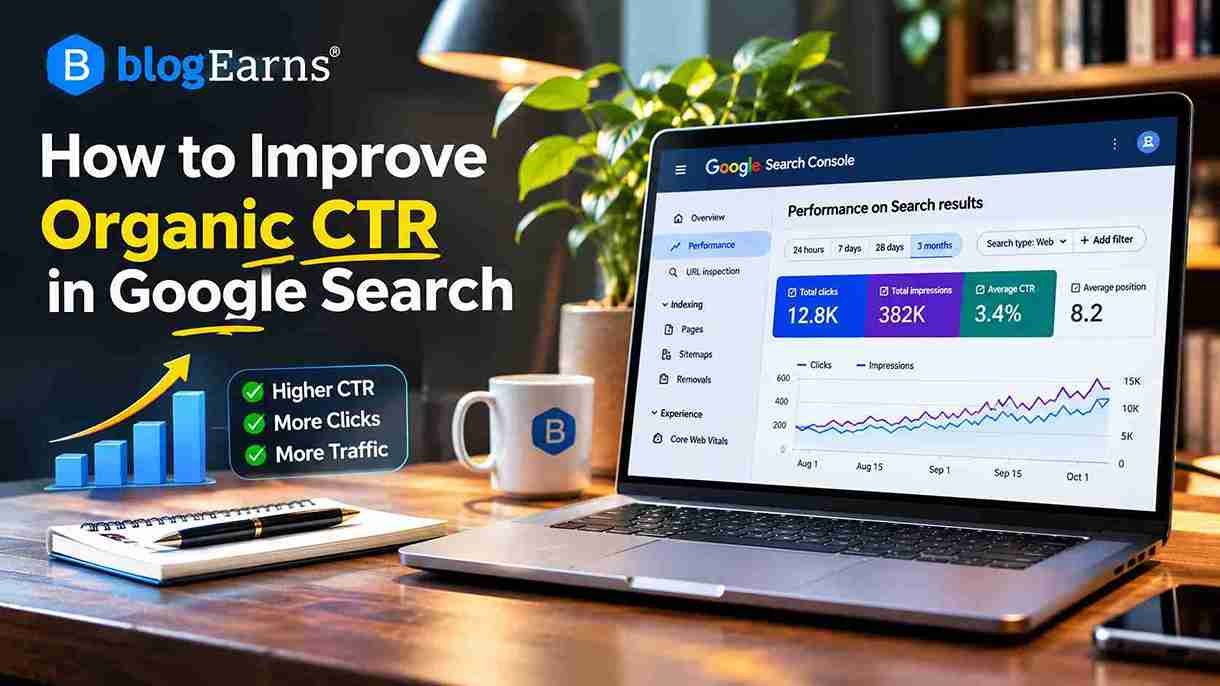
How to Improve Organic CTR in Google Search: 15 Proven Strategies
Your website is appearing in Google search results. Your articles are getting impressions, some of your pages are ranking on the first or second page, and Google is gradually discovering your content. Yet, despite all this visibility, your organic traffic remains disappointing.
What is going wrong?
In many cases, the problem isn’t that your website lacks visibility. It’s that people aren’t clicking your search results.
This is where organic click-through rate (CTR) becomes important.
Imagine that one of your blog posts receives 10,000 impressions in Google Search but attracts only 150 clicks. Your page is being displayed to thousands of potential visitors, but only a small percentage choose to visit it. Improving the relevance and presentation of that search result could help you generate more traffic from the visibility you already have.
Learning how to improve organic CTR is therefore an important part of a sustainable SEO strategy. It involves understanding what people are searching for, creating relevant search titles, writing useful descriptions, analyzing competing results, and identifying opportunities through Google Search Console.
In this guide, you’ll learn how organic CTR works, how to identify pages with low click-through rates, and 15 practical strategies to turn more Google Search impressions into relevant website visits.
What Is Organic CTR in SEO?
Organic CTR, or organic click-through rate, is the percentage of impressions that result in clicks on an unpaid search result.
In simple terms, it tells you how frequently people click your website after seeing it in Google’s organic search results.
For example, suppose your article appears 5,000 times in Google Search during a particular month. If 200 people click it, your organic CTR is 4%.
The formula is:
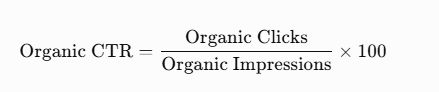
Example:
| Metric | Value |
|---|---|
| Total impressions | 5,000 |
| Total clicks | 200 |
| Organic CTR | 4% |
This means that 4 out of every 100 impressions resulted in a click.
Organic CTR is different from paid search CTR. Organic CTR measures clicks on unpaid search listings, whereas paid search CTR measures clicks on advertisements.
Understanding clicks, impressions, CTR and average position
Google Search Console provides four important performance metrics that help you understand how your pages perform in search results.
| Metric | What it means |
|---|---|
| Clicks | Number of clicks from Google Search to your website |
| Impressions | Number of times your search result was displayed |
| CTR | Percentage of impressions that generated clicks |
| Average position | Average position of your highest-ranking result for the relevant reporting data |
These metrics should be analyzed together.
For example, a page might receive more clicks because its average position improved, even if its CTR remained unchanged. Similarly, impressions can increase after a page starts ranking for additional queries, but its overall CTR might decrease.
This is why looking at CTR alone can lead to incorrect conclusions.
Two practical organic CTR calculations
Example 1: A blogging tutorial
- Impressions: 8,000
- Clicks: 320
CTR = (320 ÷ 8,000) × 100 = 4%
Example 2: An SEO guide after optimization
- Previous impressions: 10,000
- Previous clicks: 250
- Previous CTR: 2.5%
- New impressions: 10,000
- New clicks: 400
- New CTR: 4%
The page has gained 150 additional clicks without any increase in impressions.
This illustrates why improving search-result presentation can be valuable even when rankings remain relatively stable.
Note: These are illustrative calculations, not actual website performance results.
Why Is Organic CTR Important for SEO?
Organic CTR helps you understand how effectively your website converts search visibility into actual visitors.
A page can rank reasonably well and still underperform if its title doesn’t communicate the right value or its search snippet fails to address the user’s needs.
Here are five reasons why monitoring organic CTR is useful.
1. Generate more traffic from existing impressions
You don’t always need to publish another article to increase organic traffic. Sometimes, improving an existing page’s search-result presentation can generate additional visits.
2. Identify underperforming pages
A page receiving thousands of impressions but relatively few clicks deserves investigation. Its title, search intent, snippet, ranking position, or competition might explain the problem.
3. Understand what users want
Search queries reveal the language people use and the information they expect. CTR analysis can help you discover whether your search-result messaging matches those expectations.
4. Improve your content strategy
When a page receives impressions for unexpected queries, you can investigate whether its content needs additional explanations, sections, or a clearer focus.
5. Prioritize existing content improvements
Instead of treating every page equally, you can identify pages with meaningful search visibility and business potential, then prioritize those that offer the best optimization opportunities.
Does organic CTR directly affect Google rankings?
This distinction is important.
Organic CTR is a performance metric, not a guaranteed ranking lever. A higher CTR in Search Console does not establish that Google will improve a page’s ranking.
Search position, query relevance, search-result layout, device, location, and brand recognition can all influence clicks. These factors also make it difficult to determine whether a CTR increase caused a ranking improvement or simply happened alongside one.
Therefore, optimize CTR primarily to improve the usefulness and appeal of your search listings, not to manipulate Google’s ranking systems.
What Is a Good Organic CTR in Google Search?
There is no universal organic CTR percentage that every website should target.
A CTR of 3% might be perfectly reasonable for one page, while another page with similar impressions might have a substantial opportunity to improve.
The difference often comes down to the search position and the circumstances in which the result appears.
Consider these factors before judging your CTR.
1. Search position
A result appearing near the top of the search page generally has a different opportunity to attract clicks than one appearing much further down.
However, average position in Search Console is not a simple measurement of one fixed ranking. It represents the average position of your topmost result across the relevant impressions.
2. Search intent
A person searching for “what is SEO” expects an educational explanation.
Someone searching for “best SEO tools for bloggers” is probably comparing products.
A result that doesn’t match the user’s purpose may receive fewer clicks, even if it appears prominently.
3. Branded versus non-branded searches
People searching for your website or brand already know what they’re looking for.
Non-branded searches introduce your website to people who may have never encountered your brand.
Consequently, branded and non-branded CTR should be evaluated separately.
4. Device
Mobile and desktop search results can look different.
Screen width, result layout, scrolling behaviour, and the amount of visible title and description text can influence how users interact with listings.
5. Country and language
Search behaviour varies between countries and languages. A title that performs well with one audience might not communicate the same value to another.
6. SERP features
Search results can contain AI Overviews, featured snippets, videos, images, local results, shopping listings, and other elements.
These features can affect the visibility and click opportunities of traditional organic listings.
A better way to benchmark your CTR
Instead of comparing your website with an arbitrary industry-wide percentage, establish your own performance benchmarks.
Use the following approach:
| Comparison | What to evaluate |
|---|---|
| Same page, different periods | CTR changes over time |
| Similar queries | Performance for comparable search intent |
| Similar positions | Whether results perform differently at comparable positions |
| Mobile vs desktop | Device-specific opportunities |
| Branded vs non-branded | Differences in brand-driven clicks |
| Similar pages | Which title and content approaches work better |
Your objective should be to improve performance against a relevant baseline rather than chase an arbitrary CTR target.
How to Find Low-CTR Pages in Google Search Console
Google Search Console is one of the most useful free tools for finding pages that receive search impressions but fail to attract enough clicks.
Its Performance report provides clicks, impressions, average CTR, and average position, along with breakdowns by queries, pages, countries, devices, search appearance, and dates.
Here is how to conduct a practical CTR audit.
Step 1: Open Google Search Console
Visit Google Search Console and select your verified website property.
Make sure you’re analyzing the correct domain or URL-prefix property.
Step 2: Open the Search results performance report
From the left navigation, select:
Performance → Search results
This report provides an overview of how your website performs in Google organic search.
Step 3: Enable all four performance metrics
At the top of the report, enable:
- Total clicks
- Total impressions
- Average CTR
- Average position
You need all four metrics to understand whether a page’s low CTR is actually an optimization opportunity.
Step 4: Select an appropriate date range
Choose a period that provides enough impressions for meaningful analysis.
For an established website, start with the last three months. You can also compare the current period with the previous equivalent period.
For seasonal content, compare similar periods rather than assuming that every month should perform identically.
Step 5: Open the Pages tab
Scroll down to the performance table and select Pages.
You will see individual URLs along with their clicks, impressions, CTR, and average position.
Look for pages that:
- Receive substantial impressions.
- Have relatively low CTR compared with similar pages.
- Have stable or improving average positions.
- Target commercially or strategically valuable queries.
- Have search-result titles that could be more relevant.
Do not automatically classify every page with a low CTR as a problem.
A page ranking at position 25 should not be evaluated using the same expectations as one ranking at position 3.
Step 6: Investigate individual search queries
Click a page URL in the Pages tab to filter the report for that page.
Then open the Queries tab.
This is where the most valuable insights often appear.
You might discover that a single article ranks for several different searches, but its title is optimized for only one of them.
For example:
| Search query | Impressions | Clicks | CTR |
|---|---|---|---|
| how to increase blog traffic | 3,000 | 120 | 4% |
| increase organic website traffic | 2,000 | 30 | 1.5% |
| get more visitors to blog | 1,500 | 18 | 1.2% |
| blog traffic tips | 1,000 | 25 | 2.5% |
These are illustrative figures.
The page may have an opportunity to communicate its broader usefulness more clearly, provided the content genuinely addresses these searches.
Step 7: Compare mobile and desktop performance
Select the Devices tab.
Check whether your page performs differently on mobile and desktop.
If desktop CTR is noticeably higher, inspect the mobile search result and consider whether your title is too long, your most important wording appears too late, or the result is less compelling on smaller screens.
Step 8: Export the data
Use the Export option in Search Console to download the performance report.
You can use Google Sheets or Excel to:
- Sort pages by impressions.
- Identify pages with low CTR.
- Compare reporting periods.
- Calculate CTR changes.
- Group pages by content category.
- Create a prioritized optimization list.
Google also documents additional workflows for finding pages, queries, and significant performance changes.
My recommended CTR audit workflow
- Export the last 90 days of page-level performance data.
- Sort URLs by impressions, highest first.
- Identify pages with weaker-than-expected CTR for their positions.
- Inspect their query-level performance.
- Compare mobile and desktop results.
- Review competing search results and search intent.
- Prioritize pages and record their baseline metrics.
Important: Search Console can omit some anonymized queries from tables, and its average position is an aggregated metric. Don’t expect every impression or search term to appear in an exported query report.
15 Proven Ways to Improve Organic CTR in Google Search
Finding low-CTR pages is only the first step. The next challenge is making your search results more relevant, informative, and appealing.
Here are 15 practical strategies to improve organic CTR.
1. Write Compelling SEO Titles
Your SEO title is one of the most prominent elements of a traditional Google search listing.
It tells users what your page covers and helps them decide whether your result deserves a click.
A generic title may accurately describe a topic but fail to communicate why someone should choose your page.
For example:
Before: SEO Tips
After: 15 Practical SEO Tips to Increase Organic Traffic
The improved version communicates the topic, the scope, and the intended benefit.
When writing SEO titles:
- Include the primary keyword naturally.
- Clearly describe the page’s subject.
- Communicate a meaningful benefit.
- Use specific wording instead of vague promises.
- Keep the most important information near the beginning.
- Avoid unnecessary keyword repetition.
- Make sure the title matches the actual article.
Google can generate title links automatically using several sources, including the HTML title element, visible page title, headings, prominent text, and links pointing to the page. Therefore, your HTML title and on-page H1 should communicate a consistent topic. Google for Developers
2. Match Search Intent
Search intent refers to the reason behind a user’s search.
A person searching for information wants something different from someone comparing products or looking to make a purchase.
Four common types of search intent are:
| Search intent | Example query | Appropriate content |
|---|---|---|
| Informational | What is SEO? | Educational guide |
| Commercial | Best SEO tools | Product comparison |
| Navigational | Ahrefs login | Official website or login page |
| Transactional | Buy SEO software | Product or purchase page |
Suppose someone searches for “best free keyword research tools.”
A title such as “What Is Keyword Research?” is unlikely to be the strongest match.
A better title would be:
12 Best Free Keyword Research Tools for SEO in 2026
The second title directly addresses the comparison intent.
Before changing a title, examine the actual search results for your target query. Understand what Google is showing and what users are likely expecting.
3. Improve Meta Descriptions
A meta description is a short summary of a webpage included in its HTML.
Although Google does not guarantee that it will display your supplied description, a relevant description can help communicate the value of your page when Google chooses to use it.
Google may instead generate a snippet from the page content, depending on the search query.
A good meta description should:
- Explain what the page offers.
- Include the main topic naturally.
- Communicate a clear benefit.
- Use specific details where relevant.
- Encourage the right audience to visit.
- Avoid misleading promises.
For example:
Weak description:
Learn about SEO, SEO tips, SEO techniques, SEO strategies, and SEO methods for your website.
Improved description:
Discover practical SEO strategies to improve rankings, attract organic visitors, and optimize your website with this beginner-friendly guide.
The improved version sounds natural and explains what the reader can expect.
4. Include Relevant Numbers and Specific Details
Numbers can make titles more informative by communicating the scope of an article.
Compare:
- How to Improve Website SEO
- 15 Practical Ways to Improve Website SEO
The second title tells readers that the article contains a defined set of strategies.
Numbers work particularly well for:
- Tutorials.
- Checklists.
- Comparisons.
- Resource collections.
- Step-by-step guides.
However, don’t add numbers simply to make a title look attractive.
If your title promises 15 strategies, the article should actually contain 15 useful strategies.
Similarly, use years only when the content genuinely needs to be current. Updating a year without updating the information creates a misleading search result.
5. Use Power Words Carefully
Certain words help communicate the value of an article.
For example:
| Word | What it communicates |
|---|---|
| Practical | Actionable advice |
| Complete | Comprehensive coverage |
| Proven | Evidence-backed methods, when substantiated |
| Free | No-cost access |
| Essential | Important information |
| Step-by-step | Guided instructions |
| Beginner-friendly | Accessible explanations |
| Advanced | Detailed technical information |
Consider:
Basic: Keyword Research Guide
Improved: Complete Keyword Research Guide for Beginners
The second title gives readers a better idea of the intended audience and depth.
Avoid exaggerated words such as “secret,” “guaranteed,” and “ultimate” when the content cannot support those claims.
6. Target Long-Tail Search Queries
Long-tail keywords are more specific search phrases that often communicate clearer user intent.
For example:
- SEO tools
- Free SEO tools for WordPress bloggers
- Free keyword research tools for new websites
The third query identifies a more specific audience and information need.
Use Google Search Console to find longer search queries already generating impressions for your pages.
If your article receives impressions for a specific query that is not adequately addressed, consider whether the content needs a relevant section or whether a separate article would serve that intent better.
Don’t create unnecessary pages targeting minor variations of the same search.
7. Improve Content Relevance
Sometimes the problem is not the title or meta description. The actual content may not satisfy what users expect.
Imagine an article titled:
How to Increase Website Traffic
But the article mostly discusses social media promotion and barely covers organic search.
Someone searching specifically for organic traffic strategies may prefer another result.
Improve relevance by:
- Reviewing the queries generating impressions.
- Identifying the questions behind those searches.
- Comparing those questions with your existing content.
- Adding genuinely useful missing information.
- Removing outdated or irrelevant sections.
- Making the introduction clearly explain what the article delivers.
Your search-result promise and actual page experience should match.
8. Optimize for Mobile Search Results
A substantial portion of Google searches happen on mobile devices, so your search-result presentation should be evaluated on smaller screens.
Mobile titles may display differently because of screen width and search-result layout.
For better mobile presentation:
- Put the primary topic near the beginning.
- Avoid unnecessary introductory phrases.
- Keep wording concise and descriptive.
- Avoid excessive brand-name repetition.
- Ensure your page works well on mobile.
- Check the actual search result on different screen sizes.
Don’t rely on a rigid character limit to predict how Google will display a title. Search titles can be truncated according to available space and rendering conditions.
9. Improve Brand Recognition
Brand familiarity can influence whether someone chooses your result.
When users recognize a website, they may be more comfortable clicking its pages.
For a growing publication such as BlogEarns, building brand recognition requires consistency across:
- Article quality.
- Author information.
- Website design.
- Editorial standards.
- Social media presence.
- Search-result branding.
- Consistent publishing.
Use a recognizable site name and favicon, and ensure your articles have clear authorship and reliable information.
Don’t insert your brand name into every title if doing so makes the title repetitive or unclear.
10. Use Structured Data Where Appropriate
Structured data is a standardized way of describing webpage information so that search engines can better understand its content.
Depending on the page type and eligibility, valid structured data can make a page eligible for certain enhanced search appearances.
Examples include:
- Product information.
- Breadcrumbs.
- Recipe information.
- Video information.
- Organization information.
- Article information.
However, adding schema does not guarantee a rich result or higher CTR.
Use structured data only when it accurately represents the visible content and follows Google’s guidelines.
For implementation guidance, consult Google’s structured data documentation.
11. Optimize Images and Visual Search Opportunities
Images can provide additional opportunities to attract visitors through Google Images and other visual search experiences.
For image-related content, use:
- Relevant, original images.
- Descriptive filenames.
- Meaningful alt text.
- High-quality image formats.
- Appropriate image dimensions.
- Contextual placement near relevant content.
For example, an article about WordPress speed optimization should ideally include relevant screenshots, performance illustrations, or explanatory diagrams.
Don’t add unrelated images simply to increase the number of visuals on a page.
12. Refresh Outdated Content
Older articles can lose relevance when information, tools, software interfaces, or industry practices change.
Refreshing an existing article can improve its usefulness and align it more closely with current search expectations.
Review:
- Outdated statistics.
- Broken external links.
- Old screenshots.
- Discontinued tools.
- Incorrect instructions.
- Missing explanations.
- Outdated examples.
- Titles that no longer reflect the content.
For example, an article titled “Best Free SEO Tools in 2024” may need a substantial review before it can accurately target readers searching for tools in 2026.
Update the publication date only when you have made meaningful editorial changes. A date change alone does not make content more useful.
13. Improve Internal Linking and Content Architecture
Internal links connect related pages on your website.
They help readers discover relevant information and provide search engines with additional context about your site’s structure.
Suppose you have a comprehensive article about improving organic CTR.
It could naturally link to:
- What Is SEO?
- How to Do Keyword Research.
- On-Page SEO Checklist.
- Google Search Console Tutorial.
- How to Write SEO-Friendly Blog Posts.
Similarly, those articles can link back to the CTR guide where appropriate.
This builds a connected SEO knowledge base.
Internal linking is not a guaranteed direct method of increasing the CTR of an individual search listing. Its primary value is helping users and search engines navigate related content.
14. Analyze Competitor Search Results
Your search competitors can provide valuable information about what users see before clicking.
Search your target keyword and examine the pages appearing around your result.
Pay attention to:
- Title structure.
- Content format.
- Search intent.
- Specific details.
- Freshness signals.
- Brand recognition.
- Search-result features.
- The questions addressed in competing articles.
For example, if competing results offer step-by-step tutorials while your title simply says “SEO Guide,” you may have an opportunity to communicate the practical nature of your content more clearly.
However, don’t copy competitor titles.
Identify what makes their results relevant, then communicate the unique value your page genuinely offers.
15. Conduct Controlled CTR Experiments
CTR optimization should be treated as an ongoing process rather than a one-time activity.
If you change a page’s title, description, introduction, and content structure simultaneously, it becomes difficult to understand which change contributed to the result.
Instead, use a controlled approach.
- Step 1: Record the current clicks, impressions, CTR, and average position.
- Step 2: Identify the specific weakness in the search listing.
- Step 3: Make a focused change, such as improving the SEO title.
- Step 4: Allow Google time to recrawl and process the page.
- Step 5: Compare performance with an appropriate previous period.
- Step 6: Investigate other factors that could explain the difference.
For example, if impressions increased significantly because the page started ranking for additional queries, the overall CTR might decrease even if the original query performance improved.
Avoid treating every short-term change as proof that an experiment succeeded.
How to Write SEO Titles That Attract More Clicks
Your SEO title should accomplish three things:
- Tell Google and users what the page is about.
- Match the search intent behind the target keyword.
- Give users a clear reason to choose your result.
A good title doesn’t need to be sensational. It needs to be relevant, descriptive, and useful.
10 SEO title examples: Before and after
The following examples demonstrate how to make titles more specific and relevant.
| Website category | Before | Improved title |
|---|---|---|
| SEO | SEO Tips | 15 Practical SEO Tips to Grow Organic Traffic |
| Blogging | Start a Blog | How to Start a Blog in 2026: Beginner’s Guide |
| WordPress | WordPress Speed | How to Speed Up WordPress: 12 Practical Fixes |
| Hosting | Web Hosting | Best Web Hosting for Bloggers in 2026 |
| Education | Study Tips | 10 Effective Study Techniques for Better Results |
| Technology | AI Writing Tools | 12 Best AI Writing Tools for Content Creators |
| Affiliate marketing | Affiliate Marketing | Affiliate Marketing for Beginners: Complete Guide |
| Tutorials | Google Analytics | How to Use Google Analytics 4: Step-by-Step Guide |
| Product reviews | Hosting Review | Hostinger Review: Features, Pricing and Performance |
| Social media | YouTube SEO | YouTube SEO: How to Rank Videos and Get More Views |
These improvements are not guaranteed to produce higher CTR. Their purpose is to make the search-result promise clearer.
SEO title optimization best practices
- Place the main topic early. Users should understand what your page covers without reading the entire title.
- Use natural language. Avoid titles that look like keyword combinations created exclusively for search engines.
- Communicate the content format. Words such as guide, checklist, comparison, review, and tutorial help establish expectations.
- Avoid misleading claims. If your article provides beginner-level advice, don’t describe it as an advanced technical masterclass.
- Keep titles consistent with the page. Google may rewrite title links when it considers other page information more suitable. Google for Developers
How to Write Meta Descriptions That Improve CTR
A meta description gives searchers additional information about your webpage.
Think of it as a short explanation of why your article might be useful.
Although Google can generate its own snippets, providing a relevant description gives its systems another useful source of information.
Google recommends writing unique, page-specific descriptions that accurately summarize the content rather than filling them with keywords. Google for Developers
10 meta description examples: Before and after
| Topic | Weak description | Improved description |
|---|---|---|
| SEO | Learn SEO and SEO techniques for SEO. | Learn practical SEO techniques to improve search visibility, optimize content, and attract more organic visitors. |
| Blogging | Blogging tips and blogging guide for bloggers. | Discover how to start, manage, and grow a successful blog with practical advice for beginners. |
| WordPress | Learn about WordPress speed. | Discover effective ways to speed up WordPress, reduce loading times, and improve your website’s performance. |
| Hosting | Hosting services for websites. | Compare reliable web hosting options for bloggers and small businesses, including features and important considerations. |
| Keyword research | Learn keyword research. | Learn how to find relevant keywords, evaluate competition, and identify search opportunities for your website. |
| AI tools | Best AI tools and software. | Explore useful AI tools for writing, research, SEO, and content creation, including options for different budgets. |
| YouTube | YouTube SEO tips. | Learn how to optimize YouTube titles, descriptions, keywords, and videos to improve search visibility. |
| Affiliate marketing | Affiliate marketing information. | Understand how affiliate marketing works, choose suitable programs, and build a strategy for earning commissions. |
| Google Search Console | Search Console guide. | Learn how to use Google Search Console to monitor clicks, impressions, indexing, and your website’s search performance. |
| SEO audit | SEO audit tips. | Follow a practical SEO audit process to identify technical issues, content gaps, and opportunities to improve search performance. |
Meta description optimization tips
- Write a unique description for each important page.
- Include the primary topic naturally.
- Explain the main benefit of reading the article.
- Use relevant details instead of generic promotional language.
- Avoid repetitive keyword phrases.
- Don’t promise information that the article doesn’t contain.
- Review the actual snippets displayed for your important queries.
There is no fixed 160-character Google limit for meta descriptions. Search snippets are truncated according to the available display space. A concise description of around 150–160 characters can be a useful editorial target, not a Google requirement.
How SERP Features Affect Organic CTR
A Google search results page is no longer limited to ten traditional blue links.
Depending on the search query, Google may display several additional elements before or alongside conventional organic listings.
These elements can influence how much attention your result receives.
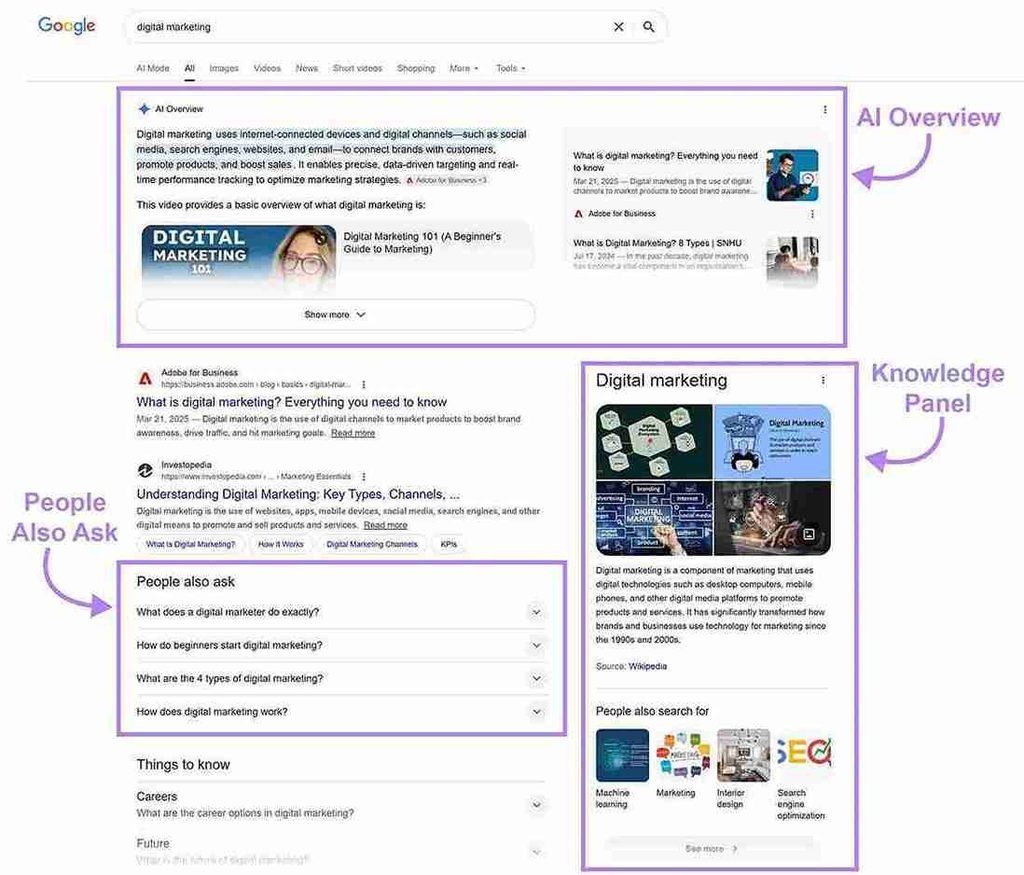
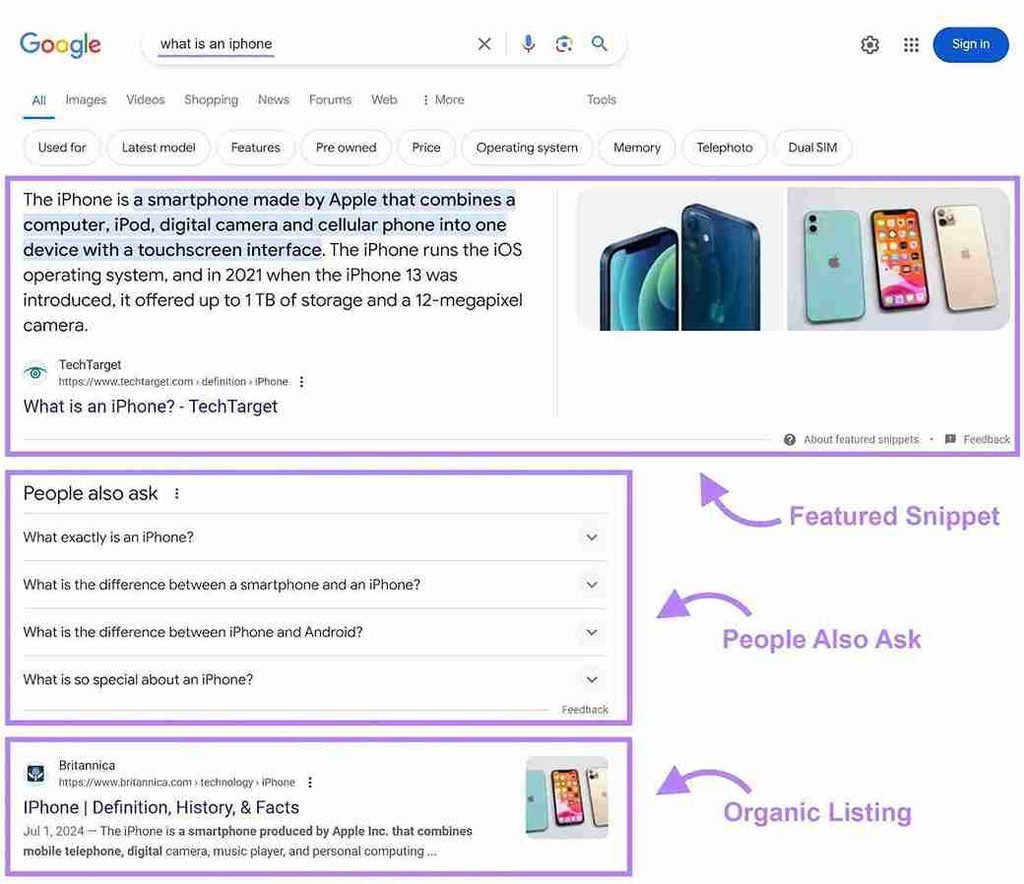
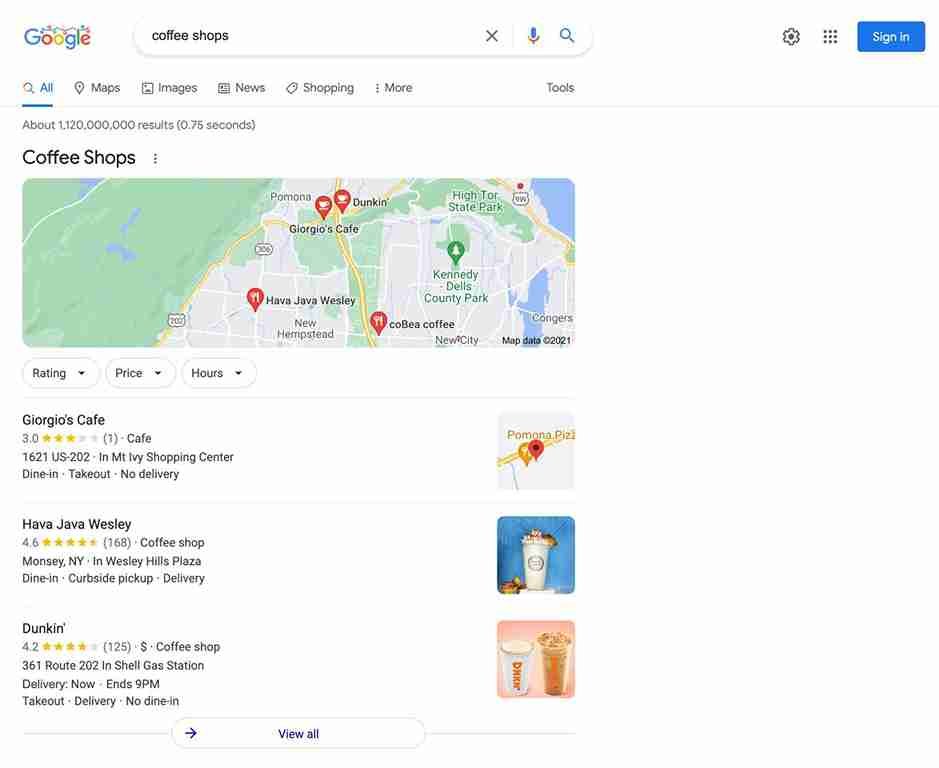
Let’s examine the major SERP features.
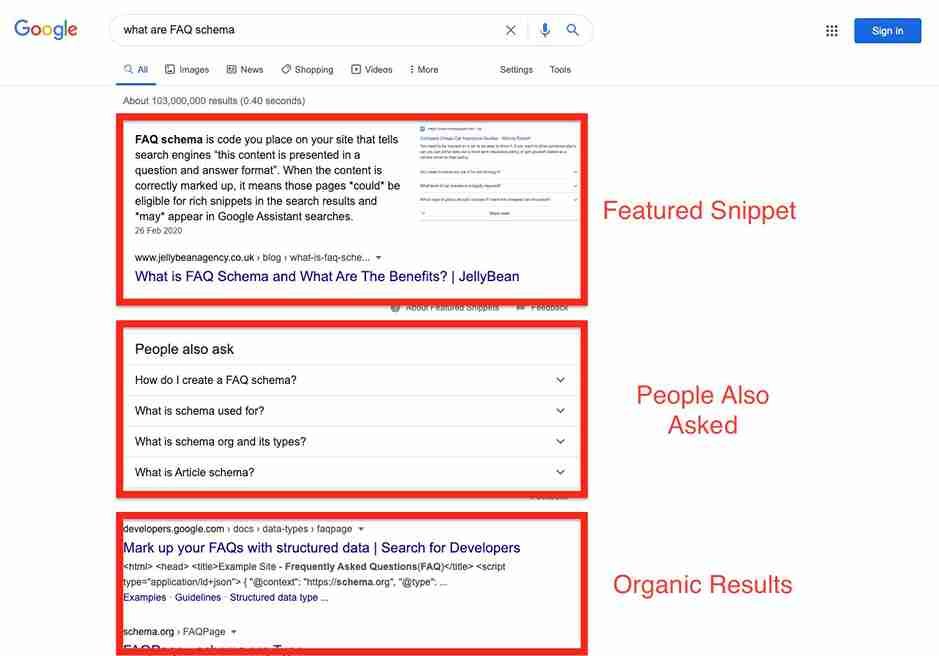
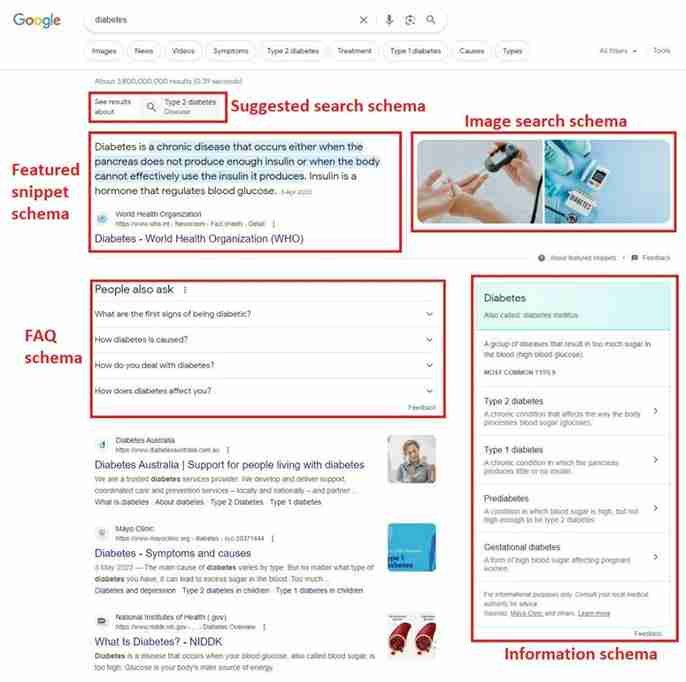
1. Featured snippets
Featured snippets display an extracted answer from a webpage, often above traditional organic results.
They can provide additional visibility and potentially attract clicks from people who want a more detailed explanation.
However, some users may get enough information from the displayed answer without visiting the source.
Focus on answering relevant questions clearly, using descriptive headings, concise explanations, and well-organized content.
There is no guarantee that Google will select your page for a featured snippet.
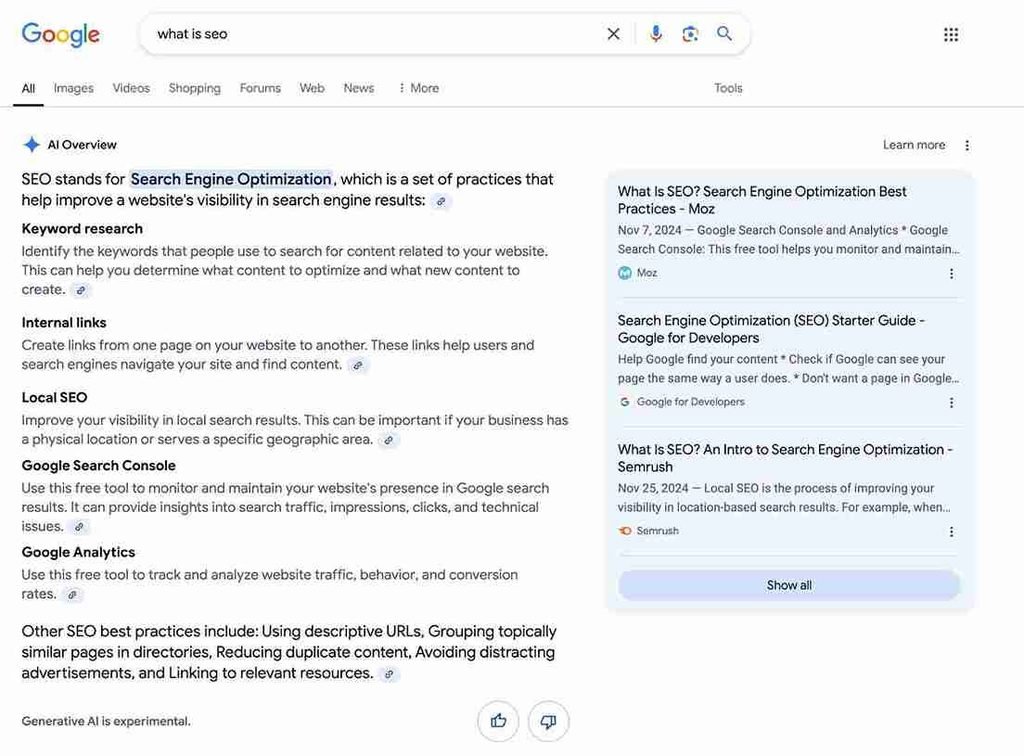
2. AI Overviews
AI Overviews provide AI-generated summaries for certain searches and may include links to supporting webpages.
These summaries can change how users interact with traditional organic results.
For website owners, it is important to create useful content that offers genuine value beyond a short summary.
Focus on:
- Clear and accurate explanations.
- Original information and insights.
- Well-organized content.
- Reliable supporting evidence.
- Useful examples and practical instructions.
- Accessible text and relevant visual resources.
Google’s current guidance says that the same foundational SEO best practices apply to AI features. There is no special AI schema or additional technical optimization required to appear as a supporting link. Google for Developers
3. People Also Ask
People Also Ask displays related questions that users can expand to see answers.
This feature can help websites receive additional exposure when their content addresses relevant questions.
Create useful question-based sections within articles, but don’t add irrelevant FAQs simply to target this feature.
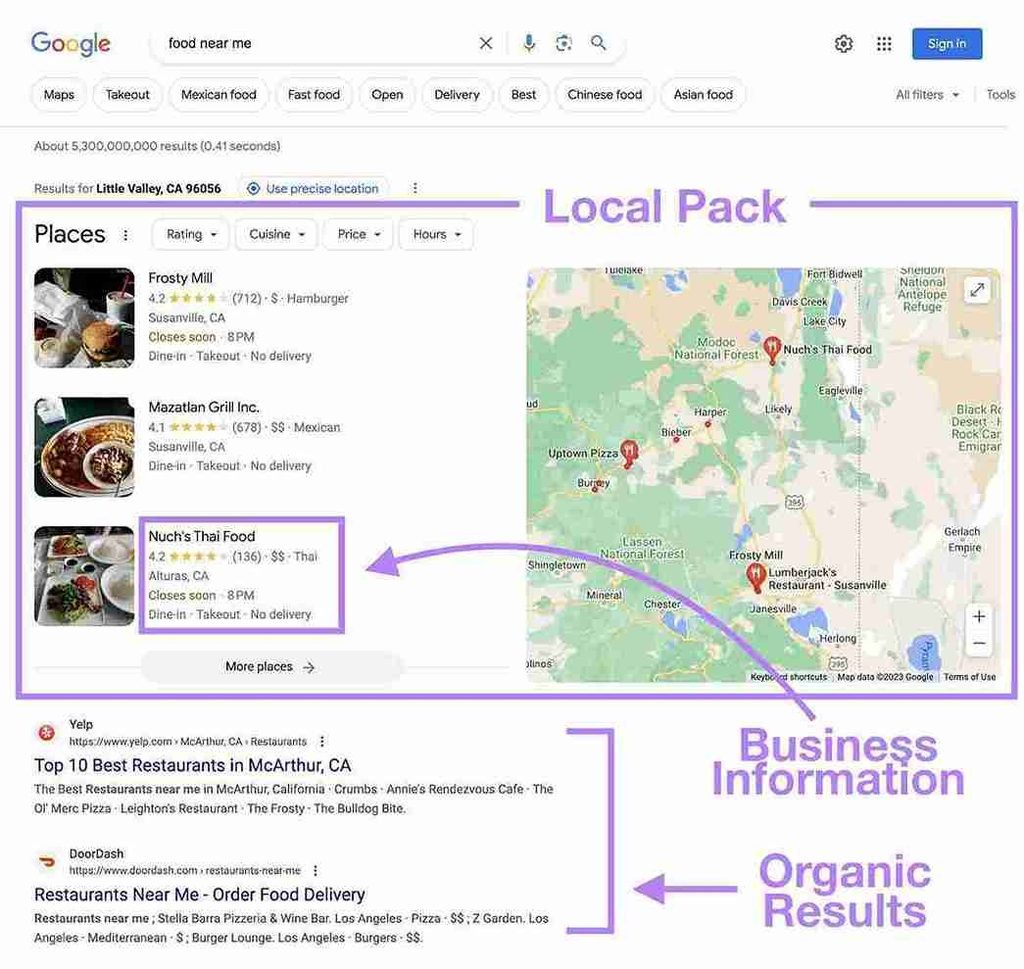
4. Local packs
Local packs display business listings and map information for searches with local intent.
For example, someone searching for “best restaurants near me” may see local business results before traditional organic listings.
Local visibility depends on factors such as relevance, distance, and prominence.
A conventional informational blog cannot directly control whether Google displays a local pack.
5. Image results
Image results can appear prominently for searches involving visual information.
Websites publishing tutorials, product reviews, design inspiration, and educational content may benefit from relevant image optimization.
6. Video results
Video results are particularly useful for tutorials, demonstrations, reviews, and instructional content.
If you publish videos, provide descriptive titles, useful descriptions, relevant thumbnails, and accessible video information.
7. Shopping results
Shopping listings can occupy prominent areas for product-related searches.
For websites publishing product comparisons or reviews, these listings may change how much attention traditional organic results receive.
8. Knowledge panels
Knowledge panels provide information about recognized people, organizations, and entities.
They can occupy significant space on the results page, particularly for branded searches.
Accurate organization information and consistent entity information help establish your website’s identity, although a knowledge panel is not something every website can obtain.
9. Sitelinks
Sitelinks are additional links displayed beneath certain search results.
They help users navigate directly to relevant sections or pages of a website.
A logical website structure, descriptive internal links, and clear page organization help Google understand your site’s structure. However, sitelinks are selected automatically.
The important lesson: Always examine the actual search results for your target keyword before changing your title or description. Your competitors aren’t the only elements competing for users’ attention.
Organic CTR Optimization Examples
The following three scenarios use hypothetical data to demonstrate how an SEO professional might identify and address CTR problems.
They are illustrative examples, not verified client case studies.
Scenario 1: A blog post receives impressions but few clicks
Low CTR opportunity
A blogging website publishes an article about increasing organic traffic.
Its performance looks like this:
| Metric | Initial performance |
|---|---|
| Impressions | 12,000 |
| Clicks | 240 |
| CTR | 2% |
| Average position | 6.5 |
The page receives substantial impressions but attracts relatively few visitors.
Identified problem:
The title is generic and doesn’t communicate the practical value of the article.
Original title:
“How to Increase Website Traffic”
Improved title:
“15 Proven Ways to Increase Organic Website Traffic”
Optimization strategy:
- Rewrite the SEO title.
- Improve the meta description.
- Review queries generating impressions.
- Ensure the article delivers the promised strategies.
- Compare performance after Google processes the changes.
The goal is to improve the relevance and attractiveness of the search result.
Scenario 2: A product review ranks on page one but attracts fewer clicks
A website publishes a review of a web hosting service.
| Metric | Initial performance |
|---|---|
| Impressions | 8,000 |
| Clicks | 160 |
| CTR | 2% |
| Average position | 5 |
Identified problem:
The title simply says:
“Hostinger Review”
Competing results communicate more useful information, such as pricing, performance, features, and limitations.
Optimization strategy:
Use a more descriptive title:
“Hostinger Review: Pricing, Features and Performance”
Then ensure the article contains genuine information about:
- Pricing.
- Hosting features.
- Performance testing methodology, if applicable.
- Advantages and disadvantages.
- Customer support.
- Suitable use cases.
Don’t claim to have personally tested a product unless you actually have.
Scenario 3: A tutorial ranks for unrelated queries
A website publishes an article titled:
“Best SEO Tools for Bloggers.”
It starts receiving impressions for queries related to free SEO tools, keyword research tools, technical SEO tools, and backlink analysis tools.
Identified problem:
The article may be targeting several different user needs without adequately addressing each one.
Optimization strategy:
Review the queries and divide them into meaningful groups.
For example:
- Free SEO tools.
- Keyword research tools.
- Technical SEO tools.
- Backlink analysis tools.
If the existing article can satisfy these needs, improve its organization and explanations.
If separate search intents require substantially different content, consider creating dedicated supporting articles.
Link them naturally to the main comparison guide.
This approach can improve topical relevance while building a stronger internal linking structure.
How to Measure CTR Improvement After Optimization
Publishing an improved title or description is not the end of the process. You need to measure whether the change actually improved search performance.
Google Search Console should be your primary measurement tool.
1. Establish a baseline
Before making changes, record:
- Total clicks.
- Total impressions.
- Average CTR.
- Average position.
- Important search queries.
- Device-level performance.
Keep a record of the date you made each change.
This makes it easier to understand what happened afterward.
2. Monitor performance at different intervals
Use the following monitoring framework:
| Period | What to examine |
|---|---|
| First 7 days | Whether Google has processed the changes and whether early data is available |
| 14 days | Initial changes in impressions, clicks, and CTR |
| 28 days | More meaningful performance comparison, where volume permits |
| 90 days | Longer-term trends, seasonality, and sustained performance |
These are review intervals, not guaranteed waiting periods. Some pages generate enough impressions for earlier analysis, while low-volume pages may require considerably longer.
Google may take several days to a few weeks to recrawl and reprocess title-related changes. Google for Developers
3. Compare clicks and CTR together
Consider this hypothetical example:
| Metric | Before | After |
|---|---|---|
| Impressions | 10,000 | 10,000 |
| Clicks | 200 | 350 |
| CTR | 2% | 3.5% |
| Average position | 5.5 | 5.4 |
In this example:
- CTR increased by 1.5 percentage points.
- Clicks increased by 150.
- Impressions remained unchanged.
- Average position remained relatively stable.
This is consistent with an improvement in search-result performance, although other factors may still have contributed.
How to calculate CTR improvement
Use:
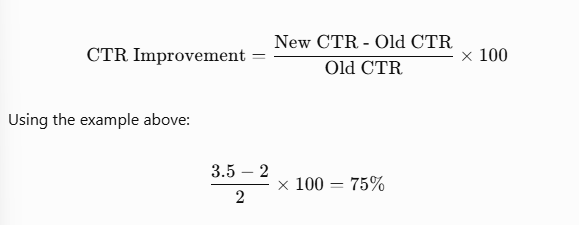
The relative CTR improvement is 75%.
Remember that this is different from the 1.5 percentage-point increase in CTR.
4. Watch for changes in average position
Suppose your CTR improves from 2% to 4%, but your average position also moves from 12 to 5.
The improvement may be largely related to better ranking visibility rather than the title change alone.
This is why you should compare pages and queries with similar positions whenever possible.
5. Evaluate individual queries
A page-level CTR can hide important differences.
One query might have a 7% CTR, while another has a 0.8% CTR.
Look at individual queries to understand which search terms are performing well and which need attention.
6. Check device and country performance
If your website receives traffic from multiple countries, compare performance by location.
Similarly, investigate whether mobile users interact differently with your search results than desktop users.
These comparisons help you avoid making broad changes based on a problem that affects only a specific audience.
Common Organic CTR Optimization Mistakes
CTR optimization can become counterproductive when website owners focus on clicks without considering relevance.
Avoid these common mistakes.
| Mistake | Why it is a problem | Better approach |
|---|---|---|
| Clickbait titles | Attract the wrong expectations | Write accurate, compelling titles |
| Keyword stuffing | Makes titles unnatural | Use keywords naturally |
| Changing titles too frequently | Makes evaluation difficult | Allow enough time to assess changes |
| Ignoring search intent | Creates a mismatch with users’ needs | Analyze actual search queries |
| Duplicate descriptions | Provides little page-specific information | Write unique descriptions |
| Comparing unrelated queries | Produces misleading conclusions | Compare similar search intents |
| Ignoring mobile results | Misses device-specific issues | Review mobile performance |
| Changing multiple elements together | Makes attribution difficult | Test focused changes |
| Using unsupported statistics | Damages credibility | Cite reliable research |
| Assuming schema guarantees rich results | Creates unrealistic expectations | Follow eligibility guidelines |
| Treating CTR as a guaranteed ranking factor | Confuses correlation with causation | Focus on useful search-result presentation |
| Making decisions from insufficient data | Can lead to false conclusions | Use appropriate reporting periods |
One particularly damaging mistake is writing a title that promises more than the article delivers.
For example, if your title says “25 Free SEO Tools That Actually Work,” but the article contains only a few outdated tools, visitors may quickly lose trust.
Your title, snippet, and actual content must work together.
Organic CTR Optimization Checklist
Use this checklist when auditing your website.
Frequently Asked Questions About Organic CTR
| 1. What is a good organic CTR in Google Search? |
|---|
| There is no universal benchmark for a good organic CTR. It varies according to search position, search intent, competition, device, country, and SERP features. Compare similar queries and pages rather than relying on a single percentage. |
| 2. How do I calculate organic CTR? |
| Divide the number of organic clicks by the number of organic impressions and multiply the result by 100. For example, 300 clicks from 10,000 impressions produce a 3% organic CTR. |
| 3. How can I increase organic CTR without improving rankings? |
| Improve your SEO titles, meta descriptions, search-intent alignment, and content relevance. You can potentially attract more clicks from existing impressions without necessarily changing your average search position. |
| 4. Does organic CTR affect Google rankings? |
| You should not assume that increasing Search Console CTR directly improves rankings. CTR is a performance metric, and an observed correlation between CTR and rankings does not establish causation. |
| 5. Why is my website getting impressions but no clicks? |
| Possible reasons include low search positions, irrelevant titles, weak descriptions, mismatched search intent, strong competitors, unfamiliar branding, and SERP features that reduce attention on traditional organic results. |
| 6. How do I find low-CTR pages in Google Search Console? |
| Open Performance → Search results, enable clicks, impressions, CTR, and average position, and select the Pages tab. Investigate pages with substantial impressions and weaker-than-expected CTR for their positions. Then examine their individual queries. |
| 7. Do meta descriptions directly affect Google rankings? |
| Google does not use meta descriptions as a direct ranking factor. However, useful descriptions may help communicate a page’s value when Google uses them as search snippets. |
| 8. How often should I change SEO titles? |
| Change titles when you identify a genuine relevance or clarity problem. Avoid repeatedly modifying titles without allowing sufficient time to measure the results. |
| 9. Can structured data improve organic CTR? |
| Eligible structured data can help Google understand your content and may make pages eligible for enhanced search appearances. However, adding structured data does not guarantee rich results or increased CTR. |
| 10. How long does it take to see CTR improvements? |
| It depends on crawling, reprocessing, impression volume, and search behavior. You may notice changes within a few weeks, but reliable conclusions often require a longer observation period. |
| 11. Why is my CTR different on mobile and desktop? |
| Mobile and desktop search results can have different layouts, screen space, and presentation. User behavior and the types of queries searched on each device can also differ. |
| 12. Can AI Overviews reduce organic clicks? |
| AI Overviews can change how users interact with search results by presenting information directly on the results page. Their impact varies by query and search-result layout. Monitor your actual Search Console performance rather than assuming every affected query will lose clicks. |
Conclusion: Turn Existing Search Visibility Into More Organic Traffic
Getting impressions in Google Search is only part of the SEO journey. Your website also needs to convince users that your result is relevant to what they are looking for.
If your pages receive impressions but generate fewer clicks than expected, start by investigating the search queries, ranking positions, and search-result presentation.
Focus on three areas first:
- Improve SEO titles: Make titles descriptive, relevant, and closely aligned with search intent.
- Write useful meta descriptions: Communicate what users will find on your page without making misleading promises.
- Analyze Google Search Console: Identify high-impression pages, investigate their queries, and monitor changes after optimization.
You don’t need to rewrite every article on your website. Start with a handful of pages that already receive meaningful search visibility and have genuine room for improvement.
Organic CTR optimization is an ongoing process. Analyze, improve, measure, and repeat.
Ultimately, the goal isn’t simply to get more clicks. It’s to attract the right visitors by making your search results more useful and relevant.