Choosing a blogging platform is one of the most important decisions you’ll make before publishing your first article. It influences your website’s design and performance. Moreover, it affects your ability to rank on search engines, monetize content, and grow your online presence, Blogger vs WordPress.
Blogging has evolved far beyond being an online diary.
Today, however, blogging is a cornerstone of the global content marketing industry worth hundreds of billions of dollars annually.
Businesses, creators, educators, and entrepreneurs use blogs to attract customers, generate leads, establish authority, and build sustainable income streams.
Millions of new blog posts are published every month, making competition stronger than ever.
In such a competitive environment, your platform choice can influence how you create content and optimize for search engines.
For example, a Blogger vs WordPress comparison helps clarify this decision.
Among the many blogging platforms available, Blogger and WordPress have remained two of the most popular choices for beginners. Blogger, owned by Google, is known for its simplicity, free hosting, and minimal maintenance requirements. WordPress, on the other hand, powers more than 40% of all websites worldwide and is widely recognized for its flexibility, extensive customization options, and advanced SEO capabilities.
At first glance, both platforms allow you to create and publish blog posts. However, when you look beyond the basics, the differences become much more significant. Questions such as Which platform is easier to use? Which one is better for SEO? Can you earn more money with WordPress? Is Blogger still relevant in 2026? are common among aspiring bloggers, and the answers depend on your goals, budget, and long-term vision.
This guide provides a detailed, unbiased comparison of Blogger and WordPress. Rather than declaring a universal winner, it examines how each platform performs in key areas such as ease of use, customization, performance, security, search engine optimization, monetization, pricing, and scalability. By the end of this comparison, you’ll have a clear understanding of which platform aligns best with your blogging goals, whether you’re starting a personal blog, building a niche authority website, or creating a full-fledged online business.
Blogger vs WordPress at a Glance
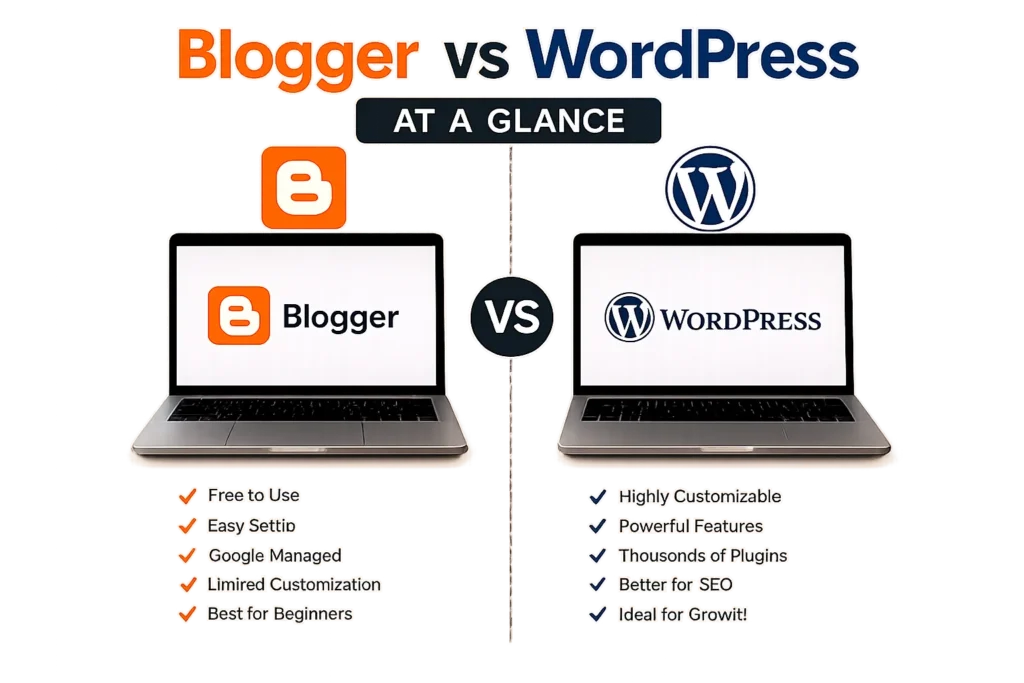
Before comparing features, pricing, and SEO capabilities, it’s helpful to understand what Blogger and WordPress actually are. Although both platforms allow you to publish blog posts and manage a website, they were built with different goals in mind. Blogger focuses on simplicity and ease of use, while WordPress emphasizes flexibility, ownership, and scalability.
What Is Blogger?
Blogger is a free blogging platform developed and maintained by Google. Launched in 1999 and acquired by Google in 2003, it enables anyone to create and publish a blog without purchasing web hosting or installing software.
One of Blogger’s biggest advantages is its simplicity. After signing in with a Google account, users can create a blog within minutes. Google handles the hosting, security, software updates, and server maintenance, allowing bloggers to focus solely on writing and publishing content.
Blogger also supports useful features such as:
- Free hosting on Google’s infrastructure
- Free blogspot.com subdomain
- Custom domain support
- Built-in Google AdSense integration
- Basic SEO settings
- Automatic SSL certificates
- Responsive themes
Despite these conveniences, Blogger offers limited customization compared to modern content management systems. The number of available templates, extensions, and advanced features is relatively small, making it better suited for personal blogs, hobby projects, and users who prefer a maintenance-free experience.
What Is WordPress?
WordPress is the world’s most widely used Content Management System (CMS). There are two versions:
- WordPress.org (Self-hosted): Open-source software that you install on your own web hosting. It offers complete ownership and unlimited customization.
- WordPress.com: A hosted service based on WordPress with various free and paid plans, but with certain restrictions depending on the subscription.
In this comparison, WordPress refers to WordPress.org, as it is the preferred choice for professional bloggers and businesses.
Unlike Blogger, WordPress requires users to purchase hosting and a domain name (unless using free alternatives). In return, it provides unmatched flexibility and control over every aspect of a website.
Key advantages of WordPress include:
- Thousands of free and premium themes
- Extensive plugin ecosystem
- Advanced SEO capabilities
- Support for eCommerce stores
- Membership and learning management systems
- Portfolio and business websites
- Complete control over website files and database
- Ability to scale from a simple blog to a large enterprise website
Because of its versatility, WordPress powers over 40% of websites on the internet, making it the leading choice for bloggers, businesses, news portals, and online stores worldwide.
Blogger vs WordPress: Quick Comparison
| Feature | Blogger | WordPress.org |
|---|---|---|
| Initial Cost | Free | Hosting and domain required |
| Ease of Setup | Very easy | Easy with one-click installation |
| Hosting | Included | Self-managed through hosting provider |
| Ownership | Google controls the platform | Complete ownership and control |
| Customization | Limited | Nearly unlimited |
| Themes | Limited selection | Thousands of themes available |
| Plugins | Not supported | Over 60,000 plugins available |
| SEO Features | Basic | Advanced with dedicated SEO plugins |
| Security | Managed by Google | User-managed with security tools |
| Monetization | Basic options | Extensive monetization possibilities |
| Scalability | Limited | Suitable for blogs of any size |
| Best For | Beginners, hobby bloggers | Professional bloggers, businesses, and long-term growth |
Which Platform Is Built for You?
At a glance, the distinction is straightforward:
- Blogger is designed for users who want a simple, free, and low-maintenance blogging platform without worrying about hosting or technical management.
- WordPress is designed for users who value flexibility, complete ownership, powerful SEO tools, and the ability to grow their website into a full-fledged business or authority brand.
This high-level overview makes it clear that while both platforms serve the same basic purpose, they cater to different audiences and long-term goals. The real differences become more apparent when we compare them across specific areas such as ease of use, customization, SEO, performance, security, and monetization.
Blogger vs WordPress: Key Differences
At first glance, Blogger and WordPress appear to serve the same purpose. Both let you publish articles, organize content, and reach readers online. However, once you start building your website, the differences become increasingly apparent. From ownership and control to setup and long-term growth, each platform follows a completely different philosophy.
Let’s examine the key differences that matter most to new bloggers.
Ownership and Control
Ownership is one of the biggest factors to consider when starting a blog because it determines how much control you have over your content and website.
With Blogger, your blog is hosted on Google’s infrastructure. While you own the content you publish, Google owns and manages the platform itself. This means Blogger operates according to Google’s terms and policies. Although it is uncommon, Google can suspend services, discontinue features, or even retire products if it chooses. You also have limited access to the platform’s underlying code and server environment.
WordPress.org takes a different approach. Since it is self-hosted, you own your website files, database, domain, and hosting account. No company controls how you design, customize, or monetize your site, provided you comply with your hosting provider’s terms of service. This level of ownership gives you complete freedom to expand your website without platform-imposed limitations.
If building a long-term digital asset is your goal, WordPress offers significantly greater control.
Ease of Use
One reason Blogger remains popular among beginners is its simplicity.
Creating a Blogger site requires only a Google account. After choosing a blog name and template, you can begin publishing posts within minutes. The dashboard is clean, straightforward, and includes only essential settings, making it ideal for users with little or no technical experience.
WordPress has become much easier over the years, especially with one-click installations offered by most hosting providers. However, the platform still includes many more settings, menus, and customization options. While these features make WordPress more powerful, they also introduce a slightly steeper learning curve.
For someone publishing a personal journal or occasional articles, Blogger feels less intimidating. For users planning to build a professional website, investing time in learning WordPress pays off with far greater flexibility.
Setup Process
Getting started with either platform is relatively simple, but the steps involved are quite different.
Setting Up Blogger
The Blogger setup process includes:
- Sign in with your Google account.
- Create a new blog.
- Choose a blog title.
- Select a Blogspot address or connect a custom domain.
- Pick a theme.
- Publish your first post.
The entire process usually takes less than 15 minutes.
Setting Up WordPress
Launching a WordPress website involves a few additional steps:
- Register a domain name.
- Purchase web hosting.
- Install WordPress using your hosting provider’s installer.
- Configure basic settings.
- Install a theme.
- Add essential plugins.
- Create important pages.
- Publish your first article.
Although there are more steps, most modern hosting companies have simplified the process so that beginners can complete it in under an hour.
Learning Curve
Your blogging experience doesn’t end after setup. As your website grows, you’ll continue learning new skills, and each platform offers a different journey.
Blogger has a very gentle learning curve. Because there are fewer settings and customization options, users can master the platform quickly. This simplicity is ideal for hobby bloggers or anyone who wants to focus exclusively on writing.
WordPress offers a broader learning experience. New users gradually become familiar with themes, plugins, SEO tools, website optimization, security, backups, and performance enhancements. While this requires more effort initially, it also equips bloggers with valuable skills that can be applied to business websites, online stores, portfolios, and other digital projects.
Instead of limiting your growth, WordPress grows alongside your knowledge and ambitions.
Key Differences at a Glance
| Aspect | Blogger | WordPress.org |
|---|---|---|
| Ownership | Platform managed by Google | Complete ownership of website and data |
| Control | Limited customization and platform control | Full control over design, features, and hosting |
| Ease of Use | Extremely beginner-friendly | Beginner-friendly with more advanced options |
| Setup Time | Around 10 to 15 minutes | Around 30 to 60 minutes |
| Technical Knowledge | Almost none required | Basic knowledge is helpful but easy to learn |
| Long-Term Flexibility | Limited | Virtually unlimited |
The differences between Blogger and WordPress become even more noticeable when you begin customizing your website. A blog’s appearance, user experience, and branding can significantly influence visitor engagement and credibility. In the next section, we’ll explore how both platforms compare in terms of themes, customization options, page builders, and overall design flexibility.
Design and Customization
The design of your blog is often the first thing visitors notice. A clean, professional, and responsive website builds trust, encourages users to stay longer, and improves engagement. While content remains the foundation of a successful blog, an attractive design can significantly enhance the overall user experience.
This is where the gap between Blogger and WordPress becomes much more noticeable.
Themes and Templates
Every blog requires a theme or template that determines its appearance, layout, typography, colors, and overall structure.
Blogger Themes
Blogger includes a handful of free responsive themes that are easy to customize through its built-in theme editor. Users can modify colors, fonts, backgrounds, and basic layouts without writing code.
Although third-party Blogger templates are available, the ecosystem is relatively small. Many templates share similar designs, and high-quality premium options are limited. Since Blogger has a smaller developer community, new template releases and updates are less frequent.
If you’re looking for a simple personal blog, Blogger’s themes are generally sufficient. However, they may feel restrictive as your website grows.
WordPress Themes
WordPress offers one of the largest theme ecosystems on the internet.
Users can choose from:
- Thousands of free themes available in the official WordPress repository.
- Premium themes with advanced features and professional support.
- Industry-specific themes for blogs, news websites, portfolios, online stores, educational platforms, and business websites.
- Lightweight themes designed for speed and SEO.
Popular WordPress themes include:
These themes are regularly updated, mobile-friendly, SEO optimized, and compatible with modern page builders.
Whether you’re creating a minimalist personal blog or a feature-rich magazine website, WordPress provides a theme to match your vision.
Customization Options
Changing colors and fonts is only the beginning. As your blog evolves, you’ll likely want to customize layouts, add new sections, improve navigation, and strengthen your brand identity.
Blogger Customization
Blogger allows users to customize:
- Header image
- Sidebar widgets
- Footer sections
- Colors
- Fonts
- Basic HTML editing
For more advanced modifications, you’ll often need to edit the template’s HTML and CSS manually. Since Blogger doesn’t support plugins, adding new functionality can be challenging and may require embedding third-party scripts.
As a result, extensive customization becomes increasingly difficult without coding knowledge.
WordPress Customization
WordPress is designed with flexibility in mind.
You can customize nearly every aspect of your website, including:
- Headers
- Footers
- Navigation menus
- Blog layouts
- Category pages
- Author pages
- Search pages
- Landing pages
- Archive pages
- Typography
- Color schemes
- Widgets
- Custom sidebars
Most of these changes can be made visually without touching a single line of code. For users who prefer deeper customization, WordPress also provides full access to theme files, custom CSS, PHP templates, and hooks.
This makes WordPress suitable for both beginners and experienced developers.
Page Builders
One of WordPress’s biggest advantages is its support for visual page builders.
Page builders allow users to create professional-looking pages by dragging and dropping elements rather than writing code.
Popular WordPress page builders include:
These tools make it easy to design:
- Homepages
- Landing pages
- Sales pages
- Portfolio pages
- Service pages
- Contact pages
- Product pages
Most page builders also include responsive editing, allowing you to optimize layouts separately for desktop, tablet, and mobile devices.
Blogger does not offer a native drag-and-drop page builder, making advanced page design much more difficult.
Branding Flexibility
As your blog grows, branding becomes increasingly important. A recognizable brand helps readers remember your website and builds credibility over time.
Blogger
Branding options are relatively basic. While you can upload a logo, adjust colors, and modify fonts, creating a completely unique design often requires editing HTML templates.
Large-scale branding changes are limited by the platform itself.
WordPress
WordPress provides virtually unlimited branding possibilities.
You can easily create a consistent brand identity by customizing:
- Logos
- Favicons
- Typography
- Color palettes
- Button styles
- Navigation menus
- Header layouts
- Footer layouts
- Call-to-action sections
- Author profiles
- Custom icons
- Landing pages
Combined with professional themes and page builders, WordPress enables bloggers to create websites that look entirely unique without hiring a developer.
Blogger vs WordPress: Design Comparison
| Feature | Blogger | WordPress.org |
|---|---|---|
| Free Themes | Limited | Thousands available |
| Premium Themes | Very Few | Extensive marketplace |
| Visual Customization | Basic | Advanced |
| Drag-and-Drop Builder | No | Yes |
| Custom CSS | Limited | Full support |
| Layout Flexibility | Moderate | Nearly unlimited |
| Mobile Responsiveness | Good | Excellent with modern themes |
| Brand Customization | Basic | Comprehensive |
| Developer Community | Small | One of the largest worldwide |
Which Platform Wins for Design?
If your goal is to launch a simple blog with minimal customization, Blogger provides enough tools to get started quickly. Its built-in themes are clean, responsive, and require very little maintenance.
However, if you want a website that reflects your unique brand, adapts to future needs, and offers complete creative freedom, WordPress is the clear winner. Its vast collection of themes, powerful page builders, and extensive customization options make it possible to create anything from a personal blog to a professional news portal or an eCommerce website without changing platforms later.
For bloggers who see their website as a long-term asset, WordPress offers a level of design flexibility that Blogger simply cannot match.
Features and Functionality
A blogging platform should do more than simply publish articles. As your website grows, you’ll likely want to add contact forms, improve SEO, create landing pages, launch an online store, build an email list, or even offer online courses. The ability to expand your website without rebuilding it from scratch is what separates a basic blogging platform from a complete content management system.
This is where Blogger and WordPress differ significantly.
Plugins vs Built-in Features
One of the biggest distinctions between Blogger and WordPress is how they add new functionality.
Blogger
Blogger comes with a fixed set of built-in features. You can write posts, create pages, manage comments, display widgets, and integrate Google services such as AdSense and Analytics. Beyond these essentials, there is little room for expansion.
If you want advanced features like:
- Contact forms
- Email subscription popups
- SEO optimization tools
- Schema markup
- Membership systems
- Advanced image galleries
- Caching
- Backup automation
- Security enhancements
you’ll usually need to rely on third-party scripts or external services. These solutions often require manual integration and may not work seamlessly together.
Because Blogger does not support plugins, adding new capabilities can become challenging as your requirements grow.
WordPress
WordPress is built around a powerful plugin ecosystem.
A plugin is an extension that adds new features to your website without requiring you to write code.
The official WordPress Plugin Directory alone offers more than 60,000 free plugins, with thousands of additional premium options available.
You can install plugins for almost every imaginable purpose, including:
- Search Engine Optimization
- Website security
- Performance optimization
- Image compression
- Contact forms
- Live chat
- Social sharing
- Backup automation
- Email marketing
- Affiliate management
- Membership websites
- Learning Management Systems (LMS)
- Appointment booking
- Event management
- Analytics
- AI-powered writing assistance
Most plugins can be installed and configured within minutes, making WordPress highly adaptable to changing business needs.
Scalability
Your blog may begin with just a handful of posts, but what happens when it grows to hundreds or even thousands of articles?
Blogger Scalability
Blogger performs well for small and medium-sized blogs. Since Google manages the hosting infrastructure, users don’t need to worry about server maintenance or uptime.
However, Blogger has limitations when handling large, complex websites. As content expands, organizing categories, adding advanced features, or managing multiple contributors becomes increasingly difficult.
For hobby blogs or personal journals, this may never be an issue. For businesses or publishers planning significant growth, these limitations become more noticeable.
WordPress Scalability
WordPress was designed to scale.
It powers everything from personal blogs to some of the world’s largest news organizations, educational platforms, and enterprise websites.
As your traffic grows, you can upgrade:
- Hosting plans
- Server resources
- CDN integration
- Database optimization
- Caching systems
without changing your platform.
Whether your website receives 100 visitors a day or several million each month, WordPress can accommodate growth with the right hosting environment.
Third-Party integration
Modern websites rarely operate in isolation. They often rely on multiple services to automate marketing, collect analytics, process payments, and communicate with customers.
Blogger integration
Because Blogger is part of the Google ecosystem, it integrates smoothly with:
- Google Analytics
- Google AdSense
- Google Search Console
- Google Tag Manager
Additional integrations are possible through embedded code, but native support for external marketing tools is limited.
WordPress integration
WordPress integrates with thousands of third-party services, including:
- Email marketing platforms
- CRM software
- Payment gateways
- Social media automation tools
- Cloud storage services
- Customer support platforms
- Marketing automation software
- Webinar platforms
- Analytics tools
- AI productivity applications
This extensive compatibility allows WordPress users to automate workflows and create highly efficient websites.
eCommerce Support
Many bloggers eventually expand beyond publishing articles and begin selling products or services.
Blogger
Blogger does not include built-in eCommerce functionality.
Although it is possible to sell products by embedding payment buttons or linking to external marketplaces, managing inventory, customer accounts, shipping, and taxes requires separate services.
As a result, Blogger is not ideal for running a full-featured online store.
WordPress
WordPress excels in eCommerce.
Using plugins such as WooCommerce, users can transform a simple blog into a fully functional online store capable of selling:
- Physical products
- Digital downloads
- Online courses
- Membership subscriptions
- Event tickets
- Services
- Software
- eBooks
Additional extensions support payment processing, shipping management, tax calculations, inventory tracking, customer accounts, coupons, subscriptions, and much more.
This flexibility allows bloggers to diversify their income without migrating to another platform.
Features and Functionality Comparison
| Feature | Blogger | WordPress.org |
|---|---|---|
| Plugin Support | ❌ No | ✅ 60,000+ Plugins |
| Built-in Features | Basic | Extensive and expandable |
| Scalability | Suitable for small to medium blogs | Suitable for blogs of any size |
| Third-Party Integrations | Limited | Extensive |
| eCommerce Support | Basic external integrations | Full-featured with WooCommerce |
| Membership Websites | Not supported | Fully supported |
| Online Courses | Not supported | Supported through LMS plugins |
| Automation | Limited | Advanced automation capabilities |
| Business Growth | Limited | Excellent |
Which Platform Offers Better Functionality?
If your goal is simply to publish blog posts and occasionally display advertisements, Blogger provides the essential tools with minimal setup. Its straightforward approach works well for users who don’t anticipate needing advanced features.
However, if you envision your blog evolving into a professional website, digital business, online store, membership platform, or content hub, WordPress is in a completely different league. Its plugin ecosystem, scalability, and seamless integrations ensure that your website can grow alongside your ambitions without forcing you to switch platforms later.
In terms of features and functionality, WordPress is the clear winner, offering the flexibility to build virtually any type of website while keeping your content and business under one roof.
SEO Comparison
For many bloggers, Search Engine Optimization (SEO) is the deciding factor when choosing a blogging platform. After all, even the most informative articles won’t generate consistent traffic if they struggle to rank on search engines.
Both Blogger and WordPress can appear in Google search results, but they offer very different levels of SEO control. Blogger provides the essential tools needed to optimize content, whereas WordPress gives you complete control over both on-page and technical SEO, making it the preferred choice for serious bloggers and businesses.
Let’s compare them in detail.
On-Page SEO
On-page SEO involves optimizing individual pages so search engines can understand your content and rank it for relevant queries.
Blogger
Blogger includes several built-in SEO features, including:
- Custom page titles
- Meta descriptions
- Search-friendly URLs
- Image alt text
- Heading tags
- Robots.text editing
- Custom robots header tags
- HTTPS support
- Automatic XML sitemap
These features are sufficient for beginners and small blogs. However, Blogger lacks advanced optimization tools that help identify SEO issues or automate best practices.
For example, Blogger does not provide:
- Keyword optimization suggestions
- Readability analysis
- Internal linking recommendations
- Schema markup management
- Automatic redirects
- SEO scoring
Most optimizations must be handled manually.
WordPress
WordPress offers complete control over on-page SEO.
With plugins such as Rank Math, Yoast SEO, or All in One SEO, bloggers can optimize every article before publishing.
These tools provide features such as:
- SEO score analysis
- Keyword optimization
- Meta title and description management
- Readability checks
- Canonical URL settings
- Open Graph optimization
- Social media previews
- Breadcrumb configuration
- Automatic XML sitemap generation
- Schema markup
- Redirect management
- Internal linking suggestions
Instead of relying solely on manual optimization, WordPress helps guide users toward SEO best practices.
Technical SEO
Technical SEO ensures that search engines can efficiently crawl, index, and understand your website.
Blogger
Because Blogger is hosted on Google’s infrastructure, many technical aspects are handled automatically.
Advantages include:
- Fast hosting
- Automatic HTTPS
- XML sitemap generation
- Mobile responsiveness
- Reliable uptime
However, users have limited control over:
- Server configuration
- URL architecture
- Caching
- Advanced schema
- Performance optimization
- Crawl directives
- Core Web Vitals improvements
This simplicity benefits beginners but can restrict advanced optimization.
WordPress
WordPress gives website owners complete technical control.
Depending on your hosting environment, you can optimize:
- Site architecture
- Crawl budget
- XML sitemaps
- Robots.text
- Canonical URLs
- Structured data
- Pagination
- Redirects
- Image optimization
- Lazy loading
- Database performance
- Caching
- CDN integration
- Core Web Vitals
This flexibility allows experienced users to fine-tune every technical aspect of their website for maximum search visibility.
SEO Plugins
One of WordPress’s greatest strengths is its SEO plugin ecosystem.
Blogger
Blogger does not support plugins.
As a result, features like schema generation, redirect management, broken link monitoring, and advanced metadata must be implemented manually or through external tools.
WordPress
WordPress users can choose from several powerful SEO plugins.
Popular options include:
- Rank Math SEO
- Yoast SEO
- All in One SEO
- SEOPress
- Slim SEO
These plugins simplify complex SEO tasks that would otherwise require technical knowledge.
URL Structure
A clean URL structure improves both user experience and search engine understanding.
Blogger
Blogger automatically creates search-friendly URLs but has some restrictions.
For example:
- Blog post URLs include the publication year and month.
- URL customization is limited once a post is published.
- Complete permalink flexibility is not available.
Example:
example.blogspot.com/2026/07/blogger-vs-wordpress.htmlWhile functional, these URLs are less flexible for long-term SEO strategies.
WordPress
WordPress allows complete permalink customization.
Popular structures include:
example.com/blogger-vs-wordpress/or
example.com/category/blogger-vs-wordpress/This flexibility enables bloggers to create shorter, cleaner, and more user-friendly URLs that are easier to remember and share.
Sitemap and Indexing
Helping search engines discover and index content quickly is another important part of SEO.
Blogger
Blogger automatically generates XML sitemaps and works seamlessly with Google Search Console.
Indexing is generally straightforward, especially because Blogger belongs to the Google ecosystem.
However, advanced sitemap customization is limited.
WordPress
WordPress also generates XML sitemaps, and SEO plugins further enhance sitemap management.
Users can:
- Create custom sitemaps
- Exclude unnecessary pages
- Generate image sitemaps
- Create video sitemaps
- Build news sitemaps
- Manage taxonomy indexing
- Control crawl priorities
These options become increasingly valuable as websites grow.
Schema Markup
Structured data helps search engines understand your content and can improve the appearance of search results through rich snippets.
Blogger
Adding schema markup in Blogger usually requires editing the template or manually inserting JSON-LD code into individual pages. While possible, it is not beginner-friendly and becomes difficult to manage on larger websites.
WordPress
WordPress makes schema implementation remarkably simple. Most leading SEO plugins include built-in support for structured data such as:
- Article
- Blog Post
- FAQ
- How-To
- Product
- Review
- Recipe
- Event
- Organization
- Person
- Local Business
Many plugins automatically generate the required schema, reducing manual work while improving eligibility for rich search results.
Core Web Vitals and Website Performance
Google considers user experience signals like Largest Contentful Paint (LCP), Interaction to Next Paint (INP), and Cumulative Layout Shift (CLS) when evaluating website performance.
Blogger
Because Blogger is hosted on Google’s servers, many blogs perform well out of the box. However, optimization options are limited, and users have little control over caching or advanced performance improvements.
WordPress
WordPress performance depends largely on your hosting provider, theme, plugins, and optimization practices. When configured correctly with lightweight themes, caching plugins, image optimization, and a CDN, WordPress websites can achieve excellent Core Web Vitals scores and load extremely quickly.
Blogger vs WordPress: SEO Comparison Table
| SEO Feature | Blogger | WordPress.org |
|---|---|---|
| Meta Titles & Descriptions | ✅ Yes | ✅ Yes |
| Custom Permalinks | Limited | Fully Customizable |
| XML Sitemap | ✅ Automatic | ✅ Advanced Control |
| Robots.txt Editing | Basic | Advanced |
| Schema Markup | Manual | Built-in via Plugins |
| SEO Plugins | ❌ Not Available | ✅ Extensive Options |
| Internal Linking Assistance | ❌ No | ✅ Available |
| Redirect Management | Limited | Comprehensive |
| Image SEO | Basic | Advanced |
| Core Web Vitals Optimization | Limited | Extensive |
| Technical SEO Control | Moderate | Excellent |
| Overall SEO Flexibility | Good | Outstanding |
Which Platform Is Better for SEO?
If you’re starting a hobby blog or writing occasionally, Blogger provides enough built-in SEO tools to help your content appear in search results. Many Blogger sites rank well because high-quality content and user satisfaction remain Google’s primary ranking factors.
However, if your goal is to maximize organic traffic, target competitive keywords, implement advanced SEO strategies, and build a long-term authority website, WordPress is the clear winner. Its unmatched flexibility, powerful SEO plugins, full technical control, and extensive optimization options make it the preferred platform for professional bloggers, publishers, and businesses aiming to dominate search results.
Speed and Performance
Website speed isn’t just about giving visitors a better experience. It also influences SEO rankings, user engagement, bounce rate, conversion rate, and revenue. Numerous studies have shown that even a one-second delay in page loading can reduce user satisfaction and increase the likelihood of visitors leaving your site before reading your content.
Both Blogger and WordPress are capable of delivering fast-loading websites, but they achieve this in very different ways. Blogger relies on Google’s managed infrastructure, while WordPress gives you complete control over performance optimization.
Default Performance
Let’s first compare how both platforms perform immediately after setup.
Blogger
Blogger is designed as a hosted platform, meaning Google manages the servers, software, and infrastructure.
Out of the box, Blogger websites usually offer:
- Fast loading speeds
- Reliable server response times
- Automatic content delivery through Google’s infrastructure
- Built-in HTTPS
- Responsive default themes
- No server maintenance required
Since users cannot install heavy plugins or complex scripts, Blogger sites generally remain lightweight and load quickly without requiring technical optimization.
For beginners, this is a significant advantage because the platform handles most performance-related tasks automatically.
WordPress
The default performance of WordPress depends on several factors, including:
- Hosting provider
- Theme quality
- Installed plugins
- Image optimization
- Database health
- Server configuration
A fresh WordPress installation on quality hosting with a lightweight theme can load just as quickly as Blogger. However, poor hosting or excessive plugins can noticeably slow down a website.
Unlike Blogger, WordPress places much of the responsibility for performance optimization in the hands of the website owner.
Performance Optimization
This is where WordPress begins to separate itself.
Blogger
Performance optimization options in Blogger are relatively limited.
Users can improve speed by:
- Compressing images before uploading
- Removing unnecessary widgets
- Choosing lightweight templates
- Minimizing JavaScript usage
Beyond these measures, there is little room for further optimization because server-level settings remain inaccessible.
WordPress
WordPress offers extensive performance optimization options.
Website owners can optimize nearly every aspect of loading speed, including:
- Browser caching
- Page caching
- Object caching
- Database cleanup
- CSS and JavaScript minification
- Lazy loading
- Image compression
- WebP image conversion
- Font optimization
- Critical CSS generation
- Script deferring
- CDN integration
Popular performance plugins include:
When configured correctly, these tools can dramatically improve page speed and Core Web Vitals.
Core Web Vitals
Google uses Core Web Vitals to measure real-world user experience. These metrics focus on how quickly a page loads, how responsive it feels, and how visually stable it remains while loading.
The three primary metrics are:
- Largest Contentful Paint (LCP): Measures how quickly the main content becomes visible.
- Interaction to Next Paint (INP): Evaluates how responsive the page is to user interactions.
- Cumulative Layout Shift (CLS): Measures unexpected layout movements while the page loads.
Blogger
Blogger performs well in this area because:
- Google hosts the platform.
- Default templates are lightweight.
- There are no heavy plugins.
- Automatic HTTPS is enabled.
- Server performance is consistently reliable.
However, optimization opportunities are limited if Core Web Vitals scores need improvement.
WordPress
WordPress websites can achieve exceptional Core Web Vitals scores when optimized properly.
Success depends on:
- Fast hosting
- Lightweight themes
- Optimized images
- Efficient caching
- Limited plugin usage
- Clean code
- CDN implementation
Many high-performing WordPress websites consistently achieve excellent PageSpeed Insights scores, demonstrating that the platform can match or even outperform hosted solutions when configured correctly.
Content Delivery Network (CDN) and Caching
A Content Delivery Network (CDN) stores copies of your website on servers located around the world, allowing visitors to load content from the server closest to their location.
Blogger
Since Blogger is hosted on Google’s global infrastructure, users already benefit from Google’s robust network.
However, there is no direct control over CDN configuration or caching policies.
WordPress
WordPress supports virtually every major CDN provider, including:
- Cloudflare
- Bunny.net
- Amazon CloudFront
- KeyCDN
- StackPath
Website owners can combine these services with caching plugins to significantly reduce loading times for visitors across different regions.
This flexibility is especially valuable for blogs with international audiences.
Mobile Performance
More than half of all web traffic now comes from mobile devices, making mobile speed a critical factor for both user experience and SEO.
Blogger
Most modern Blogger themes are responsive and adapt well to smartphones and tablets. Since the platform is lightweight, mobile performance is generally reliable without additional configuration.
WordPress
WordPress also supports responsive design, but mobile performance depends on the selected theme and optimization practices. Lightweight themes combined with properly optimized images and caching can deliver an excellent mobile experience that rivals or exceeds Blogger.
Blogger vs WordPress: Speed Comparison Table
| Performance Factor | Blogger | WordPress.org |
|---|---|---|
| Default Speed | Excellent | Good to Excellent (depends on hosting) |
| Hosting Performance | Managed by Google | Depends on hosting provider |
| Caching Control | Automatic | Full control |
| CDN Support | Built-in Google infrastructure | Supports multiple CDN providers |
| Image Optimization | Manual | Advanced plugins available |
| Database Optimization | Not Required | Full control |
| Core Web Vitals Optimization | Limited | Extensive |
| Performance Plugins | Not Supported | Wide range of optimization tools |
| Scalability Under Heavy Traffic | Good | Excellent with quality hosting |
Which Platform Performs Better?
If you want a platform that delivers reliable performance with almost no effort, Blogger is an excellent choice. Google manages the hosting environment, updates, and infrastructure, allowing you to focus entirely on creating content.
However, if you’re willing to invest a little time in optimization, WordPress offers greater long-term potential. With quality hosting, a lightweight theme, optimized images, effective caching, and a CDN, WordPress can achieve outstanding loading speeds while providing far more flexibility than Blogger.
For beginners who prioritize simplicity, Blogger performs admirably. For bloggers building a professional website with plans to grow traffic and expand functionality, WordPress provides the tools needed to optimize performance at every level, making it the stronger choice in the long run.
Security Comparison
Security is often overlooked when starting a blog, but it becomes increasingly important as your website grows. A hacked website can lead to data loss, malware infections, SEO penalties, downtime, and a damaged reputation. Whether you’re running a personal blog or a business website, choosing a secure platform helps protect both your content and your visitors.
Blogger and WordPress take very different approaches to website security. Blogger emphasizes simplicity by managing security for you, while WordPress provides greater control, allowing users to implement advanced security measures based on their needs.
Blogger Security
One of Blogger’s strongest advantages is that Google manages the entire hosting infrastructure.
This means Google takes care of:
- Server security
- Software updates
- Infrastructure maintenance
- SSL certificates
- DDoS protection
- Spam prevention
- Data center security
As a Blogger user, you don’t need to install security software or worry about updating the platform.
Other security features include:
- Automatic HTTPS support
- Google account authentication
- Two-factor authentication (2FA) through your Google account
- Reliable server uptime
- Automatic platform maintenance
Since Blogger doesn’t support plugins, the risk of vulnerabilities caused by poorly coded third-party extensions is virtually eliminated.
However, Blogger’s simplicity comes with trade-offs. Users have very little control over security settings and cannot install additional security tools tailored to specific requirements.
WordPress Security
Unlike Blogger, WordPress follows a shared responsibility model.
The WordPress core software itself is highly secure and is continuously maintained by developers worldwide. However, because WordPress is self-hosted, the overall security of your website also depends on factors such as:
- Your hosting provider
- Installed plugins
- Active theme
- User passwords
- Update practices
- Website configuration
A poorly maintained WordPress website is more vulnerable to attacks, especially if outdated plugins or weak passwords are used.
Fortunately, WordPress also offers one of the most comprehensive security ecosystems available.
Security Plugins
One of WordPress’s greatest strengths is the availability of dedicated security plugins.
Popular options include:
- Wordfence Security
- Solid Security (formerly iThemes Security)
- Sucuri Security
- All In One WP Security & Firewall
- MalCare
These plugins provide features such as:
- Malware scanning
- Firewall protection
- Login security
- Two-factor authentication
- Brute-force attack prevention
- File integrity monitoring
- Security activity logs
- IP blocking
- Country-based access restrictions
With the right configuration, WordPress websites can achieve enterprise-grade security.
Backup Options
Backups are essential because they allow you to restore your website if something goes wrong.
Blogger
Since Blogger is hosted by Google, your content is stored on Google’s infrastructure. Users can also manually export their blog as an XML backup.
However, backup options are relatively basic and don’t provide automated scheduling or one-click restoration.
WordPress
WordPress offers much more flexibility.
Popular backup plugins include:
- UpdraftPlus
- Duplicator
- Jetpack Backup
- BlogVault
These tools allow users to:
- Schedule automatic backups
- Store backups in cloud services like Google Drive or Dropbox
- Restore websites with a single click
- Create complete site backups before updates or migrations
This level of control is particularly valuable for business websites where downtime can have financial consequences.
Update Management
Keeping software updated is one of the most effective ways to maintain website security.
Blogger
Google automatically updates Blogger behind the scenes.
Users don’t need to install patches, upgrade software, or monitor version releases. This hands-off approach makes Blogger especially attractive to beginners who prefer not to deal with technical maintenance.
WordPress
WordPress requires periodic updates for:
- Core software
- Themes
- Plugins
While updates can be performed manually, many hosting providers and plugins also support automatic updates.
Although this requires a bit more attention, it ensures your website benefits from the latest security patches, bug fixes, and performance improvements.
Common Security Risks
Every website faces potential threats, but the level of exposure varies between platforms.
Blogger
Typical risks include:
- Weak Google account passwords
- Unauthorized account access
- Phishing attacks targeting Google credentials
Because Google manages the platform, server-level attacks are rarely a concern for users.
WordPress
Potential risks include:
- Outdated plugins
- Vulnerable themes
- Weak administrator passwords
- Poor-quality hosting
- Misconfigured security settings
- Malware injections
- Brute-force login attempts
The good news is that nearly all of these risks can be minimized through proper maintenance and security best practices.
Blogger vs WordPress: Security Comparison Table
| Security Feature | Blogger | WordPress.org |
|---|---|---|
| Server Security | Managed by Google | Depends on hosting provider |
| Automatic Updates | ✅ Yes | Core supported, plugins/themes require management |
| SSL Certificate | ✅ Included | Usually included by hosting providers |
| Two-Factor Authentication | Via Google Account | Available through plugins and hosting |
| Security Plugins | ❌ Not Supported | Extensive ecosystem |
| Malware Protection | Managed by Google | Available through security plugins |
| Firewall Protection | Limited user control | Advanced firewall options available |
| Backup Options | Manual export | Automated backup solutions |
| Security Customization | Limited | Extensive |
| Overall Control | Low | Very High |
Which Platform Is More Secure?
If your priority is simplicity and minimal maintenance, Blogger has a clear advantage. Google manages the servers, applies security updates, and protects the platform behind the scenes, allowing beginners to focus solely on publishing content.
On the other hand, WordPress offers far greater security flexibility. While it requires regular updates and responsible maintenance, it also provides access to powerful security plugins, advanced firewalls, automated backups, malware scanning, and enterprise-level protection. When hosted with a reputable provider and maintained properly, a WordPress website can be just as secure as, and often more adaptable than, Blogger.
For casual bloggers who want a worry-free experience, Blogger’s managed security is more than sufficient. For professionals, businesses, and website owners who need complete control over their security strategy, WordPress is the stronger long-term choice.
Monetization Options
For many people, blogging starts as a hobby but eventually becomes a source of income. Whether you want to earn a few hundred dollars each month or build a full-time online business, your blogging platform plays a significant role in determining how easily you can monetize your content.
Both Blogger and WordPress allow bloggers to generate income, but the opportunities available on each platform are very different. Blogger provides basic monetization features suitable for beginners, while WordPress offers virtually unlimited earning potential through various business models.
Let’s compare them in detail.
Google AdSense
Advertising is one of the most common ways bloggers earn money, especially when they receive consistent traffic.
Blogger
Since Blogger is owned by Google, it integrates seamlessly with Google AdSense. Eligible users can connect their AdSense account directly from the Blogger dashboard without installing any additional tools.
Advantages include:
- Easy AdSense integration
- Automatic ad placement options
- No plugin installation required
- Beginner-friendly setup
For bloggers who primarily rely on display advertising, Blogger offers one of the simplest AdSense experiences.
However, customization options are relatively limited. Users have less control over ad placement, optimization, and advanced advertising strategies compared to WordPress.
WordPress
WordPress also supports Google AdSense but offers significantly more flexibility.
Using themes and advertising plugins, bloggers can:
- Place ads anywhere on the website
- Insert ads between paragraphs
- Display sticky sidebar ads
- Create responsive ad layouts
- Optimize ads for desktop and mobile separately
- Run A/B tests for better revenue
- Combine AdSense with multiple advertising networks
This level of control helps maximize earnings while maintaining a good user experience.
Affiliate Marketing
Affiliate marketing allows bloggers to earn commissions by recommending products or services through unique referral links.
Blogger
Affiliate marketing is supported on Blogger, and users can manually insert affiliate links into their blog posts.
This approach works well for small websites, but managing hundreds of affiliate links becomes increasingly difficult because Blogger lacks specialized tools for link management and tracking.
WordPress
WordPress is one of the best platforms for affiliate marketers.
It supports powerful plugins that help bloggers:
- Manage affiliate links
- Cloak long URLs
- Track clicks
- Automatically insert links
- Create product comparison tables
- Display product boxes
- Generate call-to-action buttons
- Monitor affiliate performance
These tools simplify large-scale affiliate marketing campaigns and improve conversion rates.
Sponsored Content
As your blog gains authority, companies may approach you to publish sponsored articles or product reviews.
Blogger
Blogger supports sponsored posts without restrictions. Bloggers can publish promotional content and collaborate with brands, provided they follow advertising guidelines and disclose sponsored relationships appropriately.
WordPress
WordPress offers the same opportunities but with additional flexibility.
Businesses can create:
- Dedicated sponsor pages
- Brand partnership landing pages
- Custom review layouts
- Sponsored content categories
- Media kits
- Advertising request forms
These features present a more professional image when working with advertisers.
Selling Digital Products
Digital products often provide higher profit margins because there are no manufacturing or shipping costs.
Examples include:
- eBooks
- Templates
- Checklists
- Printables
- Stock photos
- Digital planners
- Software
- Music
- Design assets
Blogger
Blogger does not include built-in digital product functionality.
Creators usually need external services or payment platforms to sell downloadable products.
WordPress
WordPress excels in this area.
With plugins such as Easy Digital Downloads or WooCommerce, bloggers can sell digital products directly from their own website while maintaining complete control over pricing, branding, and customer experience.
Membership Websites
Some bloggers generate recurring income through exclusive premium content.
Blogger
Blogger does not provide native membership functionality.
Creating subscriber-only content typically requires integrating third-party services, which can complicate the user experience.
WordPress
WordPress makes membership websites easy to build.
Using plugins, you can:
- Restrict premium content
- Offer monthly or yearly subscriptions
- Create member dashboards
- Sell exclusive resources
- Build private communities
- Deliver premium newsletters
This recurring revenue model is particularly attractive for educators, consultants, and niche experts.
eCommerce
Many successful blogs eventually expand into online stores.
Blogger
Although Blogger can display product listings and payment buttons, it lacks a complete eCommerce system.
Inventory management, order processing, customer accounts, and shipping must be handled through external platforms.
WordPress
WordPress can become a fully functional online store using WooCommerce.
You can sell:
- Physical products
- Digital downloads
- Courses
- Services
- Event tickets
- Subscriptions
- Gift cards
Additional extensions support inventory management, taxes, shipping, payment gateways, coupons, and customer accounts, making WordPress suitable for businesses of all sizes.
Email Marketing
Email marketing is like building an email list allows bloggers to stay connected with readers and generate repeat traffic.
Blogger
Email subscription options are available through external services, but setup and customization are limited.
WordPress
WordPress integrates with leading email marketing platforms such as:
- Mailchimp
- ConvertKit
- Brevo
- ActiveCampaign
- MailerLite
Bloggers can create sign-up forms, popups, automated email sequences, welcome campaigns, and lead magnets to grow their audience more effectively.
Blogger vs WordPress: Monetization Comparison Table
| Monetization Method | Blogger | WordPress.org |
|---|---|---|
| Google AdSense | ✅ Excellent Support | ✅ Excellent Support |
| Affiliate Marketing | ✅ Supported | ✅ Advanced Tools Available |
| Sponsored Posts | ✅ Yes | ✅ Yes |
| Digital Product Sales | Limited | Excellent |
| Membership Sites | Limited | Fully Supported |
| Online Courses | External Services Needed | Native Support via Plugins |
| eCommerce | Basic | Full WooCommerce Support |
| Email Marketing | Limited | Extensive Integrations |
| Advertising Control | Basic | Advanced |
| Revenue Growth Potential | Moderate | Excellent |
Which Platform Is Better for Making Money?
If your primary goal is to earn through Google AdSense while maintaining a simple blog, Blogger provides a straightforward and beginner-friendly experience. It allows you to publish content, display ads, and generate income without worrying about hosting or technical maintenance.
However, if you’re building a blog as a long-term business, WordPress offers significantly greater earning potential. It supports multiple income streams, including affiliate marketing, sponsored content, digital products, online courses, memberships, consulting services, and full-featured eCommerce. This flexibility allows you to diversify your revenue instead of relying solely on advertising.
For bloggers who plan to grow their brand and maximize income over time, WordPress is the clear winner. It provides the tools and scalability needed to transform a simple blog into a sustainable online business.
Pricing Comparison
Cost is one of the first things beginners consider when choosing a blogging platform. While both Blogger and WordPress can help you start a blog, their pricing models are fundamentally different.
At first glance, Blogger appears to be the obvious winner because it’s completely free. However, the real question isn’t “Which platform is cheaper?” but rather “Which platform offers better value for your investment?”
Let’s break down every major expense involved.
Blogger Costs
One of Blogger’s biggest advantages is that you can start blogging without spending any money.
With a free Blogger account, you get:
- Free hosting on Google’s servers
- A free .blogspot.com subdomain
- Free SSL certificate
- Automatic software updates
- Website security managed by Google
- Unlimited blog posts
- Basic analytics
- Built-in blog management tools
If you’re comfortable using a Blogspot subdomain, your total cost is:
$0 per year
Many beginners start this way to learn blogging before investing in a custom domain.
Optional Blogger Expenses
Although Blogger itself is free, many users eventually purchase additional services to make their blog look more professional.
These optional costs may include:
| Item | Estimated Annual Cost |
|---|---|
| Custom Domain | $10 to $20 |
| Premium Blogger Template | $15 to $80 (one-time) |
| Professional Logo | Optional |
| Email Marketing Service | Depends on provider |
| Third-Party Tools | Optional |
Even after purchasing a custom domain, Blogger remains one of the least expensive blogging platforms available.
WordPress Costs
Unlike Blogger, WordPress.org software is free, but you’ll need your own hosting and domain name to use it.
Typical startup expenses include:
Domain Name
A domain is your website’s address, such as:
www.example.comMost domains cost approximately:
$10 to $20 per year
Some hosting companies include a free domain for the first year.
Web Hosting
Hosting stores your website’s files and makes them accessible on the internet.
Prices vary depending on the hosting plan.
| Hosting Type | Typical Monthly Cost |
|---|---|
| Shared Hosting | $2 to $10 |
| Managed WordPress Hosting | $10 to $35 |
| VPS Hosting | $20 to $80 |
| Cloud Hosting | $20+ |
For most beginners, affordable shared hosting is more than sufficient during the first year.
Premium Theme (Optional)
Although WordPress offers thousands of free themes, many bloggers choose premium themes for additional features and support.
Typical pricing:
$40 to $100 (usually a one-time purchase)
Popular premium theme providers include:
- Astra Pro
- GeneratePress Premium
- Kadence Pro
- Blocksy Pro
Premium Plugins (Optional)
Many essential plugins are available for free.
However, advanced features may require paid versions.
Examples include:
- SEO plugins
- Backup solutions
- Security plugins
- Form builders
- Performance optimization tools
Most beginners can launch a professional website using free plugins and upgrade only when necessary.
Hidden Costs
Every blogging platform has costs that aren’t immediately obvious.
Blogger Hidden Costs
Blogger has very few hidden financial expenses, but there are limitations that may affect long-term growth.
These include:
- Limited customization
- Smaller template ecosystem
- Dependence on third-party services for advanced features
- Potential migration costs if switching to another platform later
While these aren’t direct payments, they can require additional time and effort as your website grows.
WordPress Hidden Costs
WordPress offers greater flexibility but may involve occasional expenses such as:
- Premium plugins
- Premium themes
- Website maintenance
- Developer assistance for custom features
- Managed backups
- Higher hosting plans as traffic increases
The good news is that most of these costs are optional and only become relevant as your website expands.
Long-Term Value
The cheapest platform isn’t always the most cost-effective.
Blogger
Blogger is excellent for:
- Personal blogs
- Student projects
- Hobby websites
- Casual writers
- Beginners learning the basics
If your blogging goals remain modest, Blogger provides outstanding value at virtually no cost.
WordPress
WordPress is designed for growth.
Even though you’ll spend more initially, you gain:
- Complete ownership
- Better SEO flexibility
- Unlimited customization
- Business-ready features
- eCommerce support
- Advanced monetization opportunities
- Scalability without changing platforms
For bloggers planning to build a long-term brand or online business, these advantages often outweigh the initial investment.
Blogger vs WordPress: Pricing Comparison
| Cost Category | Blogger | WordPress.org |
|---|---|---|
| Software | Free | Free |
| Hosting | Free | Paid |
| Subdomain | Free (.blogspot.com) | Not Available |
| Custom Domain | Optional | Recommended |
| SSL Certificate | Free | Usually Free |
| Themes | Mostly Free | Thousands of Free & Premium Options |
| Plugins | Not Supported | Free & Premium |
| Maintenance | Managed by Google | User Responsibility |
| Starting Cost | $0 | Approximately $40 to $120/year (depending on hosting and domain) |
| Long-Term Scalability | Limited | Excellent |
Which Platform Offers Better Value?
If your objective is to start blogging with zero upfront investment, Blogger is difficult to beat. It provides free hosting, reliable infrastructure, and enough features to launch a simple blog without spending a dollar.
However, if you view your blog as a long-term investment, WordPress delivers far greater value. While you’ll pay for hosting and a domain, you also gain complete ownership, superior customization, stronger SEO capabilities, and virtually unlimited opportunities for growth and monetization.
In other words:
- Choose Blogger if you want the lowest possible cost and a maintenance-free blogging experience.
- Choose WordPress if you’re willing to invest a small amount upfront in exchange for greater flexibility, scalability, and long-term earning potential.
For hobby bloggers, Blogger is a cost-effective choice. For serious bloggers, entrepreneurs, and businesses, WordPress offers the better return on investment despite its higher initial cost.
Pros and Cons
By now, it’s clear that both Blogger and WordPress are capable blogging platforms. However, neither is perfect. Each has strengths that appeal to different types of users and limitations that may influence your decision depending on your blogging goals.
Rather than declaring one platform universally better, it’s more useful to understand where each one excels and where it falls short.
Blogger Pros
Blogger has remained popular for decades because of its simplicity and reliability. It removes most of the technical barriers associated with creating a website, making it an excellent option for beginners.
1. Completely Free to Use
One of Blogger’s biggest advantages is that you can start a blog without spending any money. Google provides free hosting, a Blogspot subdomain, SSL certificates, and ongoing platform maintenance.
For students, hobby bloggers, and anyone experimenting with blogging, this makes Blogger a highly accessible choice.
2. Extremely Easy to Set Up
Launching a Blogger website takes only a few minutes.
You don’t need to:
- Purchase hosting
- Install software
- Configure servers
- Manage databases
- Update the platform
Simply sign in with your Google account, choose a blog name, and start publishing.
3. Google-Managed Security
Since Google manages Blogger’s infrastructure, users don’t need to worry about:
- Server maintenance
- Software updates
- Security patches
- SSL installation
This hands-off approach makes Blogger one of the easiest platforms to maintain.
4. Reliable Performance
Blogger runs on Google’s infrastructure, offering dependable uptime and fast loading speeds without requiring users to optimize caching or server settings.
5. Simple AdSense Integration
Connecting Google AdSense is straightforward, making Blogger a convenient option for bloggers who primarily monetize through display advertising.
Blogger Cons
Although Blogger is beginner-friendly, it has several limitations that become more apparent as your website grows.
1. Limited Customization
Compared to WordPress, Blogger offers fewer themes, widgets, and design options.
Creating a unique website often requires editing HTML and CSS manually.
2. No Plugin Ecosystem
Unlike WordPress, Blogger doesn’t support plugins.
As a result, adding advanced functionality such as SEO tools, backups, memberships, or page builders can be difficult or impossible without external services.
3. Limited Scalability
Blogger works well for personal blogs and smaller websites but isn’t designed for large-scale publishing or complex business websites.
As your needs expand, the platform may start to feel restrictive.
4. Limited Monetization Options
While Blogger supports AdSense and affiliate marketing, it lacks built-in tools for:
- Online stores
- Membership sites
- Digital product sales
- Course platforms
These features require external solutions.
5. Less Ownership and Control
Although you own your content, the platform itself is controlled by Google.
This means you’re subject to Google’s policies and have limited control over the hosting environment.
WordPress Pros
WordPress has become the world’s most popular CMS because of its flexibility and long-term growth potential.
1. Complete Ownership
With WordPress.org, you own your website, hosting account, files, and database.
This gives you full control over how your site looks, functions, and evolves.
2. Unlimited Customization
WordPress offers thousands of themes and over 60,000 plugins, allowing you to create virtually any type of website.
Whether you’re building a blog, business website, portfolio, or online store, WordPress provides the flexibility to bring your vision to life.
3. Outstanding SEO Capabilities
WordPress is widely regarded as one of the best platforms for SEO.
With advanced plugins and full technical control, users can optimize:
- Titles
- Meta descriptions
- Schema markup
- XML sitemaps
- Internal linking
- Redirects
- Core Web Vitals
- Structured data
This makes WordPress particularly attractive for bloggers targeting competitive search rankings.
4. Excellent Monetization Opportunities
WordPress supports virtually every blogging business model, including:
- Display advertising
- Affiliate marketing
- Sponsored content
- Digital products
- Memberships
- Online courses
- Consulting
- eCommerce
This flexibility allows bloggers to diversify their income as their audience grows.
5. Highly Scalable
WordPress can grow alongside your website.
Many of the world’s largest blogs, news portals, educational platforms, and business websites use WordPress because it can handle increasing traffic and evolving requirements without requiring a platform change.
WordPress Cons
Despite its many advantages, WordPress also comes with responsibilities that beginners should understand.
1. Higher Initial Cost
Unlike Blogger, WordPress requires hosting and usually a custom domain.
Although these costs are relatively modest, they are still higher than starting with Blogger.
2. Requires Regular Maintenance
Website owners are responsible for:
- Updating WordPress
- Updating plugins
- Updating themes
- Performing backups
- Monitoring security
Fortunately, many hosting providers automate much of this process.
3. Steeper Learning Curve
Because WordPress offers so many features, it takes more time to learn than Blogger.
New users may initially feel overwhelmed by the number of settings and customization options.
4. Plugin Compatibility Issues
Installing too many plugins, or poorly coded ones, can occasionally lead to compatibility problems or reduced website performance.
Choosing reputable plugins and keeping them updated minimizes these risks.
5. Performance Depends on Hosting
Unlike Blogger, WordPress performance isn’t guaranteed.
Your website’s speed depends on:
- Hosting quality
- Theme optimization
- Plugin selection
- Image optimization
- Caching configuration
Fortunately, these factors are within your control and can be optimized over time.
Pros and Cons Comparison Table
| Platform | Advantages | Disadvantages |
|---|---|---|
| Blogger | Free hosting, easy setup, Google-managed security, minimal maintenance, beginner-friendly | Limited customization, no plugins, fewer monetization options, restricted scalability, less control |
| WordPress | Complete ownership, advanced SEO, extensive customization, strong monetization, highly scalable | Requires hosting, regular maintenance, learning curve, plugin management, performance depends on hosting |
Final Verdict on the Pros and Cons
If your goal is to start a simple blog quickly without spending money or handling technical tasks, Blogger remains a dependable choice. It’s ideal for hobby bloggers, students, and anyone who values simplicity over advanced features.
However, if you’re planning to build a professional blog, niche authority site, or online business, WordPress offers far greater long-term advantages. Its flexibility, scalability, powerful SEO tools, and extensive monetization options make it a platform that can grow with your ambitions rather than limit them.
Ultimately, the best choice depends on your goals, budget, and how far you want your blog to evolve.
Blogger vs WordPress Feature Comparison Table
After exploring each aspect individually, let’s bring everything together in one comprehensive comparison. The table below summarizes the most important differences between Blogger and WordPress, making it easier to identify which platform aligns with your blogging goals.
While Blogger excels in simplicity and cost-effectiveness, WordPress stands out for flexibility, scalability, and professional website development.
Blogger vs WordPress: Complete Feature Comparison
| Feature | Blogger | WordPress.org |
|---|---|---|
| Platform Type | Hosted blogging platform by Google | Self-hosted Content Management System (CMS) |
| Ownership | Google manages the platform | Complete ownership of website and data |
| Software Cost | Free | Free |
| Hosting | Included | Requires separate hosting |
| Custom Domain | Supported | Supported |
| Setup Difficulty | Very Easy | Easy |
| Learning Curve | Minimal | Moderate |
| Maintenance | Managed by Google | User-managed |
| Themes | Limited | Thousands of free and premium themes |
| Customization | Basic | Nearly unlimited |
| Page Builders | Not Available | Elementor, Spectra, Bricks, Divi, and more |
| Plugin Support | No | 60,000+ plugins |
| SEO Features | Basic | Advanced |
| Schema Markup | Manual implementation | Easy through plugins |
| URL Customization | Limited | Fully customizable |
| XML Sitemap | Automatic | Automatic with advanced control |
| Technical SEO | Limited | Extensive |
| Core Web Vitals Optimization | Limited | Complete optimization possible |
| Website Speed | Excellent by default | Excellent with proper optimization |
| Security | Managed by Google | User-managed with advanced security tools |
| Backups | Manual export | Automated backup solutions available |
| Monetization | Basic | Extensive |
| Google AdSense | Excellent support | Excellent support |
| Affiliate Marketing | Supported | Advanced tools available |
| Sponsored Posts | Supported | Supported |
| Digital Products | Limited | Fully supported |
| Membership Websites | Not Supported | Fully supported |
| Online Courses | Requires external services | Supported through LMS plugins |
| eCommerce | Basic | Full WooCommerce support |
| Scalability | Suitable for small to medium blogs | Suitable for websites of any size |
| Third-Party Integrations | Limited | Extensive |
| Performance Optimization | Limited control | Full control |
| Developer Community | Small | Largest CMS community worldwide |
| Best For | Hobby bloggers and beginners | Professional bloggers, businesses, and publishers |
Blogger vs WordPress: Head-to-Head Winner
| Category | Winner | Reason |
|---|---|---|
| Ease of Use | 🟢 Blogger | Simple interface and quick setup |
| Initial Cost | 🟢 Blogger | Completely free to start |
| Hosting Management | 🟢 Blogger | Google manages everything |
| Customization | 🔵 WordPress | Unlimited design flexibility |
| Themes | 🔵 WordPress | Massive theme ecosystem |
| Plugins | 🔵 WordPress | Over 60,000 plugins |
| SEO | 🔵 WordPress | Advanced optimization tools and full control |
| Performance Optimization | 🔵 WordPress | Greater control over speed improvements |
| Security Flexibility | 🔵 WordPress | Advanced security features and plugins |
| Monetization | 🔵 WordPress | Supports multiple income streams |
| Affiliate Marketing | 🔵 WordPress | Better link management and optimization |
| Digital Products | 🔵 WordPress | Native selling capabilities |
| Online Store | 🔵 WordPress | WooCommerce integration |
| Membership Sites | 🔵 WordPress | Comprehensive membership solutions |
| Scalability | 🔵 WordPress | Built for long-term growth |
| Long-Term Value | 🔵 WordPress | Ideal for professional websites |
Scorecard
To provide a quick overview, here’s how both platforms compare across key areas.
| Category | Blogger | WordPress.org |
|---|---|---|
| Ease of Use | ⭐⭐⭐⭐⭐ | ⭐⭐⭐⭐☆ |
| Beginner Friendly | ⭐⭐⭐⭐⭐ | ⭐⭐⭐⭐☆ |
| Design Flexibility | ⭐⭐⭐☆☆ | ⭐⭐⭐⭐⭐ |
| SEO Features | ⭐⭐⭐☆☆ | ⭐⭐⭐⭐⭐ |
| Performance | ⭐⭐⭐⭐☆ | ⭐⭐⭐⭐⭐ |
| Security | ⭐⭐⭐⭐☆ | ⭐⭐⭐⭐⭐ |
| Customization | ⭐⭐☆☆☆ | ⭐⭐⭐⭐⭐ |
| Monetization | ⭐⭐⭐☆☆ | ⭐⭐⭐⭐⭐ |
| Scalability | ⭐⭐☆☆☆ | ⭐⭐⭐⭐⭐ |
| Overall Value | ⭐⭐⭐⭐☆ | ⭐⭐⭐⭐⭐ |
Quick Recommendation Based on Your Goals
| If You Want To… | Recommended Platform |
|---|---|
| Start blogging for free | Blogger |
| Learn blogging without technical knowledge | Blogger |
| Create a personal diary or hobby blog | Blogger |
| Build a professional blog | WordPress |
| Rank higher in competitive Google searches | WordPress |
| Make money through multiple income streams | WordPress |
| Launch an online business | WordPress |
| Sell products or courses | WordPress |
| Scale your website over the years | WordPress |
| Have complete ownership and control | WordPress |
Overall Comparison
Both Blogger and WordPress are capable platforms, but they serve different audiences.
Blogger shines in its simplicity. It’s free, easy to use, and maintained by Google, making it an excellent starting point for beginners, students, and hobby bloggers who want to publish content without dealing with technical complexities.
WordPress, however, is built for growth. It offers complete ownership, superior SEO capabilities, unmatched customization, powerful monetization options, and the flexibility to evolve from a simple blog into a professional website or full-fledged online business. While it requires a modest investment and occasional maintenance, the long-term benefits far outweigh the initial effort for serious bloggers.
The comparison table clearly illustrates that Blogger wins on simplicity and affordability, whereas WordPress dominates nearly every category related to growth, flexibility, and long-term success.
Which Platform Should You Choose?
After comparing Blogger and WordPress across SEO, customization, security, performance, monetization, and pricing, the biggest question remains:
Which platform is the right choice for you?
The answer isn’t the same for everyone. The best platform depends on your goals, budget, technical comfort level, and long-term plans. Someone who wants to share travel experiences with friends has very different needs from someone planning to build a profitable niche website or an online business.
Here’s how to decide.
Choose Blogger If…
Blogger is an excellent choice if your primary focus is simplicity and convenience.
You should choose Blogger if you:
- Are completely new to blogging.
- Want to start without spending money.
- Don’t want to manage hosting or website maintenance.
- Prefer a simple dashboard with minimal settings.
- Plan to write occasionally rather than publish frequently.
- Need a personal blog, portfolio, or hobby website.
- Don’t require advanced design customization.
- Primarily want to earn through Google AdSense without additional business features.
For example, a college student documenting campus life, a traveler sharing personal experiences, or someone maintaining a family blog can comfortably use Blogger for years without feeling limited.
If your website remains relatively small and your needs stay simple, Blogger can serve you well.
Choose WordPress If…
WordPress is the better option if you view blogging as a long-term investment rather than a short-term project.
Choose WordPress if you:
- Want complete ownership of your website.
- Plan to build a personal brand or authority website.
- Want to compete for competitive keywords on Google.
- Intend to publish content regularly.
- Need advanced SEO tools and optimization.
- Want unlimited design flexibility.
- Plan to sell products, services, or online courses.
- Want to create membership websites or online communities.
- Expect your website traffic to grow significantly.
- Want multiple monetization opportunities beyond display advertising.
Whether you’re starting a technology blog, finance website, government job portal, health blog, digital marketing website, or online magazine, WordPress provides the flexibility needed for long-term growth.
Best Platform for Beginners
Many beginners assume Blogger is automatically the better choice because it’s free and easier to use. While that’s true from a setup perspective, the decision should also consider your future goals.
Blogger Is Better for Beginners Who:
- Want to learn the basics of blogging.
- Have no budget.
- Need a website online within minutes.
- Don’t want technical responsibilities.
- Are blogging as a hobby.
WordPress Is Better for Beginners Who:
- Want to build a serious blog from day one.
- Are willing to spend a small amount on hosting.
- Want to learn valuable website management skills.
- Plan to grow their blog into a business.
- Don’t want to migrate to another platform later.
Many successful bloggers recommend starting with WordPress if your budget allows because migrating from Blogger to WordPress after your site has hundreds of articles can require additional time and careful planning.
Best Platform for Professional Bloggers
Professional bloggers usually focus on:
- Organic search traffic
- Brand building
- Affiliate marketing
- Email list growth
- Sponsored partnerships
- Digital product sales
- Business scalability
In these areas, WordPress has a clear advantage.
Its powerful SEO plugins, extensive customization options, advanced analytics integrations, and flexible monetization tools make it the preferred platform for most full-time bloggers and publishers.
That’s one of the reasons why many well-known blogs and content-driven businesses use WordPress.
Best Platform for Businesses
If your website represents a business, your requirements extend beyond publishing blog posts.
Business websites often need:
- Service pages
- Landing pages
- Lead generation forms
- Appointment booking
- Customer support integration
- CRM connectivity
- Online payments
- Marketing automation
- Analytics dashboards
WordPress supports all of these through its vast ecosystem of themes and plugins.
Blogger, while reliable for publishing content, isn’t designed to function as a complete business website.
Decision Matrix
The table below can help you make a quick decision based on your priorities.
| Your Priority | Recommended Platform |
|---|---|
| Completely free blogging | Blogger |
| Fastest setup | Blogger |
| No technical maintenance | Blogger |
| Personal or hobby blog | Blogger |
| Professional blogging | WordPress |
| Long-term SEO growth | WordPress |
| Advanced customization | WordPress |
| Affiliate marketing | WordPress |
| Selling digital products | WordPress |
| Online store | WordPress |
| Membership website | WordPress |
| Business website | WordPress |
| Maximum earning potential | WordPress |
| Complete ownership | WordPress |
Our Recommendation
If you’re simply exploring blogging, experimenting with content creation, or writing for personal enjoyment, Blogger remains a dependable and cost-effective platform. It removes technical complexity and allows you to focus entirely on writing.
However, if your ambition is to create a website that attracts substantial organic traffic, generates consistent income, and grows into a recognizable online brand, WordPress is the better investment. Although it requires purchasing hosting and spending a little time learning the platform, it rewards that effort with greater flexibility, stronger SEO capabilities, broader monetization options, and virtually unlimited scalability.
A practical way to think about it is:
- Choose Blogger if blogging is your hobby.
- Choose WordPress if blogging is your career, business, or long-term passion.
The platform you choose today should support not only where your blog is now but also where you want it to be in the coming years.
Can You Migrate from Blogger to WordPress?
Many bloggers begin their journey with Blogger because it’s free, easy to use, and requires almost no technical knowledge. However, as their blog grows, they often realize they need more flexibility, better SEO tools, advanced customization, and stronger monetization options. This is when migrating to WordPress becomes a logical next step.
The good news is that yes, you can migrate from Blogger to WordPress. WordPress even includes built-in import tools that make the process relatively straightforward. However, a successful migration involves more than simply moving your blog posts. To protect your search rankings, traffic, and user experience, you need to migrate carefully.
Is Migration Easy?
The difficulty of migration depends on the size of your Blogger website.
If your blog contains only a few dozen articles, the process is usually quick and can often be completed within a couple of hours.
For larger websites with hundreds or thousands of posts, images, labels, and custom pages, migration requires more planning to ensure everything transfers correctly.
A typical migration includes these steps:
- Purchase a domain name and web hosting.
- Install WordPress.
- Import Blogger posts and comments.
- Transfer images and media files.
- Recreate important pages.
- Configure SEO settings.
- Redirect Blogger URLs to the new WordPress site.
- Test internal links and navigation.
- Submit the new XML sitemap to Google Search Console.
Following these steps carefully helps preserve your existing organic traffic and minimizes disruptions for visitors.
Things to Consider Before Migrating
Before making the switch, keep the following points in mind.
1. Back Up Your Blogger Site
Always export your Blogger content before starting the migration.
A backup ensures you can restore your data if something goes wrong during the transfer.
2. Preserve Your URL Structure
One of the biggest SEO mistakes during migration is changing URLs unnecessarily.
If possible, keep your WordPress permalink structure as close as possible to your Blogger URLs.
This helps:
- Preserve existing rankings
- Reduce crawl errors
- Maintain backlinks
- Improve user experience
3. Set Up Proper Redirects
Redirects tell search engines that your content has moved to a new location.
Without proper redirects:
- Visitors may encounter 404 errors.
- Search engines may treat your new pages as completely different content.
- Existing backlinks can lose value.
- Organic traffic may decline temporarily.
Implementing 301 redirects from your Blogger URLs to their corresponding WordPress pages helps transfer SEO value and ensures visitors are automatically taken to the correct location.
4. Reconfigure SEO Settings
After migration, review your SEO setup carefully.
Important tasks include:
- Updating page titles
- Optimizing meta descriptions
- Generating a new XML sitemap
- Configuring robots.text
- Installing an SEO plugin
- Adding structured data where appropriate
- Connecting Google Search Console
- Connecting Google Analytics
This is also a good opportunity to improve older articles by updating keywords, headings, and internal links.
5. Check Images and Internal Links
Imported posts sometimes contain image URLs or internal links that still point to the old Blogger website.
After migration, verify that:
- Images load correctly.
- Internal links point to the new domain.
- Navigation menus function properly.
- Categories and tags are organized logically.
Fixing these issues early improves both user experience and SEO.
Common Migration Mistakes
Migrating a blog isn’t difficult, but overlooking small details can negatively affect search visibility.
Avoid these common mistakes:
Skipping Backups
Never migrate without creating a complete backup of your Blogger content.
Ignoring Redirects
Failing to set up redirects is one of the most common reasons websites lose traffic after migration.
Changing Every URL
Changing URL structures unnecessarily can result in broken backlinks and slower search engine re-indexing.
Whenever possible, preserve existing URLs or redirect them correctly.
Publishing Duplicate Content
Keeping identical articles live on both Blogger and WordPress for an extended period can confuse search engines.
Once your migration is complete and redirects are in place, ensure that search engines recognize the WordPress version as the primary location for your content.
Forgetting Google Search Console
After migration, submit your new XML sitemap and monitor:
- Indexing status
- Crawl errors
- Redirect issues
- Coverage reports
- Performance metrics
This helps identify and resolve any SEO issues quickly.
Blogger vs WordPress Migration Comparison
| Migration Aspect | Blogger | WordPress |
|---|---|---|
| Export Content | ✅ Supported | ✅ Import Tool Available |
| Import Posts | N/A | Simple Import Process |
| Import Comments | ✅ Supported | ✅ Supported |
| Media Transfer | Partial | Can Be Imported and Optimized |
| URL Redirects | Manual Configuration | Fully Supported |
| SEO Preservation | Requires Planning | Excellent with Proper Redirects |
| Downtime | Usually Minimal | Usually Minimal |
Is It Worth Migrating?
If your Blogger website is performing well but you’ve reached the platform’s limitations, migrating to WordPress is often a worthwhile investment. The transition requires some planning, but the long-term benefits can be substantial.
By moving to WordPress, you gain:
- Complete ownership of your website
- Advanced SEO tools
- Unlimited customization
- Better monetization opportunities
- Stronger scalability
- Access to thousands of themes and plugins
- Greater flexibility for future growth
For bloggers who plan to turn their website into a long-term brand or online business, migrating to WordPress is less about changing platforms and more about creating a foundation that can support future success.
Frequently Asked Questions (FAQs)
| 1. Which is better, Blogger or WordPress? |
|---|
| The better platform depends on your goals. Blogger is ideal for beginners who want a free, low-maintenance blogging platform, while WordPress is better for users who need advanced SEO, greater customization, complete ownership, and long-term scalability. If you’re planning to build a professional blog or online business, WordPress is generally the better investment. |
| 2. Is Blogger completely free? |
| Yes. Blogger is completely free to use. It includes free hosting, a free .blogspot.com subdomain, an SSL certificate, and platform maintenance. If you want a more professional web address, you can purchase and connect a custom domain, but this is optional. |
| 3. Is WordPress free? |
| The WordPress.org software is free and open source. However, you’ll need to pay for web hosting and usually a domain name. The overall cost depends on your hosting provider and any premium themes or plugins you choose to use. |
| 4. Which platform is better for SEO? |
| Both platforms support SEO, but WordPress provides significantly more control. With powerful SEO plugins, customizable URL structures, schema markup, advanced metadata, and technical optimization options, WordPress is generally the preferred platform for bloggers targeting competitive search rankings. |
| 5. Can I make money with Blogger? |
Yes. Blogger supports several monetization methods, including:
|
| 6. Can I use my own domain with Blogger? |
| Yes. Blogger allows you to connect a custom domain purchased from any domain registrar. This lets you replace the default yourblog.blogspot.com address with a professional domain like www.yourwebsite.com while continuing to use Blogger’s free hosting. |
| 7. Is WordPress difficult for beginners? |
| Not anymore. Most hosting providers offer one-click WordPress installation, making setup much easier than it was in the past. While WordPress has a steeper learning curve than Blogger due to its extensive features, beginners can learn the basics quickly through practice and online tutorials. |
| 8. Which platform loads faster? |
| Out of the box, Blogger often performs exceptionally well because it’s hosted on Google’s optimized infrastructure. WordPress performance depends on factors such as hosting quality, theme selection, plugins, and optimization. With proper configuration, a WordPress website can be just as fast or even faster than Blogger. |
| 9. Can I migrate from Blogger to WordPress later? |
| Yes. WordPress includes built-in import tools that make migrating posts and comments from Blogger relatively simple. To preserve SEO rankings and traffic, it’s important to create backups, configure proper 301 redirects, and submit the new sitemap to Google Search Console after migration. |
| 10. Which platform is better for affiliate marketing? |
| Both platforms support affiliate marketing, but WordPress is the stronger choice. It offers plugins for link management, product comparison tables, click tracking, and conversion optimization, making it much easier to manage large affiliate websites. |
| 11. Which platform is more secure? |
| Blogger benefits from Google’s managed infrastructure, so users don’t need to worry about server maintenance or platform updates. WordPress requires more active management, but when hosted with a reputable provider and secured with trusted plugins, it can provide an equally robust level of protection while offering greater flexibility. |
| 12. Can I create an online store with Blogger? |
| Blogger doesn’t include built-in eCommerce functionality. While you can link to external marketplaces or embed payment buttons, it isn’t designed to manage products, inventory, or customer accounts. WordPress, combined with WooCommerce, provides a complete solution for running an online store. |
| 13. Which platform is better for beginners in 2026? |
| If your goal is to learn blogging without spending money, Blogger is a great starting point. However, if you’re serious about blogging as a career or business and can invest in hosting, starting directly with WordPress may save you from migrating later. |
| 14. Why do most professional bloggers use WordPress? |
| Professional bloggers choose WordPress because it offers complete ownership, advanced SEO tools, extensive customization, powerful plugins, and multiple monetization options. Its flexibility allows a simple blog to evolve into a business website, membership platform, or online store without changing platforms. |
| 15. Should I choose Blogger or WordPress in 2026? |
| If you want a free, simple, and maintenance-free blogging experience, Blogger is an excellent option. If your goal is to build a professional blog, authority website, or online business with strong SEO and long-term growth, WordPress is the better choice. Your decision should reflect both your current needs and your future ambitions. |
Conclusion
Choosing between Blogger and WordPress ultimately comes down to what you want to achieve with your blog. Both platforms are capable of helping you publish content online, but they are designed for different types of users and different stages of a blogging journey.
If your priority is to start blogging quickly without spending money, Blogger is an excellent option. It offers free hosting, automatic security updates, reliable performance, and a simple interface that lets you focus entirely on creating content. For hobby bloggers, students, personal journals, or anyone experimenting with blogging for the first time, Blogger remains a practical and dependable choice.
On the other hand, if your goal is to build a professional blog, grow organic traffic, establish a personal brand, or create a long-term online business, WordPress is the platform that provides the flexibility and tools to achieve those ambitions. From advanced SEO optimization and unlimited customization to powerful plugins, eCommerce capabilities, and diverse monetization options, WordPress offers room to grow without forcing you to migrate as your website expands.
Here’s a quick summary:
- Choose Blogger if:
- You want a completely free blogging platform.
- You prefer a simple, maintenance-free experience.
- You’re creating a personal or hobby blog.
- You don’t need advanced customization or business features.
- Choose WordPress if:
- You want complete ownership of your website.
- SEO and organic traffic are important to you.
- You plan to monetize your blog through multiple income streams.
- You want unlimited customization and scalability.
- You’re building a professional blog, business website, or online brand.
While Blogger may help you take your first step into blogging, WordPress provides a foundation that can support your journey for years to come. Many successful bloggers and businesses started small but chose a platform that could grow with them, and that’s one of the biggest advantages WordPress offers.
Instead of choosing the platform that seems easiest today, think about where you want your blog to be two, five, or even ten years from now. Selecting a platform that aligns with your long-term vision will save time, reduce future migration challenges, and provide greater opportunities for growth.
Whether you choose Blogger or WordPress, remember that high-quality content, consistent publishing, effective SEO, and a genuine focus on helping your audience will always have a greater impact than the platform itself. A well-written article that answers readers’ questions and provides real value has the potential to perform well on either platform.
Start with the platform that best fits your goals, stay consistent, keep learning, and continuously improve your content. Over time, those efforts will contribute far more to your blogging success than any single feature or tool.